
OmniMedia
A friendly little music widget for the Omarchy status bar.
The bar icon shows the current track (and a playing/paused state). Hover it to open a popup with album art, a draggable progress bar, playback controls, and a live audio visualizer.
Status: In development. This project is a work in progress. Features may change or break between updates, and not everything is polished yet. Feedback, bug reports, and feature ideas are very welcome.
Overview
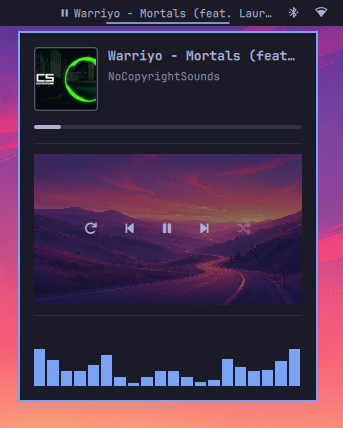
Features
- Now-playing info on the bar: song name + play/pause state
- Popup with album art, title, and artist
- Progress bar — drag to seek
- Controls: repeat, previous, play/pause, next, shuffle
- Audio visualizer (cava) while the popup is open
- Switches between players (e.g. cliamp + YouTube Music) automatically, with a clickable source list when more than one is active
- Download YouTube tracks — save the currently playing YouTube track as a tagged MP3 file with embedded metadata and album artwork
Requirements
- Omarchy (the shell plugin API)
cava— needed for the visualizer. Install it if you want the visualizer.yt-dlp— required for the download feature. Install it if you want to download tracks.ffmpeg— required by yt-dlp for audio conversion. Install it alongside yt-dlp.wl-paste(fromwl-clipboard) — needed to read YouTube links from the clipboard.
Install
-
Put this folder in your user plugin directory:
mkdir -p ~/.config/omarchy/plugins cp -r omnimedia ~/.config/omarchy/plugins/ -
Enable the plugin:
omarchy plugin enable omnimedia -
Add it to the bar (the right side is the default):
omarchy bar put omnimedia --section right -
Restart the shell to pick everything up:
omarchy restart shell
Uninstall
-
Remove the widget from the bar and disable the plugin:
omarchy plugin disable omnimedia -
Delete the plugin folder:
rm -rf ~/.config/omarchy/plugins/omnimedia -
Restart the shell to drop everything:
omarchy restart shell
Use
- Hover the music icon on the bar to open the popup.
- Drag the progress bar to seek.
- Use repeat / previous / play-pause / next / shuffle to control playback.
- Repeat and shuffle light up with a background while active. If the current player doesn't support them (for example YouTube Music), the widget does its best: repeat loops the current track on its own, and shuffle stays greyed out since it can't be controlled.
- With multiple players open, click a source in the list to switch to it.
Downloading tracks
A Download YouTube button is always visible below the visualizer. To download a track:
- Copy a YouTube link to your clipboard.
- Click the Download YouTube button.
- A confirmation popup shows the video title, artist, thumbnail, and duration.
- Click Download to save the track to
~/Musicas a tagged MP3 file.
- The download includes embedded title, artist, album, and cover artwork.
- A progress percentage is shown while the download is active.
- Click Cancel during the download to abort.
- If the clipboard doesn't contain a YouTube link, the button shows a message.
- If
yt-dlporffmpegis not installed, the button shows a message indicating which dependency is missing.
Downloaded files are named Artist - Title.mp3 (with unsafe filesystem
characters removed). Existing files are not overwritten.
Future plans
- Lyrics support — show synced/unsynced lyrics for the current track in the popup.
- More cava designs — alternative visualizer styles/themes for the cava output, switchable from the popup.
- More polish on the progress bar and playback control fallbacks.
Contributing
Contributions are welcome! Ideas, bug reports, and pull requests are all appreciated, especially around the future plans above. Please keep changes in line with the existing code style and note that contributed code falls under the same license as the rest of the project.
Notes
cliamprepeat/shuffle are driven through thecliampCLI. Other players use the standard MPRIS interface.- Changes to files in
~/.config/omarchy/plugins/hot-reload; a fullomarchy restart shellis recommended after editingWidget.qml.
License
See LICENSE. In short: you may use, modify, and redistribute this plugin freely, as long as you include the copyright notice and permission notice from the original LICENSE in any copies or substantial portions of the software.