
Depot — an Omarchy shell plugin
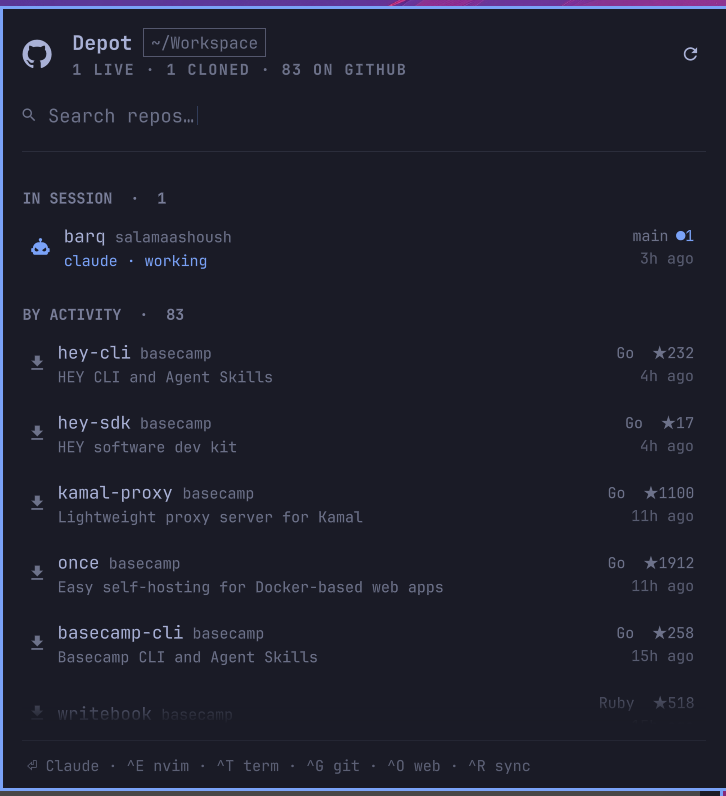
Every GitHub repo you can reach, in your Omarchy bar. See which checkouts have uncommitted work, clone the ones you haven't, and start your coding agent in any of them — without leaving the keyboard.
Install
omarchy plugin add https://github.com/salamaashoush/omarchy-depot.git --enable --yes
omarchy restart shell
Requires gh signed in (gh auth login), plus
python3 and jq, which Omarchy already ships. herdr
is needed only for agent sessions and also ships with Omarchy; set an agent
with omarchy default agent <name> if you haven't. Optional: lazygit for the
git action.
To summon it from the keyboard, add a binding to ~/.config/hypr/bindings.lua:
o.bind("SUPER + SHIFT + R", "Repos", "omarchy-shell sashoush.depot toggle")
Pick a combination that is free on your machine — hyprctl binds -j is the
authority, and it is worth avoiding keys one slipped modifier away from
something disruptive.
Removing
omarchy plugin remove sashoush.depot --yes
omarchy restart shell
That drops the widget from the bar and deletes the plugin directory. Two things
live outside it and are safe to delete by hand: the cached GitHub listing at
~/.local/state/omarchy/depot/remote.json, and any keybinding you added to
~/.config/hypr/bindings.lua. The plugin never writes anywhere else — it does
not touch your git config, your repos, or any Omarchy config besides its own
entry in shell.json.
Order
Two groups earn the top by being unfinished work: IN SESSION (a herdr pane
running an agent in that checkout) and UNCOMMITTED WORK. Everything else is
one BY ACTIVITY stream, cloned and uncloned interleaved, newest first,
where activity is max(your last commit, GitHub's last push) — the same number
the row displays, so a row's position and its stated age never disagree.
Sorting cloned repos above uncloned ones was the obvious first design and the wrong one: it buried a repo pushed an hour ago under a checkout last touched two years ago.
Inside IN SESSION the agents that need you come first: one blocked on an approval (red, pulsing), then one that has finished its turn, then the busy ones, then the idle ones. When the last scan saw an agent blocked or done, the bar dot turns red.
The chips under the search field narrow the list to Local checkouts, Changes (every checkout with uncommitted or unpushed work, in session or not), or repos only on GitHub.
Keys
Typing filters. Prefix matches on the repo name rank above substring matches,
above matches in the description; clts finds clap-ts by subsequence.
| Key | Action |
|---|---|
⏎ |
Cloned → agent session. Not cloned → clone, then session |
^D |
Clone only |
^E |
Editor (omarchy-launch-editor, so whatever omarchy is set to) |
^T |
Terminal in the checkout |
^G |
lazygit |
^O |
Open on GitHub |
^R |
Force a GitHub refresh |
^N / ^P |
Move the cursor (arrows work too; j/k type into the filter) |
← / → |
Change scope: All, Local, Changes, GitHub |
Esc |
Clear the filter, then the scope, then close |
Bar icon: left click opens, right click refreshes. On a row, left click runs the primary action and middle click opens it on GitHub. The active row cross-fades its status column into terminal, editor, lazygit, and GitHub buttons in the same slot, so nothing moves under the pointer. Hover only takes the cursor once the pointer actually moves, so a list refilling under a resting pointer never steals the highlight from the keyboard.
Sessions
⏎ on a checkout starts herdr if it isn't up, waits for its socket, creates a
workspace with --cwd at the repo, and starts your coding agent in that
workspace's root pane. herdr names the agent after the repo, lowercased and
cut to 32 characters with a numeric suffix on collision, since herdr rejects
names like MyRepo or lib.v2 outright.
Which agent? By default whatever omarchy default agent is set to — the same
setting the rest of Omarchy reads — so there is nothing to configure if you
already picked one. Pin a different one just for this panel with the agent
setting. Every agent omarchy default agent offers is supported. herdr detects
and drives pi, claude, codex, gemini, grok, omp, opencode,
copilot, hermes, muse, and cursor-agent (herdr's cursor kind);
crush and openclaw still launch, as a plain command in the pane without
herdr's agent status. openclaw goes through omarchy-launch-openclaw --tui,
which attaches it to its gateway.
Every repo becomes another workspace inside the one running herdr session, never a second herdr instance — so herdr's workspace bindings walk between the repos you have open. Opening a repo that already has a session focuses it rather than stacking a second agent on the same checkout, and that lookup matches on the pane's working directory, not its label: labels are repo short names, and two owners can share one. A pane in a subdirectory of the checkout counts too. The focus goes to the pane itself, so it lands on the right tab even when several repos share one herdr workspace.
Sessions prompt for approval as usual. To start them unattended:
omarchy bar set sashoush.depot autoApprove true --json
That applies the same flag Omarchy's own launcher uses for your agent
(--permission-mode auto for Claude, --yolo for Gemini, --approve-for-me
for Codex, and so on). agentArgs appends anything else you want.
The session that ⏎ chains onto a clone is the exception. It prompts however
autoApprove is set, because that checkout arrived from GitHub seconds ago and
nobody has read a line of it. Press ⏎ again once you have.
Clone destinations
A repo clones to <workspaceDir>/<name>. When more than one repo wants that
folder name — two orgs with a .github repo, or the same project name under a
personal account and an org — the contested ones go to
<workspaceDir>/<owner>/<name> instead, which the depth-2 scan then finds.
Uncontested names stay flat. Cloning goes through gh, so it honors your
gh config git_protocol and authenticates for private repos.
Settings
omarchy bar set sashoush.depot <key> <value> (numbers and booleans need
--json):
| Key | Default | Meaning |
|---|---|---|
workspaceDir |
~/Workspace |
Where clones land and checkouts are scanned |
scanDepth |
2 |
Levels below the workspace to search. 2 finds both <ws>/repo and <ws>/owner/repo |
owners |
[] |
Empty auto-detects your GitHub login plus every org you belong to. Set it to pin the list |
refreshIntervalSec |
90 |
Local rescan cadence while the panel is open. Closed, it drops to max(600, that × 8) — each tick costs two git processes per checkout, and a closed panel only has to keep the bar dot honest |
remoteTtlSec |
1800 |
How stale the cached GitHub listing may get |
repoLimit |
200 |
Repos fetched per owner. An owner that hits the limit is named in the panel's status line rather than silently truncated |
includeForks |
false |
Forks are hidden by default |
agent |
auto |
auto follows omarchy default agent; or pin one of pi, omp, opencode, claude, codex, grok, gemini, openclaw, hermes, copilot, crush, cursor-agent, muse |
autoApprove |
false |
Start the agent without approval prompts, using the same flag Omarchy's own launcher uses for it. The session chained onto a fresh clone still prompts |
agentArgs |
"" |
Extra arguments appended to the agent's command line |
cloneProtocol |
auto |
auto follows gh config git_protocol; ssh or https force that transport |
editorCommand |
"" |
Empty uses omarchy-launch-editor |
How it works
manifest.json   plugin + settings schema
Panel.qml       bar icon, popup and IPC
DepotView.qml   everything inside the popup, and its keys
RepoRow.qml     one row of the list
Service.qml     owns every subprocess; the view never spawns one
Model.js        formatting, filtering, grouping — stateless
repos.py        the inventory scan
actions.sh      clone / session / open, one JSON line per call
repos.py walks the workspace scanDepth levels down for checkouts, running
git status --porcelain=v2 --branch across a thread pool, and merges that with
gh repo list for every owner. A directory that is itself a checkout is never
descended into, so vendored submodules don't each become a row.
The GitHub half is cached in ~/.local/state/omarchy/depot/remote.json. The
panel's periodic scan passes --stale-ok and never touches the network, so it
stays a local pass, bounded by the slowest git status in the workspace (well
under a second for most, a few seconds for a very large checkout); a cold fetch of several
hundred repos takes seconds and only happens on the refresh button, ^R, or
once the cache passes its TTL — always in the background, with the cached list
already on screen. A failed refresh keeps serving the last good cache rather
than blanking the list.
Every color and metric comes from the qs.Commons Color and Style
singletons, so omarchy theme set <name> re-themes the widget with no work
here.
Hacking on it
Saving a file re-registers the plugin but does not reliably re-instantiate
the bar widget, and on Omarchy 4.0.4 a plugin directory that is a symlink to a
working checkout is not watched at all. Either way a stale panel keeps
rendering with no error anywhere. Run omarchy restart shell to see QML or JS
changes.
omarchy plugin validate .          # manifest + entry points
python3 repos.py --stale-ok | jq   # the scan, without the shell
./actions.sh clone "" /tmp/x owner/name
License
MIT