
Clamshell
Two-mode lid switch for Omarchy laptops. Use the laptop as usual, or flip to Clamshell when the machine is on a desk (or a shop bench) driving an external display with a keyboard and mouse — lid shut, session still live, laptop panel off.
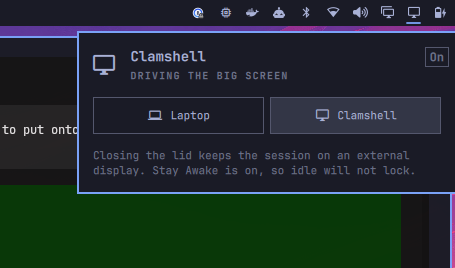
What it does
Omarchy already has automatic clamshell display handling: close the lid with a monitor attached and the internal panel blanks. What it does not do is give you a named mode that also:
- stops systemd from suspending on lid close (even if the internal panel disconnects and logind no longer sees a “docked” machine)
- skips the undocked lid-close lock
- turns on Stay Awake so idle does not lock a stream while you are talking to camera
This plugin is that switch.
| Mode | Lid close |
|---|---|
| Laptop | Lock when there is no external display, and logind may suspend |
| Clamshell | Stay awake on the external display. Stay Awake is on. The laptop panel blanks once a monitor is connected |
Turn Clamshell off before the laptop goes in a bag. A closed lid with no external display will keep the machine running. The panel warns if that happens, and a notification fires after 15 seconds.
Installation
omarchy plugin add https://github.com/seabass-tech/omarchy-clamshell.git --enable
Or drop the folder at ~/.config/omarchy/plugins/seabass.clamshell/ and run:
omarchy plugin enable seabass.clamshell --after omarchy.monitor
Then point Hyprland’s lid bind at the plugin helper so Clamshell can skip the undocked lock. In ~/.config/hypr/bindings.lua:
hl.unbind("switch:on:Lid Switch")
o.bind(
  "switch:on:Lid Switch",
  nil,
  os.getenv("HOME") .. "/.config/omarchy/plugins/seabass.clamshell/scripts/clamshell lid-close",
  { locked = true }
)
Reload Hyprland (hyprctl reload). Optional, so the lid-switch inhibitor comes back after login without waiting for the bar:
omarchy hook install post-boot ~/.config/omarchy/plugins/seabass.clamshell/hooks/clamshell
No sudo. The inhibitor is a user-session systemd-inhibit --what=handle-lid-switch.
Removal
~/.config/omarchy/plugins/seabass.clamshell/scripts/clamshell off
omarchy plugin disable seabass.clamshell
omarchy plugin remove seabass.clamshell
Revert the lid bind in ~/.config/hypr/bindings.lua (delete the unbind / o.bind pair above) and remove ~/.config/omarchy/hooks/post-boot.d/clamshell if you installed the hook.
Usage
- Click the bar icon (laptop in Laptop mode, monitor in Clamshell) to open the panel
- Pick Laptop or Clamshell
- Right-click the icon to flip modes without opening the panel
- Keyboard in the panel:
h/lor arrows move, Enter selects,cclamshell,Esccloses
Omarchy menu: Toggle → Clamshell. IPC:
omarchy-shell seabass.clamshell toggle
omarchy-shell seabass.clamshell clamshell
omarchy-shell seabass.clamshell laptop
~/.config/omarchy/plugins/seabass.clamshell/scripts/clamshell status
License
MIT