
air-Q for Omarchy
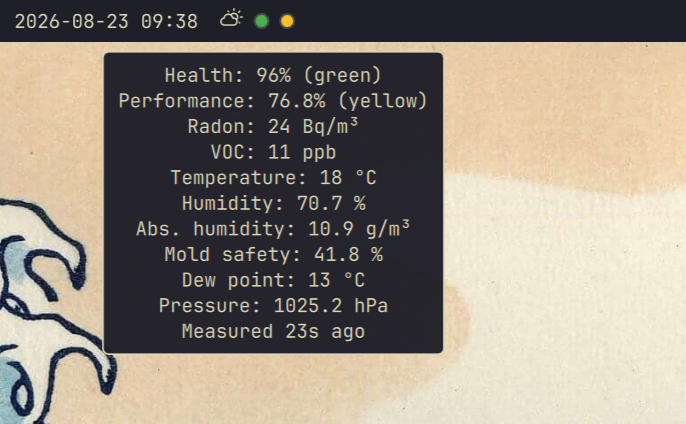
A Quickshell bar widget for local air-Q air quality monitors. Two dots show the health index first and performance index second. Each dot is green at or above 80%, yellow from 60% to 80%, and red below 60%; unavailable or stale readings are gray.
Clicking the widget opens a panel with all measurements exposed by the device, sensor status, measurement age, health, and performance. The last good reading remains visible and is marked stale during connection failures while the plugin retries automatically.
Requirements
- Omarchy with the Quickshell desktop shell
- An air-Q device reachable on the local network
curlxdg-opento open the device page from the widget
Install
omarchy plugin add https://github.com/sgruendel/omarchy-airq.git --enable
omarchy bar set sgruendel.airq host YOUR_AIRQ_HOST
omarchy bar set sgruendel.airq serial YOUR_AIRQ_SERIAL
Use the hostname or IP address only for host, without http:// or a trailing
slash. Open the widget and enter the device password when prompted. The plugin
stores it in GNOME Keyring using the Secret Service tools included with Omarchy.
Controls
- Left click: open or close the detail panel
- Middle click: refresh now
- Right click: open the air-Q device page
Rin the panel: refresh nowOin the panel: open the device pageEsc: close the panel
The widget also exposes refresh, open, close, show, hide, and
toggle over Omarchy shell IPC. For example:
omarchy shell sgruendel.airq refresh
Configuration
Settings can be changed through the Omarchy bar widget settings or with
omarchy bar set sgruendel.airq KEY VALUE.
| Key | Default | Purpose |
|---|---|---|
host |
empty | Device hostname or IP address |
serial |
empty | Device serial number |
refreshSeconds |
30 |
Polling interval in seconds (10–3600) |
radonWarning |
100 |
Radon warning threshold in Bq/m³ (10–10000) |
indexGreenThreshold |
80 |
Minimum green health/performance index (0–100) |
indexYellowThreshold |
60 |
Minimum yellow health/performance index (0–100) |
Security and privacy
The plugin talks directly to the air-Q device over the local network and does
not use a cloud service. The device password is looked up in the desktop Secret
Service and is never stored in Omarchy's shell.json or passed in process
arguments. Passwords entered in the panel are masked, sent to the keyring over
stdin, and cleared from the field as soon as the storage helper starts. The
encrypted API response is decrypted inside the plugin.
Responses are capped at 64 KiB before the shell collects, decodes, or decrypts
them, and device-provided status text is always rendered as inert text.
Like other Quickshell plugins, this plugin is not sandboxed. Review the source before installing it.
Remove
omarchy plugin remove sgruendel.airq
secret-tool clear application omarchy-airq serial YOUR_AIRQ_SERIAL
The second command is optional and removes the saved device password from the desktop keyring.
Development
Run the model and decryption tests with:
node --test