
lerd Glance
Your lerd environment at a glance in the Omarchy Quattro bar. Sites, services, workers and resources without opening the dashboard.





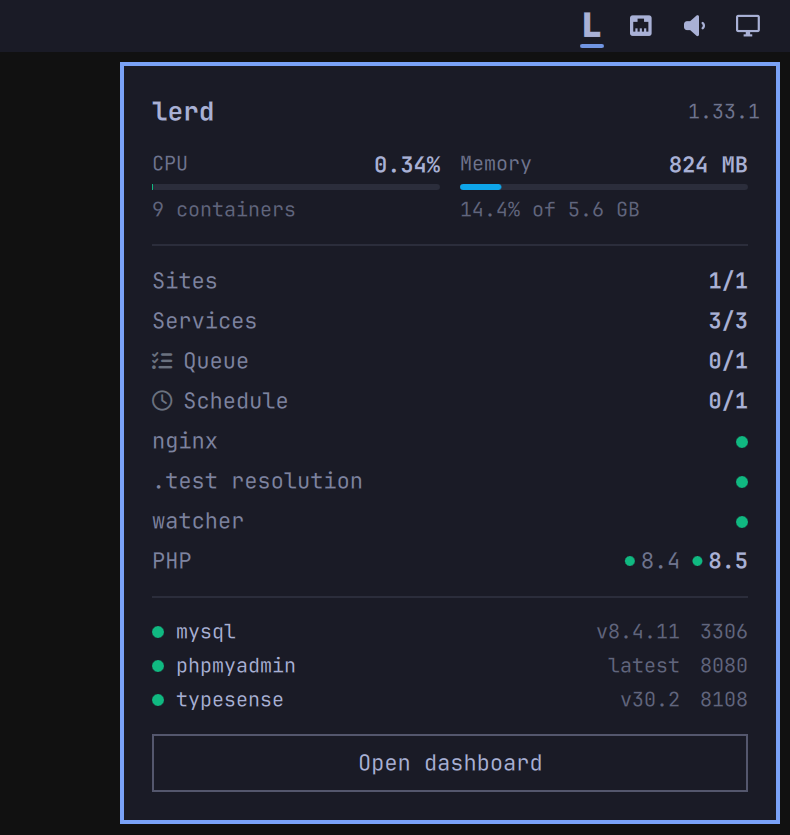
lerd Glance puts the state of your local PHP environment in the bar you are already looking at. A healthy environment stays quiet, a broken one is obvious from across the screen, and the whole thing talks to nothing but the lerd already running on your machine.
Features
In the bar
-
🔴 Quiet until it matters. The bar carries lerd's mark on its own and gains a coloured dot only when something is wrong, yellow for a warning and red when nginx is down.
-
🖱️ Hover for the short version. Site and service counts, CPU, memory, and the list of problems, without opening anything.
-
🌗 Monochrome and theme-aware. The mark takes the bar's foreground, so it looks right in every Omarchy theme.
In the panel
-
📊 Resources. Total CPU and memory across every lerd container, drawn as the same meters the dashboard uses, with the share of host memory and the container count.
-
🌐 Sites and services. How many of each are running, with paused sites left out of the count instead of quietly failing it.
-
⚙️ Workers by type. A counter and a glyph per kind: queue, horizon, schedule, reverb, Stripe, and framework workers such as Vite.
-
🩺 Environment health. nginx,
.testresolution and the file watcher, plus every installed PHP version with the default in bold. -
🗄️ Services at a glance. One row each with status, version and port.
-
⚠️ Needs attention. What is actually wrong, in plain words, and nothing at all when nothing is. A worker only counts as unhealthy when lerd itself says so, so a queue worker you never started is not reported as broken.
Actions
-
🚀 Open dashboard. Hands off to
xdg-open http://lerd.localhost. -
🧹 Clean up. Appears only when lerd reports reclaimable disk space, shows how much, and lets lerd apply its own freshly inspected plan rather than calling podman itself.
Requirements
Omarchy Quattro, and lerd running on the same machine. Nothing else, and no configuration.
Install
omarchy plugin add https://github.com/lerd-env/lerd-omarchy-glance.git --enable
Usage
Click the widget to open or close the panel, press Escape to close it. Clicking also forces a refresh; otherwise it polls every 30 seconds, and every 5 seconds while the panel is open.
Configure
omarchy bar move sh.lerd.glance --section right
The plugin reads http://127.0.0.1:7073, the address lerd's dashboard already
listens on, and says so plainly when lerd is not running. If you serve lerd on
another port, change the endpoint property at the top of BarWidget.qml.
Privacy and permissions
Everything happens over loopback to the lerd instance already running as your
user. The plugin sends no telemetry and contacts no third party. It changes
nothing unless you press a button: the cleanup request, and the xdg-open that
Open dashboard runs. That xdg-open is the only process it ever starts.
Development
All the logic that turns lerd's API into what you see lives in Model.js, free
of QML imports, so it runs under node while the shell loads the same file:
node --test test/model.test.mjs
BarWidget.qml owns the polling and hands a finished summary to Panel.qml.
Meter.qml, StatRow.qml, StatusDot.qml and Mark.qml are the pieces both
are drawn from, and Theme.js holds the state palette, which follows the lerd
dashboard's own colours.
Validate a change the way the shell does before opening a pull request:
omarchy plugin validate ~/.config/omarchy/plugins/sh.lerd.glance
qmllint -I "$OMARCHY_PATH/shell" ~/.config/omarchy/plugins/sh.lerd.glance/*.qml
Remove
omarchy plugin remove sh.lerd.glance
License
MIT