
Shell Settings — Omarchy Plugin
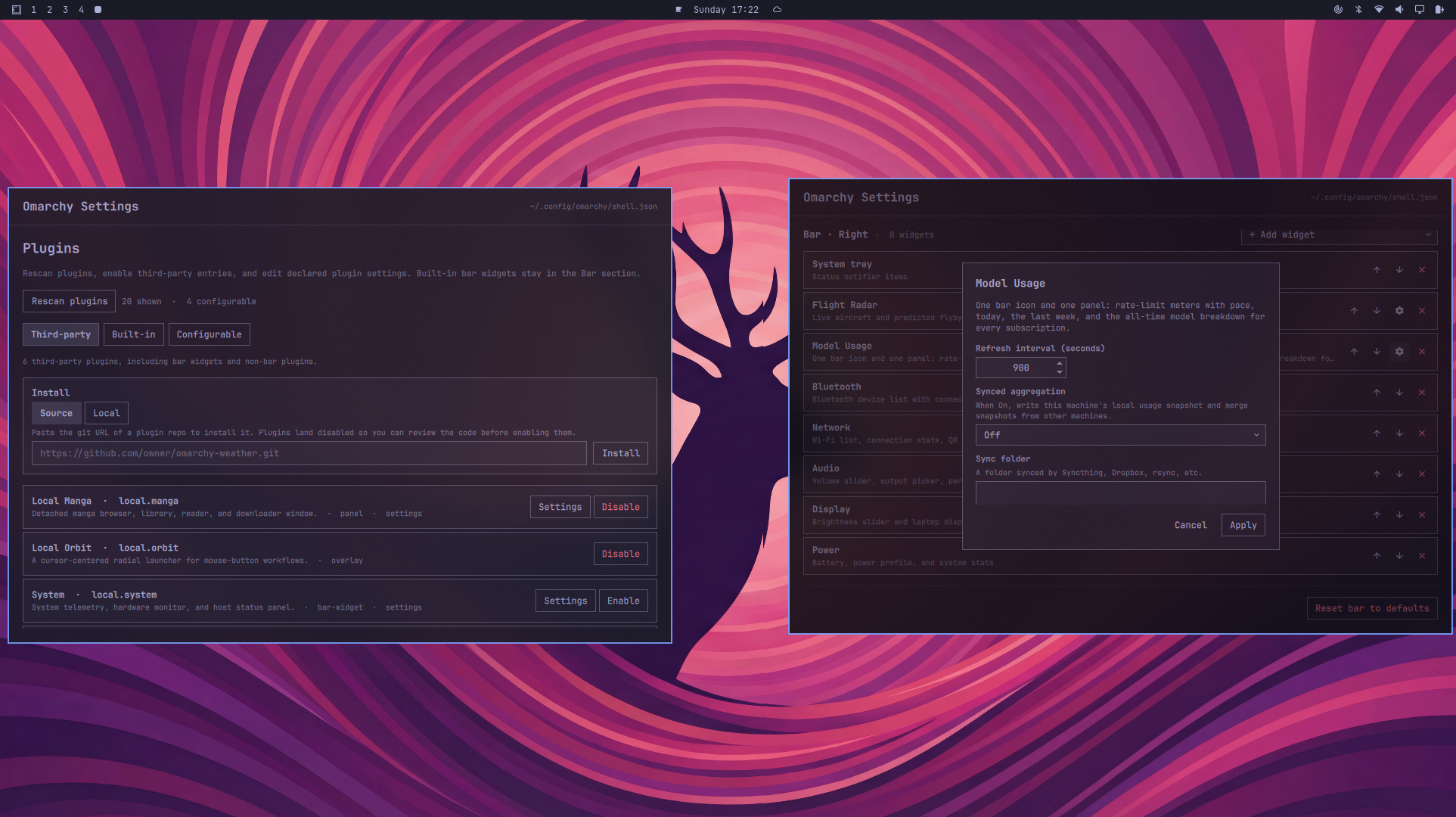
A settings panel for Omarchy that lets
you configure your shell without hand-editing ~/.config/omarchy/shell.json.
Manage plugins, adjust idle/lock timings, and arrange the bar — all from a
single QML panel summoned with a keybind.
Features
- Plugin management — rescan the plugin registry, enable/disable third-party plugins, and install new ones from a git URL or a local folder.
- Plugin settings — edit settings declared by any plugin's manifest from a dynamically generated form (booleans, numbers, strings, lists, enums…).
- Idle & lock — set when Omarchy starts the screensaver and when it locks the screen after you stop using the system.
- Bar editor — pick the bar position (top/bottom), toggle transparency,
drag widgets between the left/center/right sections, add/remove bar widgets,
and tweak per-widget options. Auto-saves to
shell.json. - Safe apply — all edits are staged as a draft, validated, and only written
to
shell.jsonwhen you hit Apply; Cancel discards the draft.
Preview
Installation
From git (recommended)
omarchy plugin add https://github.com/AyushKr2003/shell-settings --enable --yes
Manually
Place the plugin in your plugins directory:
~/.config/omarchy/plugins/shell.settings/
Then register and enable it:
omarchy-shell shell rescanPlugins
omarchy plugin enable shell.settings
Removal
Uninstall with the Omarchy CLI:
omarchy plugin remove shell.settings
Or remove it manually:
rm -rf ~/.config/omarchy/plugins/shell.settings
omarchy-shell shell rescanPlugins
Usage
Open the panel through the shell's generic plugin IPC:
omarchy-shell shell summon shell.settings
Or assign a keybind that summons it (for example SUPER+I in
config/hypr/bindings.lua):
bind("SUPER", "I", function()
  o.plugin("shell.settings").panel:toggle()
end)
Sections
The panel is organized into three sections:
Plugins
- Rescan the plugin registry to pick up newly installed plugins.
- Enable/disable third-party plugins.
- Install a plugin from a git URL (
omarchy plugin add <git-url> --enable --yes) or from a local folder that contains amanifest.json. - Edit declared settings for any configurable plugin — see Plugin settings for the full schema reference.
Filtered views keep the list manageable:
- Third-party — all user-installed plugins, including bar widgets.
- Built-in — built-in non-bar Omarchy plugins.
- Configurable — built-in non-bar plugins that declare settings.
Built-in bar widgets are intentionally managed from the Bar section instead.
Idle
Set how many seconds of inactivity pass before:
- the screensaver starts,
- the screen locks.
Bar
- Choose the bar position: top or bottom.
- Toggle transparency.
- Drag widgets between the bar's three sections (left, center, right).
- Drop in plugin-provided bar widgets.
- Adjust per-widget options (for example clock format: horizontal, alternate, or vertical).
- Reset the whole bar back to defaults.
Changes here auto-save to shell.json.
How it works
The plugin writes through the shell's injected config mutator and plugin
registry, so it updates ~/.config/omarchy/shell.json directly — no custom
shell.omarchySettings IPC method is needed.
Plugin settings
Any plugin can expose editable settings by declaring a settings object in its
manifest.json. The panel reads the manifest, fills the form from defaults,
and writes changes back to shell.json under the plugin's id:
{
  "settings": {
    "defaults": { "example": true },
    "schema": [
      { "key": "example", "type": "boolean", "label": "Example" }
    ]
  }
}
The full schema — field types (string, boolean, integer, number,
enum, multiselect), options, and dynamic optionsCommand — is defined by
the Omarchy shell itself in
docs/omarchy-shell.md
and PluginRegistry.qml; this panel renders whatever schema it declares.
Bar widgets can keep using barWidget.schema or a built-in settingsForm;
their settings open from the Bar section the same way.
Requirements
- Omarchy shell (with the
omarchy-shellCLI and plugin registry) - Quickshell (provided by Omarchy)
- Qt 6.11+ with QtQuick and QtQuick.Controls
- The
shell.settingsplugin itself is written in QML; it needs no compilation or external dependencies beyond what Omarchy's shell ships.
Development
The plugin lives as a standard Omarchy panel plugin:
manifest.json— plugin id, name, and entry point (SettingsPanel.qml).SettingsPanel.qml— the full settings UI.components/— reusable QML pieces (DynamicSettingsForm.qml,InstallSection.qml,FolderPicker.qml,NDropdown.qml).
Run qmllint after edits:
qmllint SettingsPanel.qml
Validate the manifest:
omarchy plugin validate config/omarchy/plugins/shell.settings
License
MIT © AyushKr2003 — see LICENSE.