
Session Browser — Omarchy bar widget
A native Omarchy bar panel that answers: what AI coding sessions have I run on this machine, and how do I get back into one?
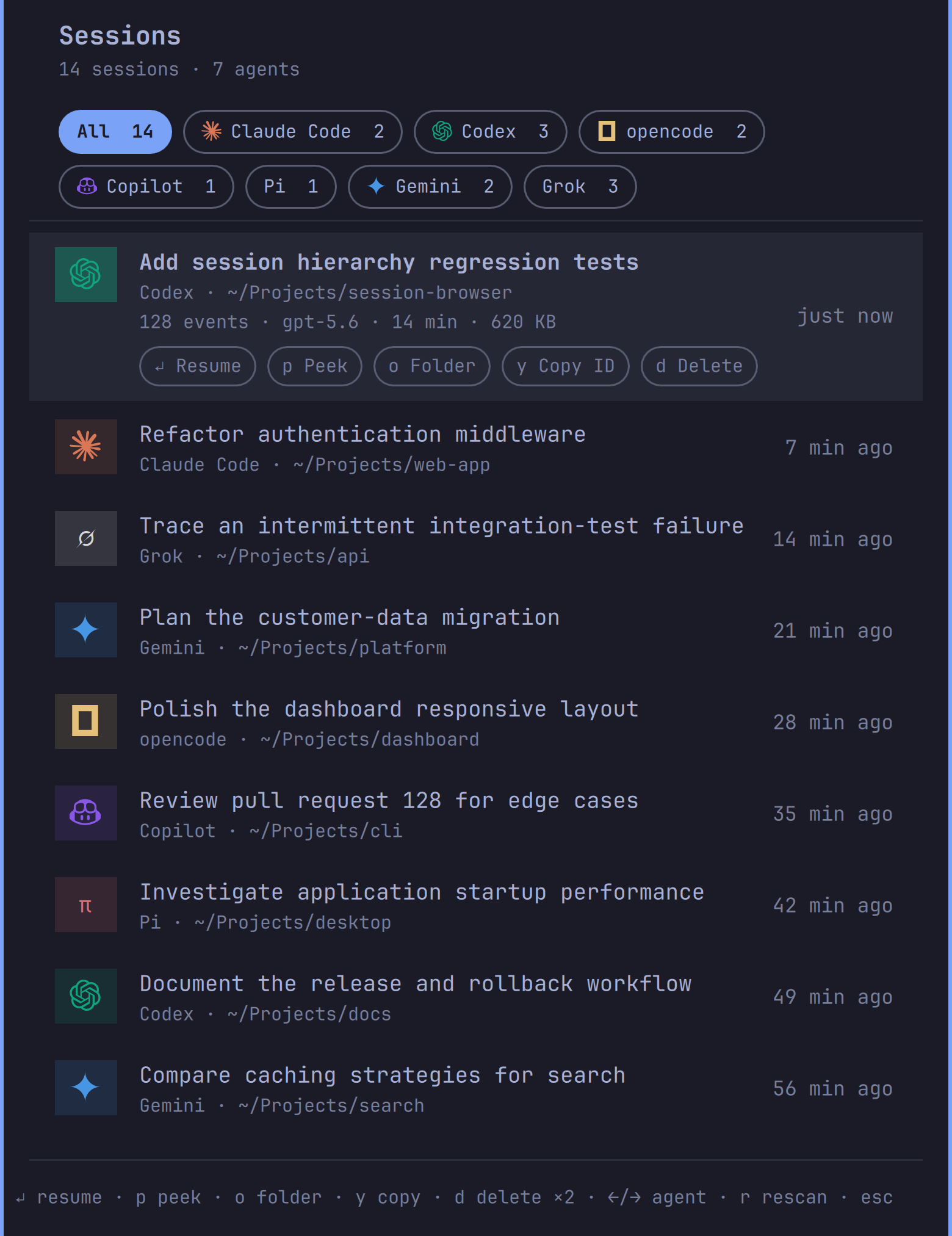
It discovers past sessions from Claude Code, Codex, opencode, Copilot CLI, Pi, Gemini CLI, and Grok Build and lists them newest-first with the opening prompt or title, project directory, and relative age. Filter by agent with one click, then Enter resumes the exact session in a terminal, opened in its original working directory. The selected row expands with metadata (message count, model, duration, size — plus token count and cost for opencode) and per-session controls.
What it runs, exactly
This plugin does more than observe, so here is the complete inventory. The
helper script is list-sessions — plain python3; read it
before installing, as you should for any shell plugin (Omarchy plugins run
unsandboxed).
Scanning (on panel open or r — nothing polls in the background):
- Reads session transcripts under
~/.claude/projects/,~/.codex/sessions/,~/.copilot/,~/.pi/agent/sessions/,~/.gemini/tmp/, Grok's$GROK_HOME/sessions/(or~/.grok/sessions/), and opencode's sqlite database (opened read-only). Local reads only; no network access, no telemetry, nothing written to disk. - Shows resumable top-level conversations, not worker sessions. It uses each
agent's native hierarchy marker: Codex thread metadata, Claude sidechains,
opencode's
parent_id, Gemini's nested/kind metadata, and Grok'ssession_kindplus child registry. Copilot keeps child events inside the parent log, while Pi's built-in subagents run without persistent sessions. Explicit user forks remain visible. - Hard bounds before parsing: each provider considers at most 128 matching
candidates and returns at most 50 sessions. A scan has cumulative ceilings
of 1,024 paths, 768 file opens, 64 MiB read, and four seconds. Regular files
are opened with no-follow/nonblocking flags and verified with
fstat; FIFOs, devices, sockets, and leaf symlinks are skipped. JSON files are capped at 2 MiB, JSONL title reads at 1 MiB per file, individual lines at 256 KiB, metadata passes at 2 MiB, and the opencode database at 512 MiB with bounded result fields, row counts, SQLite VM work, and a deadline progress handler. The database plus WAL/SHM footprint is conservatively charged in full to the same 64 MiB cumulative allowance, and every auxiliary file receives the same regular-file check. - The helper caps its own JSON output at 900 KiB. Independently, the panel
terminates collection after six seconds and rejects payloads over 1 MiB
before
JSON.parse. If a cumulative collection ceiling prevents a complete scan, retained rows remain usable and the header reports partial results. Output trimming uses a bounded binary search rather than repeatedly walking every row. Titles are capped at 90 characters; all session-derived text is stripped of terminal control bytes and renders as plain text (Text.PlainText). Malformed, excessively nested JSON records are skipped.
Actions (each runs only on your explicit click/keypress on that row):
- Resume — launches that agent's own targeted resume command (
claude --resume <id>,codex resume <id>,opencode --session <id>,copilot --resume <id>,pi --session <path>,gemini --resume <id>, orgrok --resume <id>) in a new terminal viaxdg-terminal-exec,cd'd to the session's directory. - Peek — renders the transcript (control characters stripped) into a
floating terminal with
less, with independent three-second, 8 MiB, and 400-block limits. Its opencode query streams at most 400 bounded rows rather than materializing the complete result set. - Folder — opens the session's directory with
xdg-open. - Copy ID — copies the session id with
wl-copy. - Delete — permanently removes that one session (transcript files, or
opencode session delete). Requires a second confirming press, and is offered only for agents where deletion is well-defined. - Session ids are validated against strict per-agent patterns before any action runs; anything else is refused. Panel actions have an eight-second watchdog, and synchronous clipboard/deletion commands have their own shorter timeouts. No sudo, no pkexec, no polkit.
The screenshot above uses synthetic session names and paths; no private transcript data is included in the repository.
Requirements
Omarchy 4.x. Runtime commands used by the plugin—python3, bash, less,
setsid, uwsm-app, xdg-open, xdg-terminal-exec, and wl-copy—ship
with Omarchy. The Python collector uses only the standard library and never
installs packages.
The agent CLIs are optional. A provider appears when it has sessions on disk; its CLI is needed only when you choose Resume for one of those sessions. No API keys, accounts, network services, or background daemon are required by the plugin itself.
Run the fixture suite with:
python3 -m unittest discover -s tests -v
Install
omarchy plugin add https://github.com/Sudhanshugtm/omarchy-session-browser.git --enable
Use
| Action | Result |
|---|---|
| Left-click bar icon | Open the session list |
Click a row / Enter |
Resume that session in a terminal |
| Arrows | Move selection (list auto-scrolls) |
←/→ or pill click |
Filter by agent |
p |
Peek at the transcript |
o |
Open the session's folder |
y |
Copy the session id |
d d |
Delete the session (double-press to confirm) |
r |
Rescan |
Esc |
Close panel |
IPC target for keybindings: omarchy-shell sid.sessions toggle.
Remove
omarchy plugin remove sid.sessions
Deletes the plugin folder and removes the widget from the bar. Your agents' session stores are never touched by removal.
Credits
Bundled agent logos are from Simple Icons (CC0). Grok uses Omarchy's icon-font mark, sourced from Grok's official favicon. Trademarks and logos remain the property of their respective owners and appear here for identification only.
License
MIT — see LICENSE.