
SQLite Viewer — Omarchy bar widget
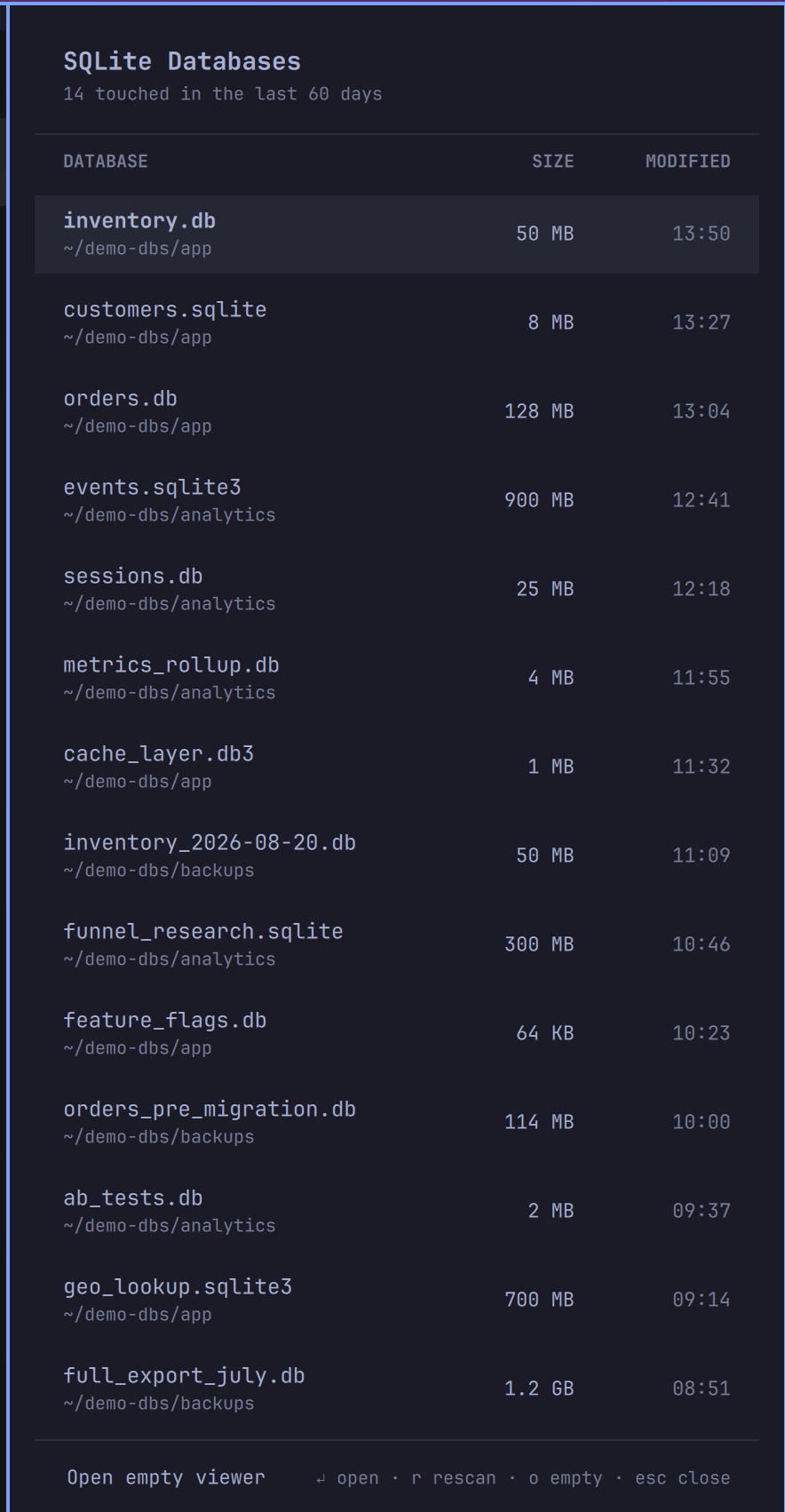
A native Omarchy bar panel for your SQLite databases. Click the database icon and get a themed table of every database file touched in the last 60 days — name, location, size, and when it changed — sorted newest first, with your project databases ranked above the app-state ones hiding in dot-directories. Click a row (or press Enter) and it opens in DB Browser for SQLite.
Requirements
- Omarchy 4.x (the widget is built from the shell's own panel components).
- DB Browser for SQLite:
omarchy pkg add sqlitebrowser— the one dependency you must install. The widget tells you (via a desktop notification) if it's missing. fdis used for the fast file scan when present (Omarchy installs it by default); plainfindis the automatic fallback.jqanduwsmare Omarchy package dependencies, so they're always there.
Install
omarchy plugin add https://github.com/Sudhanshugtm/omarchy-sqlite-viewer.git --enable
Use
| Action | Result |
|---|---|
| Left-click bar icon | Open the databases panel |
Click a row / Enter |
Open that database in DB Browser |
j/k or arrows |
Move the selection |
r |
Rescan |
o / footer button |
Open an empty viewer |
Esc |
Close panel |
| Tab | Switch to the neighboring bar panel |
| Right-click bar icon | Skip the panel, launch the viewer directly |
There's also an IPC target for keybindings:
omarchy-shell sid.sqlite-viewer toggle.
What it scans — and what it does with it
Full transparency, because this widget walks your home directory:
- Scope:
*.db,*.sqlite,*.sqlite3,*.db3files under$HOMEmodified in the last 60 days, including hidden directories (that's how it finds things like~/.grokor~/.codexstate databases). Tool caches (node_modules,.cache,.cargo,.rustup), git internals, browser profiles (Chromium, Firefox, Thunderbird), and trash are excluded; dot-named files are skipped. Capped at the 14 most recent, with visible project paths ranked above databases inside hidden directories. - Metadata only: the scan reads file names, sizes, and modification
times (
fd/find+stat). It never opens a database or reads a single byte of its contents. Opening contents is DB Browser's job, and only for the file you explicitly click. - Nothing leaves your machine: no network access, no telemetry, no files written anywhere. The scan output exists only in the shell process's memory while the panel is open.
- No elevated privileges: nothing runs as root; there is no
sudoorpkexecanywhere in this plugin. - When it runs: only on demand — opening the panel or pressing
r. Nothing polls in the background. The scan takes ~30 ms withfd. - Hard bounds: the directory walk itself is killed after 3 seconds
(
timeout), so even a pathological tree with few matching files cannot make the scan run unbounded — a timed-out walk shows whatever it found. Traversal also stops 8 directory levels deep, at most 400 candidate files are ever stat'ed and sorted, and the panel refuses oversized scan output outright. File names and paths are rendered as plain text (Text.PlainText), never as rich text.
The exact commands are in open-db — it's 92 lines of bash,
please read it before installing (as you should for any shell plugin;
Omarchy plugins run unsandboxed inside your shell process).
The screenshot above shows staged demo data, not anyone's real files.
Remove
omarchy plugin remove sid.sqlite-viewer
This deletes the plugin folder and removes the widget from the bar; nothing
else is touched. sqlitebrowser stays until you remove it yourself
(sudo pacman -R sqlitebrowser).
License
MIT — see LICENSE.