
Wiki Wait
Wiki Wait is a small Wikipedia reader for the Omarchy bar: open it while an agent is working, pick a mood, and follow a good rabbit hole without losing sight of the work in progress.
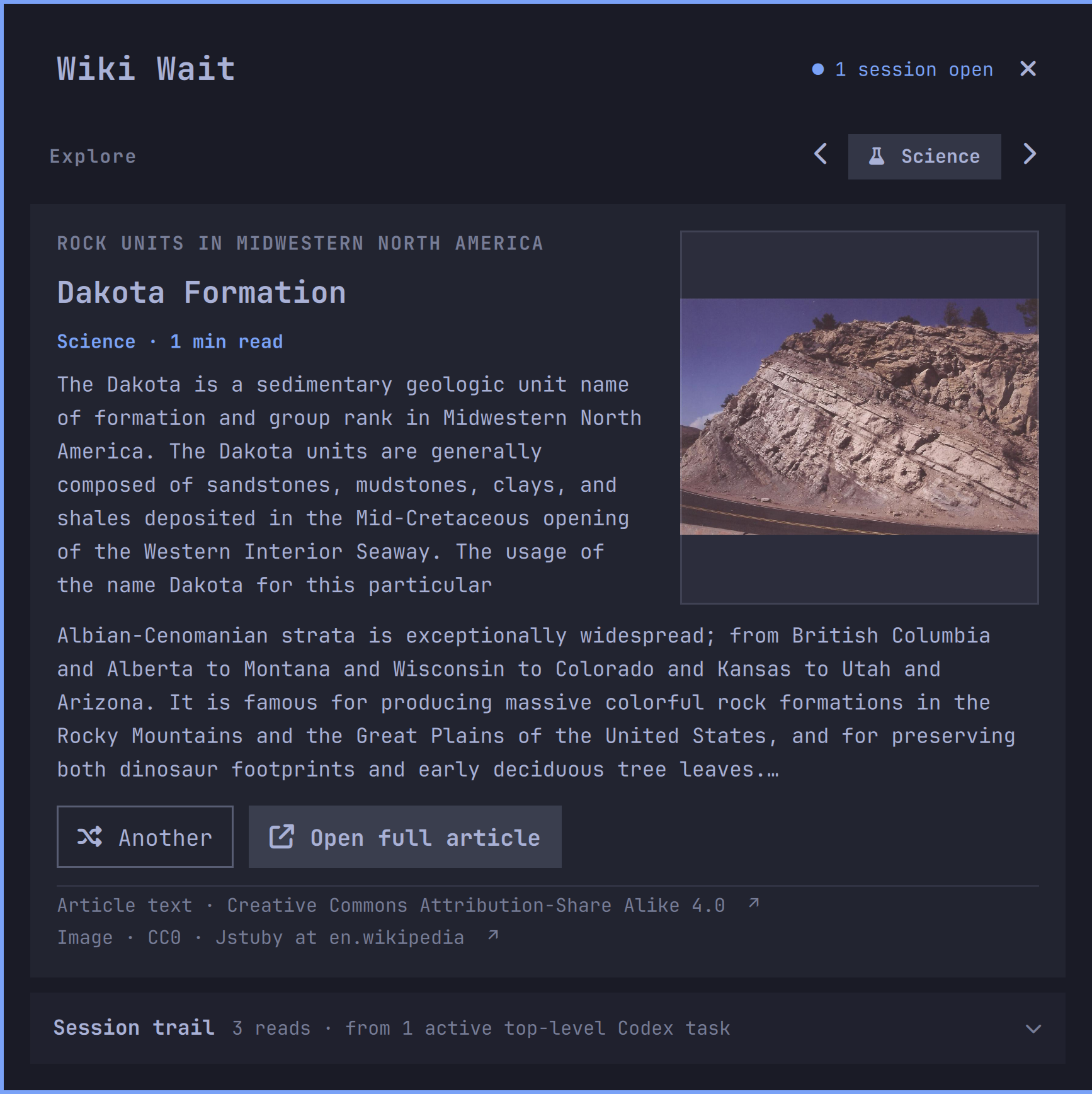
The preview's Wikipedia text and Wikimedia image are credited in THIRD_PARTY_NOTICES.md.
Installation
omarchy plugin add https://github.com/Sudhanshugtm/omarchy-wiki-wait.git --enable
The session-aware trail is private and optional, so it remains off after a fresh installation. Enable it explicitly with:
omarchy bar set sid.wiki-wait sessionReadingList On
Update or remove the plugin with:
omarchy plugin update sid.wiki-wait
omarchy plugin remove sid.wiki-wait
Removal does not erase the optional article cache at
~/.cache/omarchy/wiki-wait/; users who want it gone can remove that directory
manually.
What it does
- Shows a clean, scrollable Wikipedia article card with an optional image, short description, reading time, and link to the full article.
- Shows Wikipedia's current article-text license and the selected image's own license and creator credit. Both are clickable; the image line opens its exact Wikimedia description page.
- Offers six moods: Surprise, Science, History, Nature, Culture, and Places.
- Can build a three-item reading trail from broad themes detected in current or recent Codex work. It stays collapsed until wanted; prompt text stays local.
- Caches the last article locally, so reopening the panel is instant.
- Shows live counts for Codex agents and subagents. Other supported agent CLIs are described conservatively as open sessions rather than assumed to be generating.
- Fetches an article only when the reader first needs one or you ask for another. The activity check is local and does not make network requests.
Interactions
- Left click: open or close Wiki Wait.
- Middle click: fetch another article and open the panel.
- Left / right: change mood and fetch a matching article.
- R, N, or Space: fetch another article.
- T: expand or collapse the session-aware reading trail.
- Enter or O: open the full article in the browser.
- Close button or Esc: close the panel.
The panel is also available over IPC:
omarchy-shell shell summon sid.wiki-wait '{}'
omarchy-shell shell hide sid.wiki-wait
omarchy-shell shell toggle sid.wiki-wait '{}'
How the session trail is made
- Wiki Wait checks current Codex writer locks and selects top-level tasks only; subagent sessions are excluded. It considers at most four active tasks.
- For each selected task, it reads only the latest user request in memory—not agent output. If nothing is explicitly active, it may use the most recently updated top-level task that is still locked and no more than 12 hours old.
- A fixed local keyword map reduces those requests to one or two broad themes, such as “Computing” or “Design & interfaces.” No model or remote classifier is involved.
- Wiki Wait chooses a prewritten generic search for the theme and asks Wikipedia for three public articles. The original request is never included in that search.
Privacy and network behavior
The activity helper emits aggregate counts only. For live Codex sessions it
reads the session metadata and lifecycle event types (task_started,
task_complete, and turn_aborted) associated with active writer locks. It
does not emit or send prompts, responses, working directories, process
arguments, PIDs, session IDs, or account data. Exact process names are used to
recognize other installed agent CLIs; those are reported only as open sessions.
The optional session trail reads only the latest user message from live, top-level Codex turns. If no turn is explicitly active, it can fall back to the most recently updated top-level session that still has a writer lock and is no more than 12 hours old. It immediately reduces that text in memory to broad labels such as “Computing” or “Design & interfaces.” Only a fixed, generic search phrase selected for those labels is sent to Wikipedia. The source text, matched words, repository path, and session identifiers are never emitted, cached, logged, or added to a URL. The feature is Off by default.
Article requests go directly to the English Wikipedia Action API. A request
contains the selected mood's public search phrase and a generic plugin user
agent. The same response supplies Wikipedia's current site-wide text-license
label and link. For a selected page image, Wiki Wait makes a second Action API
request for that file's LicenseShortName, license link, description page,
and creator credit. If those image rights cannot be verified, the image is not
shown. The verified Wikimedia thumbnail is then downloaded before the card is
displayed, which prevents late image pop-in and lets the shell render it from
a bounded local cache. There is no telemetry, analytics, login, contact
address, or third-party proxy. The last article, its license metadata, and one
photo are cached under ~/.cache/omarchy/wiki-wait/ with user-only permissions.
Requirements
- Omarchy Shell with local plugin support
- Python 3 standard library; no Python packages are required
- Internet access to
en.wikipedia.organdupload.wikimedia.org - Codex session data under
~/.codex/is optional and used only for Codex activity counts and the opt-in session trail
Capabilities
- Runs the bundled
wiki-waitPython helper directly, without a shell or install hook. - Reads active Codex writer locks and session records. Status mode reads only metadata and lifecycle event types; session-trail mode additionally reads the latest user request from top-level tasks in memory.
- Reads same-user process metadata under
/procto recognize exact installed agent CLI names. Only aggregate counts are shown. - Connects only to English Wikipedia and Wikimedia upload hosts for article data, source-provided license metadata, and thumbnails.
- Writes a bounded, user-only article and image cache under
~/.cache/omarchy/wiki-wait/and can open selected Wikipedia links in the default browser.
The plugin never elevates privileges or manages system packages. It does not read browser credentials or use authentication tokens.
Configuration
The local activity refresh defaults to eight seconds. Change it with:
omarchy bar set sid.wiki-wait activityRefreshSec 12 --json
Enable the private session reading trail with:
omarchy bar set sid.wiki-wait sessionReadingList On
Independence
Wiki Wait contains no Wikimedia logos, icons, or stylized wordmarks. The plain name “Wikipedia” is used only to identify the source of article content and links. Wikipedia is a trademark of the Wikimedia Foundation. Wiki Wait is an independent reader and is not endorsed by or affiliated with the Wikimedia Foundation.
Development
From this directory:
omarchy plugin validate .
qmllint BarWidget.qml Panel.qml
python3 -m unittest discover -s tests -v
The article summaries and thumbnails are provided by Wikipedia/Wikimedia and remain subject to the exact licenses shown in the panel. The panel links to the full article, the article-text license, and the selected image's Wikimedia description page.