
simple.dock
A minimal, autohiding app dock for Omarchy (Quickshell).
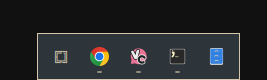
Features
- Centered dock card opposite the bar (default: bottom edge).
- Apps menu button that opens the Omarchy apps menu.
- Pinned apps (in your chosen order) followed by running apps.
- Left-click a running app to focus it (or launch a pinned app that isn't running).
- Right-click for a context menu: Launch, Pin to Dock / Unpin from Dock, and Close Window(s).
- Pin state persists in
~/.config/omarchy/dock.jsonacross shell restarts. - Autohide: the dock hides and reveals itself when the cursor touches the
bottom edge of the screen. Disable it via
~/.config/omarchy/simple.dock.json("autohide": false) to keep the dock pinned. - Configurable monitor via
"screen": "eDP-1"in the same file.
Requirements
- An Omarchy system (omarchy-shell with Quickshell support).
Installation
Install and enable with the official Omarchy plugin command:
omarchy plugin add https://github.com/nightdevil00/simple.dock.git --enable
The command clones the repo into ~/.config/omarchy/plugins/simple.dock,
validates the manifest, and enables the plugin. To update it later:
omarchy plugin update simple.dock
To uninstall:
omarchy plugin remove simple.dock
After installing (or removing) the plugin, the shell restarts or rescans the
plugin directory automatically; if the dock does not appear, run
omarchy restart shell.
The dock appears at the bottom of the primary monitor. Touch the bottom edge of the screen with the cursor to reveal it.
Configuration
Pinned apps
Pinned apps are stored in ~/.config/omarchy/dock.json:
{
  "pinned": ["vesktop", "foot", "org.gnome.Nautilus"]
}
Entries are desktop-file ids (the .desktop suffix is optional). The file is
created automatically the first time you pin an app; edits you make to it are
picked up while the shell is running.
Autohide and screen
The dock hides and reveals itself when the cursor touches the bottom edge of
the screen. To keep it pinned and always visible, create
~/.config/omarchy/simple.dock.json with:
{
  "autohide": false,
  "screen": "eDP-1"
}
autohide—true(default) enables hover-reveal autohide;falsekeeps the dock pinned and always visible.screen— optional name of the monitor to attach the dock to (fromhyprctl monitors); defaults to the first screen Quickshell reports.
The file is optional — a missing file uses the defaults. Edits are picked up live, no restart needed.
Files
manifest.json— plugin manifest (id: simple.dock,kind: overlay, kept loaded).Dock.qml— the dock UI (a full-screen overlay whose interactive region is limited to the dock card, the context menu, and the bottom reveal strip).DockModel.js— pure helpers for the model and persistence.
License
MIT