
Beszel servers — an Omarchy bar widget
Watch your Beszel-monitored servers from the Omarchy bar. One icon that turns urgent the moment a server drops or an alert fires, and one panel with per-server CPU, memory, and disk meters.
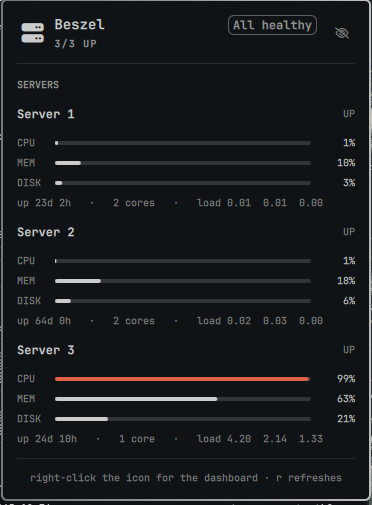
Sensitive details are hidden by default — click the eye to reveal them.
Install
omarchy plugin add https://github.com/skoom21/omarchy-beszel.git --enable
~/.config/omarchy/plugins/skoom.beszel/setup
The first command clones, validates, and enables the widget. The second is a
one-time prompt for your hub URL, email, and password — it verifies them
against the hub before writing anything, and stores them in a 0600 file so
your password never lands in shell.json.
Prefer to stay in the GUI? Skip setup and fill in Hub URL, Hub email,
and Hub password under Setup › Plugins › Beszel servers instead. Until
one of the two is done, the panel tells you exactly what to do:
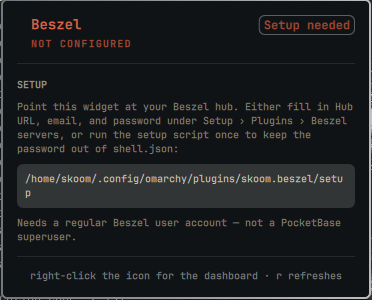
Requirements: Omarchy with the Quickshell bar, python3 (stdlib only), and
a reachable Beszel hub. Use a regular Beszel user account — not a
PocketBase superuser, which the API treats differently.
Removal
omarchy plugin remove skoom.beszel
That unloads the widget and takes it out of your bar layout. It leaves nothing of yours behind except the two files it created, which you can delete if you are not reinstalling:
rm -rf ~/.config/beszel-status    # hub credentials
rm -rf ~/.cache/omarchy-beszel    # cached session token
The plugin never writes to shell.json itself — only omarchy plugin enable/disable and omarchy bar do, and omarchy plugin remove reverses
that. Nothing else on your system is touched.
What you get
| Bar | A server glyph. Normal colour when everything is up; the theme's red when a server is down, an alert is firing, or the hub is unreachable. Dimmed until configured. |
| Panel | Per-server cards: name, UP/DOWN badge, optional subtitle, CPU/MEM/DISK meters, then uptime, core count, and load averages. |
| Alerts | A FIRING ALERTS section appears only when Beszel actually has something triggered. |
Meters shift colour by severity — foreground, the theme accent at 75%, red at
90%. A server that is down shows dimmed empty tracks and — rather than
freezing its last reading as though it were current.
| Input | Action |
|---|---|
| Left click | Toggle the panel |
| Right click | Open the Beszel dashboard |
| Middle click | Force a refresh |
| Eye (in the panel) | Reveal sensitive details for this viewing |
r |
Refresh (panel focused) |
| Arrows | Scroll |
Esc |
Close |
Settings
Setup › Plugins › Beszel servers, or under this widget's entry in
~/.config/omarchy/shell.json.
| Key | Default | Meaning |
|---|---|---|
maskSensitive |
On |
Hide server names, addresses, and hub URL behind the eye |
hubUrl |
— | e.g. http://localhost:8090 |
email |
— | Beszel user account |
password |
— | Plain text in shell.json — prefer setup |
credentialsFile |
~/.config/beszel-status/config |
Override the file location |
refreshIntervalSec |
30 | Poll cadence while the panel is closed |
openRefreshIntervalSec |
5 | Faster cadence while it is open |
Settings win per field over the credentials file, so putting the URL in the GUI while leaving the password in the file works as you would expect.
The credentials file
url=http://localhost:8090
email=you@example.com
password=...

# Optional: a subtitle under a server's name in the panel.
# The key must match the system name as it appears in Beszel.
label.web-1=Hetzner · 10.0.0.1
Written by ./setup with mode 0600. Secrets reach the helper through the
environment, never argv, so they do not show up in ps.
How it works
Panel.qml shells out to bin/beszel-status, which authenticates against the
hub's PocketBase API, caches its token under $XDG_CACHE_HOME/omarchy-beszel/,
and re-authenticates on a 401. The helper always prints valid JSON and always
exits 0, so a hub outage renders as a message in the panel rather than a broken
bar. Run it yourself to see:
python3 ~/.config/omarchy/plugins/skoom.beszel/bin/beszel-status | jq
python3 ~/.config/omarchy/plugins/skoom.beszel/bin/beszel-status --check
--check is the human version: it prints one line and sets a real exit code.
Troubleshooting
| Symptom | Cause |
|---|---|
| Icon dimmed, SETUP card | No URL/email/password resolved yet |
| "Hub rejected those credentials" | Wrong password, or a superuser account instead of a user |
| "Cannot reach hub" | Hub down, wrong port, or a tunnel that is not up |
| "No systems registered" | The hub authenticates but has no systems assigned to that user |
| Icon missing entirely | omarchy plugin list — is skoom.beszel enabled? |
Force a poll with omarchy-shell skoom.beszel refresh, and reload plugin code
with omarchy-shell shell rescanPlugins.
A note on the alert colour
Omarchy maps the shell's urgent role from the active theme's plain red,
which in some themes is a near-grey that reads as "disabled" rather than
"alert". And bright_red is an ANSI slot name, not a luminance promise — some
themes make it the darker of the two. So the helper reads red,
bright_red, and orange, computes WCAG contrast against the theme
background, and returns whichever actually reads. It re-checks every poll, so
the colour follows theme changes without a restart.
Security
Plugins run as unsandboxed code inside your long-lived omarchy-shell
process, so this one is written defensively.
Credentials. They reach the helper through the environment, never argv, so
they never appear in ps. setup writes the file 0600 inside a 0700
directory and reads the password with read -s, so it stays out of your shell
history and scrollback. The cached session token is written 0600 in a 0700
directory, with an explicit chmod — O_CREAT does not tighten a file that
already exists. The password is never included in the helper's JSON output.
Sensitive details are hidden by default. Server names identify projects and
the label line carries provider and IP, so the panel withholds both — along
with the hub URL, and the username in the setup path — until you click the eye
in the hero. Masked rows keep their position (Server 2), so the panel stays
readable at a glance; the metrics themselves reveal nothing. Revealing lasts
only for that viewing: closing the panel re-arms the mask, so it cannot be left
off by accident before a screen share. Set Hide sensitive details to Off
to opt out, or bind the toggle:
omarchy-shell skoom.beszel toggleReveal
The hub is treated as untrusted. A hub you do not control — or one that has been compromised — is a hostile input source, and the plugin is built to assume that:
- Redirects are refused.
urllibreplays theAuthorizationheader across a cross-origin redirect, so a hub could otherwise bounce an authenticated request to a host it controls and harvest the session token. The Beszel API has no legitimate use for a redirect, so one is an error. - Hub strings are never markup. QML
Textdefaults toText.AutoText, which auto-detects and renders HTML — a server named<img src="http://attacker/beacon.png">would make the shell issue an outbound request. EveryTextelement pinstextFormat: Text.PlainText. - Responses are capped at 4 MB, so a hostile hub cannot exhaust memory.
No shell interpolation. Omarchy's bar.run() passes its argument to
bash -lc. This plugin never uses it. The dashboard launches through
Quickshell.execDetached's argv form, and only for a string matching an
http(s) allowlist, so neither a crafted hubUrl nor a file:// or
javascript: URL can turn a right-click into command execution.
Transport. A https:// hub is encrypted and its certificate is verified.
A plain http:// hub to anything but loopback sends your password and every
later request in the clear; setup warns when you enter one. Prefer https://,
or reach a remote hub over an SSH tunnel and point the plugin at localhost.
Storing the password in plugin settings puts it in ~/.config/omarchy/shell.json
in plain text, readable by anything running as you and easy to commit to a
dotfiles repo by accident. The settings field is labelled accordingly. Use
setup unless you have a reason not to.
Note for anyone editing this
Do not name a property data on the root. data is Item's default property
— the list holding its visual children — and shadowing it silently stops every
child of the widget from rendering while still reserving its slot in the bar.
The payload property is called payload for exactly that reason.
License
MIT — see LICENSE.