OmaScore
Omarchy shell plugin that displays live scores for NFL, NBA, MLB, NHL, college football/basketball and soccer in the bar widget, with a details panel showing favorited teams pinned to the top, a league switcher, day/week navigation, and player stats grouped by stat name.
Install
From a git checkout:
cp -r . ~/.config/omarchy/plugins/slowburnaz.omascore
omarchy plugin enable slowburnaz.omascore
omarchy bar put slowburnaz.omascore --section right
Or via git:
omarchy plugin add https://github.com/SlowburnAZ/omascore.git --enable
Usage
Bar Widget
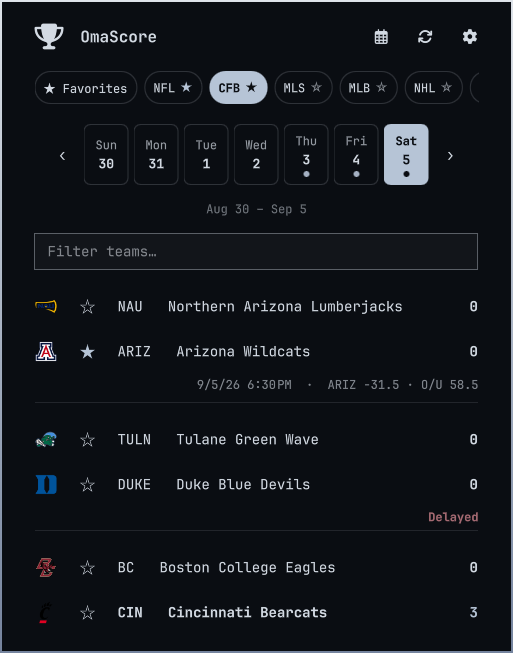
- The bar widget shows live game scores with favorite teams highlighted in accent color. Bar display in Settings switches between favorite score, live count, next-game start time, and icon-only — live favorites always take priority, and the tooltip carries the full game line.
- Tap a game to open the details panel with full stats, venue, and player lists.
- Use the league switcher pills at the top to change between NFL, CFB, NBA, WNBA, NCAAM, NCAAW, MLB, NHL, MLS, EPL, LaLiga, Bundesliga, Serie A, Ligue 1, UCL — or ★ Favorites for today's favorited-team games across every league at once.
- Score changes, final scores, and kickoff reminders for favorited teams raise desktop notifications — Finals only limits them to final scores and Kickoff reminders sets the warning window (Off/10/30/60 min). Find them under Notifications in the panel's Settings screen (gear icon, top right of the panel header), or
omarchy bar set slowburnaz.omascore notifications false. - Keyboard: ↑/↓ or j/k moves a highlight across games, Enter/Space opens the highlighted game, Esc steps back (highlight → detail → panel). Multiple live favorite games rotate in the bar every 4s. Header icons (refresh, today, settings) show tooltips on hover.
- Pre-game odds: spread and over/under appear on upcoming games by default — toggle off via Show pre-game odds in Settings.
- Game times render in your system timezone and locale format (the ESPN feed is ET); polling adapts — 25s when a favorite is live, 60s when anything is live, 120s otherwise — and the panel reopens on your last-used league.
Details Panel
- Game list: live rows carry a pulsing strip on the left edge, final games dim the losing team, and empty days tell you which day has games next. A team filter appears on busy days; refresh and today shortcuts sit in the header.
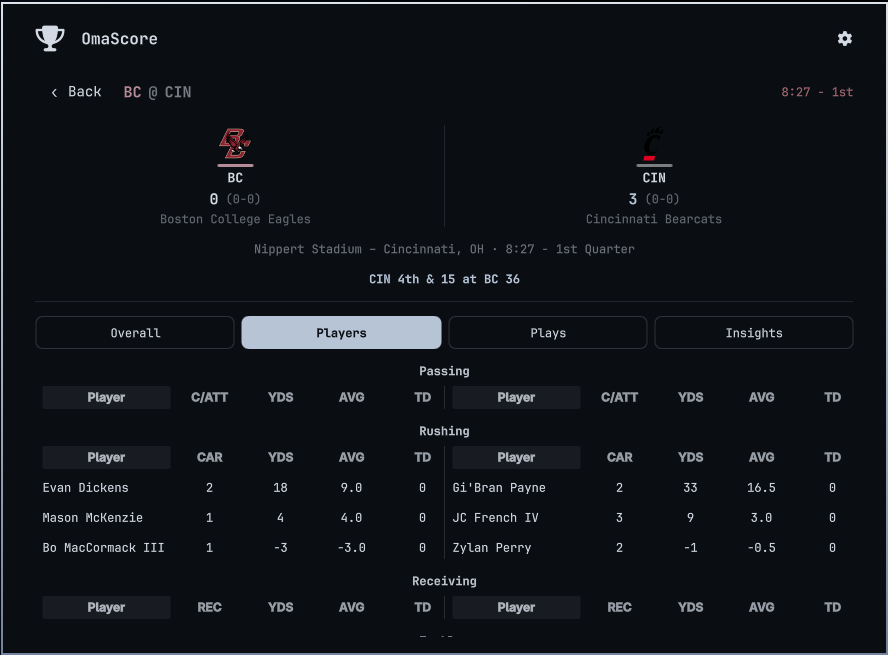
- Detail view: the team header stays pinned while the stats scroll beneath it. Each side is tinted with its real ESPN team color (dark hues are lifted until they read on the panel). Live games refresh in place on the poll cadence without losing your tab or scroll position.
- Overall tab: Team statistics split by home/away with a vertical divider (labels are league-specific). A split bar under each row is sized by each team's share, so the leading side is visible at a glance.
- Live situation: for NFL/CFB games in progress, the current down & distance and ball spot render in accent under the venue line.
- Matchup predictor: for pre-games where ESPN publishes win chances, each side's percentage renders team-colored under the venue line (hidden once the game starts).
- Players tab: Player statistics grouped by category with a fixed 110px Player column and horizontally scrollable stat columns.
- Favorites: Teams saved per-league appear pinned at the top of the game list, above live games. They persist in dconf (the desktop settings store), so
omarchy plugin disable/remove+add/enablekeeps them. - Logos: Team logos loaded from ESPN network sources (transparent PNG).
Navigation
- All leagues share a 7-day selector (Sun–Sat). Dots mark days with games; select a day to load its scores (
?dates=YYYYMMDD). Today keeps a small underline when another day is selected. - Shift weeks with the ‹ / › buttons. On open, today is auto-selected — or, if today has no games, the next day that does.
Languages
The UI follows your system locale — currently English, Spanish, Portuguese, and Dutch (LANG/LC_ALL, e.g. es_ES.UTF-8) — or the Language setting in the panel's Settings screen. Translations live in I18n.js; unknown locales fall back to English. Common ESPN stat labels (fouls, cards, possession, …) are translated; anything the feed sends that isn't in the dictionary stays in English.
Remove
omarchy plugin remove --yes slowburnaz.omascore
Configure
omarchy bar move slowburnaz.omascore --section right
Dependencies
curl— all ESPN API calls run through it (preinstalled on Omarchy).dconf— favorites persist through the desktop settings daemon (preinstalled on Omarchy).
Data & attribution
Score data, logos, and imagery come from ESPN's public (undocumented) scoreboard API and CDN. OmaScore is an independent project — not affiliated with, sponsored by, or endorsed by ESPN. Data is for personal, non-commercial use and remains the property of ESPN. The API is unofficial and may change or become unavailable without notice; polling is deliberately lightweight and adaptive (25s when a favorite is live, backing off to 2 minutes otherwise).
Debugging
QML errors and plugin logs go to the systemd user journal:
journalctl --user -g "omascore" -f
screenshots