
Den
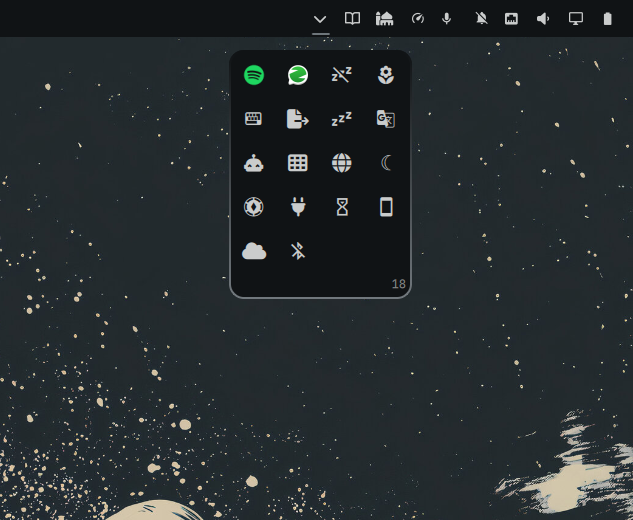
A Windows-style overflow flyout for the Omarchy shell bar. Clicking the chevron drops down a compact grid of icon tiles holding every tray app that isn't pinned on the stock tray, plus any bar plugins tucked away inside. Strictly a declutter tool — Den never enables, disables, or removes anything.
Why
New tray apps and plugin widgets pile up on the bar. Den gives them one home: unpinned tray apps appear automatically, and any bar widget can be dragged in — leaving your bar minimal and your overflow one click away.
Omarchy 4.0.3 compatibility
On Omarchy 4.0.3+ the stock bar injects a scoped PluginBarApi into
third-party widgets — without the widget registry, full shell config, or drag
state that Den relies on. Den locates the real host bar through a built-in
sibling widget in the same visual tree. This is an internal compatibility
bridge, not a supported public API: Den gains direct access to the bar and
its shell, as on earlier versions. It requires the stock bar and a mounted
built-in sibling widget; future Omarchy releases may need another adaptation.
Other third-party widgets mounted inside Den receive a scoped DrawerBarApi
owned by their drawer slot. These facades sit outside the stock visible-slot
cache, so layout-triggered prunePluginBarApis() does not destroy them. They
keep their per-plugin shell access and mirror the host's presentation/popout
state. No packaged Omarchy files are modified.
Diagnostics: omarchy-shell so.den status reports the configured and mounted
IDs plus a per-widget barPresent flag. omarchy-shell so.den toggle opens or
closes the drawer.
Layout-change regression check
With drawer-owned facades, repeatedly running the stock bar's
prunePluginBarApis() preserves every tucked widget's live bar reference, and
plugin panels position beside the drawer instead of the stock bar.
WeChat attention reveal
Hidden WeChat tray icons appear temporarily before the Den chevron while their
icon changes signal unread-message blinking, then hide again after 1250 ms
without updates. The pinned/hidden tray configuration is preserved.
revealAttentionIds selects watched app IDs and defaults to ["wechat"].
The same temporary button also handles NeedsAttention, activation,
middle-click and scrolling. Nonvisual icon listeners use Instantiator.
Gestures
| Action | How |
|---|---|
| Open / close | click the chevron |
| Tuck a widget away | press-and-hold it anywhere on the bar → drop on the glowing chevron or the open card |
| Show again | drag the tile onto the eject strip at the top of the card ("Release to show") |
| Show at an exact spot | plugins only — drag the tile out of the card and drop it between two bar widgets |
| Activate | left-click a tile (apps launch; plugins toggle their panel under the card) |
| App menu | right-click an app tile — full menu with submenus, rendered inline |
| Send plugin back | right-click a plugin tile |
| Reorder | hold a tile, hover a landing slot (accent ring), release |
Middle-click and scroll behave like normal tray icons. The chevron always points toward the flyout: down on a top bar, up on a bottom bar, inward on left/right bars.
Plugin icons
Omarchy plugins carry no icon metadata, so tile faces resolve through a fallback chain:
- manual overrides — add an
iconsmap to Den's entry in~/.config/omarchy/shell.json:{ "id": "so.den", "widgets": ["..."], "icons": { "omaplug": "\uf013" } } - optional manifest convention —
iconorbarWidget.iconaccepts a Nerd Font glyph or an image path (relative paths resolve against the plugin dir) - live extraction of the widget's actual bar-button glyph from its mounted instance — a pure nerd-font glyph first, then one stripped out of mixed button text (" Notifications"), then a plain Unicode symbol (⌨)
- a builtin guess from the plugin id/name (keyboard, window, hotspot, notifications, stats and friends)
- letter avatar
Tray apps always render their real icon (symbolic icons are tinted to match your theme).
Install
omarchy plugin add https://github.com/SaifOmar/so.den.git --enable
That's it. Place it on your bar:
omarchy bar move so.den --section right
Uninstall
omarchy plugin remove so.den
Settings
All settings live on Den's entry in ~/.config/omarchy/shell.json:
widgets— which bar plugins are tucked away (managed by dragging; edit by hand if you prefer)captureOverflow— defaulttrue. Registers unpinned tray ids as hidden on the stock tray so its own hover-expander stays empty and Den becomes the single overflow. Set tofalseto leave the stock tray alone.icons— per-plugin icon overrides, see above.popupMaxWidth— default184. Width of the dropdown card, in Omarchy "space" units (the same UI scale used everywhere, so it tracks DPI).popupMaxHeight— default340. Height of the dropdown card in the same units. A taller card lets the inner tile grid show more rows before scrolling.
The card is resized directly: grab any edge (top, bottom, left, right) or
corner and drag. Sizes snap to whole tile columns and rows, so you always
land on a clean grid with no half-cut tiles, and the choice is saved once
when you release. Double-click any edge to reset that axis to its default.
The two keys above hold the persisted values if you prefer to edit
shell.json by hand; sizes are clamped to a sane range and to the screen.
Files
manifest.json— plugin metadata (bar-widget kind)Den.qml— the widgetDenModel.js— pure config/tray helpersDrawerBarApi.qml— scoped bar facade for widgets mounted inside the drawer