
omarchy-airpods
AirPods noise control and battery in the Omarchy bar.
Standard Bluetooth profiles carry audio and the media keys, but they do not
carry noise control mode, per-pod battery, or in-ear status. Apple sends these
over a vendor protocol (AAP) on L2CAP PSM 0x1001. This plugin speaks that
protocol directly: the whole backend is one Python file on the standard
library. Nothing to compile, no systemd unit of its own, no companion app.
The plugin pauses the music when a pod comes out of your ear, and continues
it when the pod goes back in. The earBehavior setting picks the rule. The
plugin acts only on a player that it paused itself, and only while the
AirPods are the current audio output.
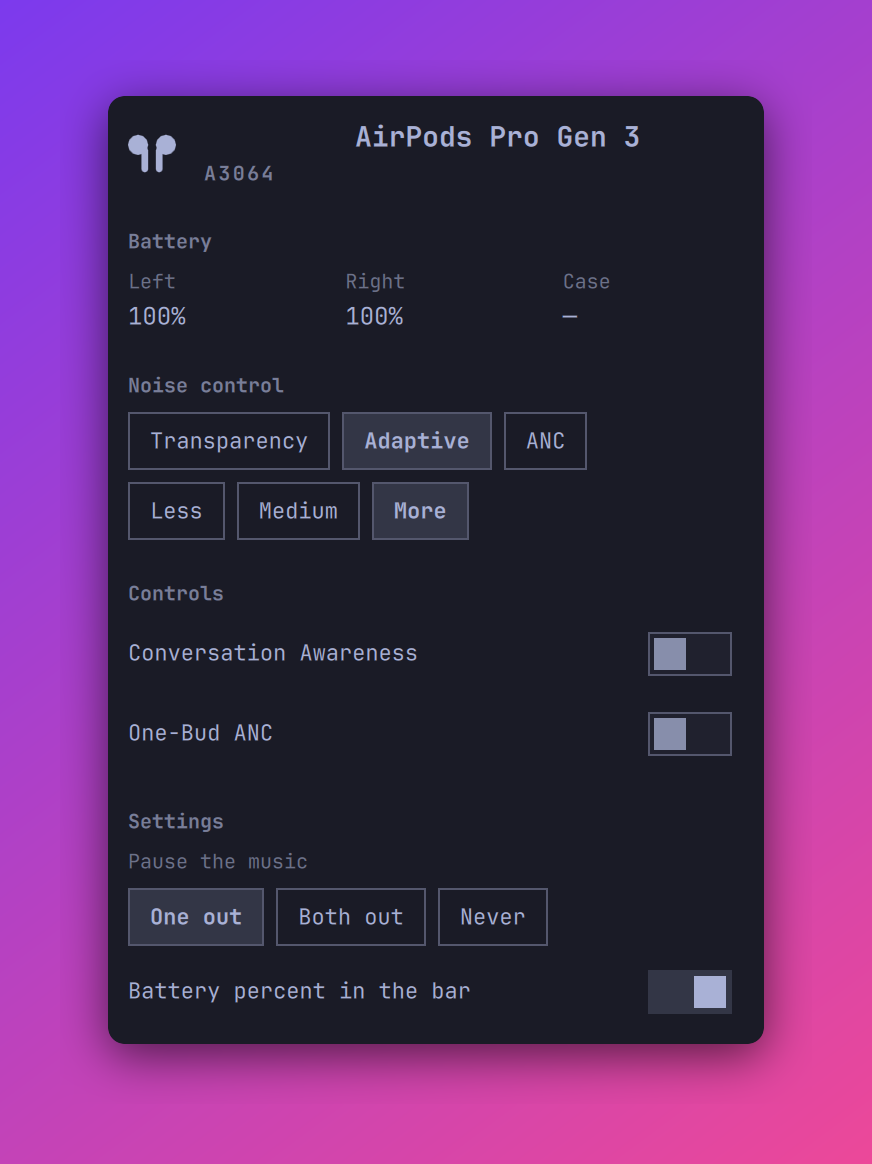
The panel shows:
- The device name and the model number
- The battery level of each pod, and of the case when it reports one. A bolt marks a component that charges.
- Buttons for Off, Transparency, Adaptive, and ANC, with the current mode selected. Off is absent on AirPods Pro 3.
- The adaptive noise level (Less, Medium, More) while Adaptive is the mode
- Switches for Conversation Awareness and One-Bud ANC. A switch is dim until the device reports the control.
The bar shows an AirPods icon with the battery level of the lowest pod. The widget leaves the bar while no AirPods are connected. Volume, output selection, and pairing stay in the stock Audio and Bluetooth panels.
Install
omarchy plugin add https://github.com/s0up4200/omarchy-airpods.git
omarchy plugin enable soup.airpods
To move the widget:
omarchy bar move soup.airpods --section right --after omarchy.clock
Then tell BlueZ to identify itself as an Apple device, or the AirPods refuse
the AAP channel. Add this line to /etc/bluetooth/main.conf:
DeviceID = bluetooth:004C:0000:0000
Restart Bluetooth and reconnect the AirPods:
sudo systemctl restart bluetooth
Removal leaves only the DeviceID line behind:
omarchy plugin remove soup.airpods
Do not run LibrePods at the same time
The AirPods accept one AAP client. If LibrePods holds the channel, this plugin reads stale data and its commands are ignored. Use one or the other.
Command line
The backend works on its own:
~/.config/omarchy/plugins/soup.airpods/bin/airpods watch
~/.config/omarchy/plugins/soup.airpods/bin/airpods capture
~/.config/omarchy/plugins/soup.airpods/bin/airpods selftest
capture prints every raw packet as hex, for building selftest fixtures.
watch holds the channel open and prints a line for each change, which is
what the panel runs:
{"connected": true, "address": "…", "name": "AirPods Pro", "model": "A3047",
 "mode": "adaptive", "battery": {"left": 90, "right": 85, "case": null},
 "charging": {"left": false, "right": false, "case": false},
 "ear": ["in_ear", "in_ear"], "ca": false, "onebud": false,
 "adaptive_level": 50}
watch also takes key value commands on stdin: mode anc, ca on,
onebud off, adaptive 50. The AirPods dump mode and model once per
Bluetooth connection, to whichever client holds the channel then — a second
client reads mostly null.
The bar starts one watch for each monitor, and the AirPods answer only the
first client. The copy that binds the abstract socket omarchy-airpods opens
the channel; the others connect to it, print the lines it sends, and forward
their commands to it. That keeps the widget alive on every monitor. To see a
mirror at work, run a copy by hand while the bar runs and keep its stdin open:
sleep 30 | ~/.config/omarchy/plugins/soup.airpods/bin/airpods watch
It prints the same lines as the bar. A copy started with stdin closed (from
/dev/null, for example) exits immediately, because an empty read means the
caller went away.
A null value means the device has not reported it; the panel shows — or
a dim control. Putting one pod in the case disconnects the other pod, so
the panel can go quiet mid-use.
Interactions
- Bar icon: a click of any button toggles the panel.
- Panel: Tab and Shift+Tab move to the neighboring bar panel, Esc closes. The mode buttons and the switches are mouse-only.
- IPC:
omarchy-shell soup.airpods <open|close|show|hide|toggle>. Works while the widget is off the bar.
Settings
The panel has a Settings section for these. A change writes to the widget's
entry in ~/.config/omarchy/shell.json. The same keys take a value from the
command line:
omarchy bar set soup.airpods showBattery false --json
Booleans need --json; a bare value is stored as a string and reads as off.
| Key | Default | What it does |
|---|---|---|
showBattery |
true |
Show the battery percent next to the bar icon |
earBehavior |
One out |
When a pod out of your ear pauses the music: One out, Both out, or Never |
Tested with
AirPods Pro 2 (models A3047 and A3048) and AirPods Pro 3 (model A3064) on Omarchy 4, BlueZ 5.87. Other AirPods models use the same protocol, but they are not tested. Reports are welcome.
Development
A widget on the bar keeps the QML it loaded. After an edit, run:
omarchy restart shell
How it works
bin/airpods connects to L2CAP PSM 0x1001, sends the AAP handshake, then
asks for the feature flags and the notification stream. The AirPods answer
with metadata, battery, and control packets. Writing a control is one
command packet on the same channel, which is why watch reads commands
from stdin. The AirPods never echo a control write back to the sender, so
watch keeps the value it sent until the next connection's dump corrects it.
Credit
This plugin exists because of LibrePods by Kavish Devar. That project did the hard part: it reverse-engineered Apple's AAP protocol and wrote down what every packet means. The handshake, the opcodes, the battery layout, the control command for the listening mode, and the 300 ms gap that the AirPods need after the handshake all come from reading its source.
No code was copied. The packet layouts are facts about Apple's protocol, and this plugin implements a small part of them in Python.
Donations
If this plugin is useful to you, the Sponsor button in the sidebar takes you to GitHub Sponsors and Buy Me a Coffee. Very welcome, never expected.
License
MIT