
Passpage for Omarchy
Your passpage.space shares in the Omarchy bar.
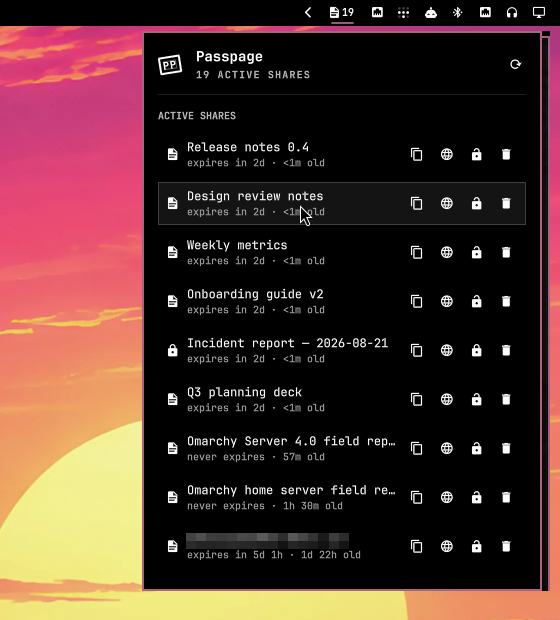
The bar shows a page glyph with the number of active shares. Click it for a panel that lists every share with its expiry, passcode state and view count, plus quick actions: copy link, open in browser, set / change / remove passcode, delete. Shares expiring within 24 h are highlighted; expired but not-yet-swept shares sit in a dimmed Expired section so you can delete them early.
Publishing is intentionally not here — pages are published by agents or the
passpage CLI through the API. This plugin is for seeing and managing what
is live.
Install
omarchy plugin add https://github.com/Zeus-Deus/passpage-omarchy-plugin --enable
Then give it an API key. Create one at passpage.space → Dashboard → API keys
and save it to ~/.config/passpage/key (the same file the passpage CLI uses):
mkdir -p ~/.config/passpage && chmod 700 ~/.config/passpage
printf %s 'pp_…' > ~/.config/passpage/key && chmod 600 ~/.config/passpage/key
Mode 600 (or 400) is required — the plugin refuses to read a key file
that group or others can access, or that is a symlink or not owned by you.
The panel watches that file and picks the key up without a restart. While it
is missing, unsafe (permissions/ownership), invalid, or rejected by the
server, the bar glyph shows a ! badge and the panel says why.
Dependencies
Everything is already present on a stock Omarchy install:
curl— all API callsperl— guarded API-key reader (already installed as a dependency ofgit)wl-copy(wl-clipboard) — copy linkomarchy-launch-browser— open share / dashboard
No background services, installers, elevated privileges, or remote builds.
The plugin never writes outside the shell's own shell.json settings (and
only when Omarchy asks it to).
Usage
| Action | Mouse | Key |
|---|---|---|
| Copy link | click row or | Enter / c |
| Open in browser | | o |
| Set / change / remove passcode | / | p |
| Delete (with confirmation) | | x |
| Refresh | or middle-click the bar icon | r |
| Open passpage dashboard | — | d |
j/k or arrows move the cursor, Esc closes (or cancels an open editor /
dialog), Tab switches to the neighbouring bar panel.
Passcode editor: type and press Enter to set; leave it empty and press
Enter to remove an existing passcode.
IPC:
omarchy-shell passpage toggle | open | close | refresh | status
status returns JSON, e.g.
{"loaded":true,"active":11,"expired":0,"expiringSoon":1,"error":"", "keyMissing":false,"keyInvalid":false,"keyUnsafe":false}.
Configure
Settings live inline on the bar entry in ~/.config/omarchy/shell.json
(Omarchy's plugin settings UI edits the same keys):
{ "id": "space.passpage.shares", "refreshIntervalSec": 300 }
| Key | Default | Meaning |
|---|---|---|
refreshIntervalSec |
300 |
Background refresh of the bar count (30–3600). The panel always refreshes when opened. |
baseUrl |
https://passpage.space |
Only for a self-hosted passpage. |
Remove
omarchy plugin remove space.passpage.shares
This deletes the plugin folder and its bar entry. Your API key file
(~/.config/passpage/key) is yours and is left alone.
Security notes
- The API key and any passcode you type are handed to
curlthrough a config file on stdin — never on the command line, so they are not visible in/proc. - curl runs with
-q(never reads~/.curlrc) and--globoff, so no inherited option and no glob in a URL can redirect the request, weaken TLS, attach the key to another URL, or fan one request out to several hosts. baseUrlis validated to a single unambiguous http(s) endpoint —httpsis required unless the host is loopback, so credentials never cross the network in cleartext; userinfo, backslashes, controls, bidi/zero-width marks, whitespace,?/#, and curl URL globs are rejected. A blank value falls back to the default; any other unusable value fails closed (no request) rather than silently falling back to production. Brackets delimiting an IPv6 host are supported.- Requests to loopback hosts never transit an
http_proxy/HTTPS_PROXYfrom the environment (noproxy = localhost,127.0.0.1,::1in every curl config), so a proxy can never see the bearer token of a local-dev request in cleartext. Remote https requests still honour your proxy settings. - The API key path is opened exactly once with no-follow/nonblocking flags;
its regular-file type, owner, mode
600/400, and ≤4 KiB size are checked through that descriptor, then the same descriptor is read. A symlink swap cannot race the checks, and a special, world-readable, or oversized file at the key path can't be read into the shell. The reader also retains a 2-second outer timeout so a stalled filesystem cannot hang refresh. Perl is available through Omarchy's stockgitdependency. The key must be a single printable token. A missing, unsafe, or invalid key file is surfaced distinctly (!badge, panel explanation) and no share data is shown without a usable key. - URLs handed to the clipboard/browser are passed as a separate argument (never
interpolated into a shell string) and restricted to
http(s)://. - Any non-zero curl exit is treated as a failed request; a partial or truncated
body is never parsed as success, and a stale in-flight response can't
overwrite newer local state. Changing
baseUrlor the key file clears the cached share list immediately, and both list and action (delete/passcode) responses that started under the old target or credential are discarded on arrival — rows and results from the old server can never bleed into the new one. - Remote strings (titles, error details) are stripped of markup, control, bidirectional-override and zero-width characters before display, and rendered as plain text — a title cannot visually spoof what you are copying or deleting. The same characters are rejected in share URLs before they reach the clipboard or browser.
- Responses are bounded at the source: curl's stdout and stderr pass through
head -c(2 MiB / 16 KiB) before they reach the shell, so an oversized body is cut off and reported as an error rather than buffered. The share list is then clamped (≤500 entries, every field length-checked) before it reaches the UI. A broken or hostilebaseUrlcannot grow the shell process. - Only bearer-token endpoints are used:
GET /api/shares/_mine,PATCH /api/shares/<slug>/passcode/_api,DELETE /api/shares/<slug>/_api. The plugin cannot create keys or publish pages. - Like every Omarchy shell plugin, it runs unsandboxed inside the shell process.
Development
node --test tests/model.test.js           # pure logic: expiry, formatting, curl config
omarchy plugin validate .                 # manifest + folder rules
omarchy plugin add "$PWD" --yes --enable  # install a local clone
git -C ~/.config/omarchy/plugins/space.passpage.shares pull && omarchy-restart-shell
qs log -p /usr/share/omarchy/shell --tail 60
License
MIT — see LICENSE.