
Space Era ISS Tracker
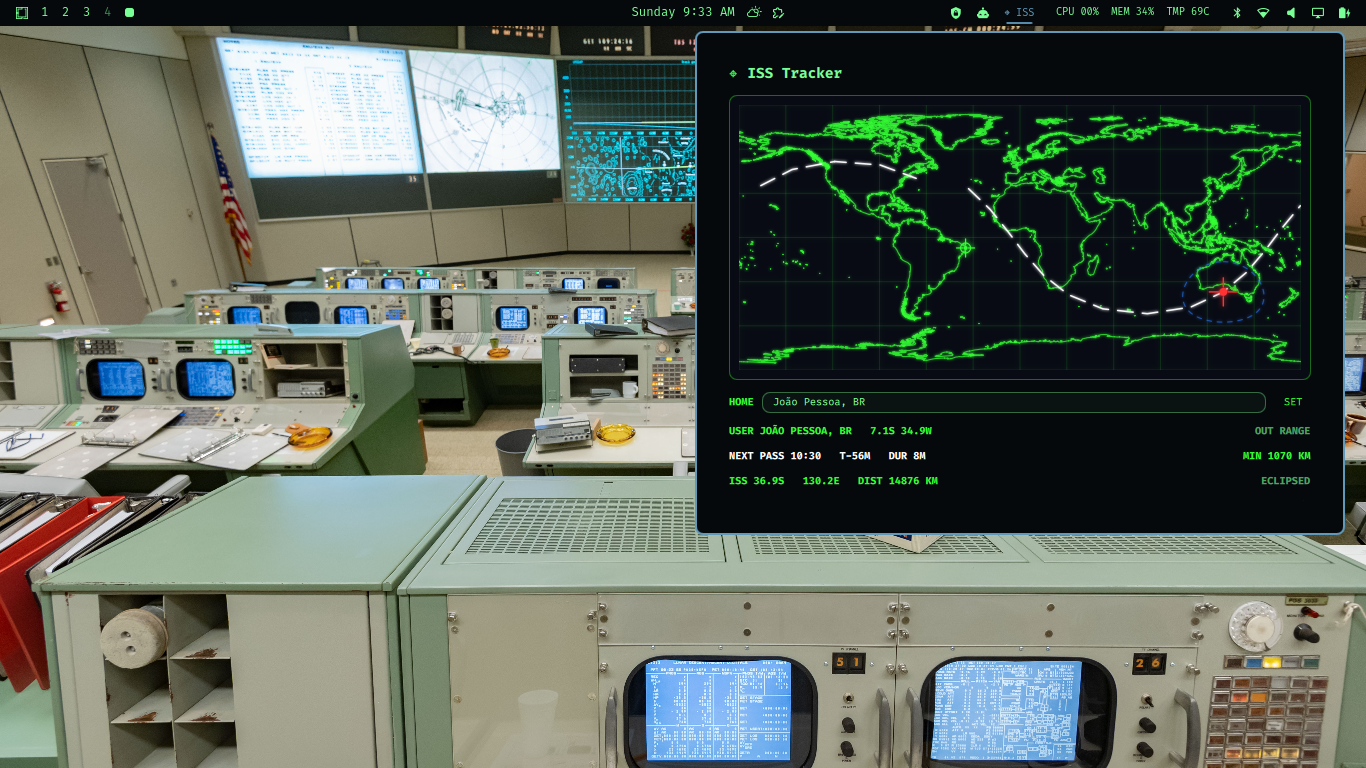
Space Era ISS Tracker is a live Omarchy bar plugin that feels like a tiny mission-control instrument. It plots the International Space Station on a console-style world map, draws the current orbit, shows your city, predicts the next pass, and flashes ACQUIRED when the station enters your visibility footprint.
It is orbital telemetry with a little drama.
Features
- Live ISS latitude, longitude, altitude, and velocity.
- Real coastline map data rendered in terminal-inspired style.
- 19-node ground track orbit projection.
- Red ISS indicator & dynamic 2,200 km blue visibility circle.
- Configurable home city with saved location and optical sighting flare predictions.
- User-location marker on the map.
- Next pass prediction with countdown, duration, and closest approach.
- Flashing/inverting bar state with
ACQUIREDwhen the ISS is in range. - 🚀 Upcoming 7-Day Space Launch Manifest with Launch Library 2 integration.
- Interactive launch pad coordinate targeting with glowing target crosshairs.
- Live mission HUD with T-minus countdowns and favorite bookmarks (
★). - Right-click refresh from the bar.
Screenshot
Install
Install and enable it directly from GitHub:
omarchy plugin add https://github.com/diogogc/spaceera-iss-tracker.git --enable
If you prefer a manual setup, clone it into your Omarchy plugins directory and use the manifest id spaceera.iss-tracker in your bar layout.
Add the widget to your Omarchy bar configuration if it is not added automatically:
{
  "bar": {
    "layout": {
      "right": [
        "spaceera.iss-tracker"
      ]
    }
  }
}
Omarchy validates the plugin before installing it. If needed, restart the shell:
omarchy restart shell
Remove
Disable and remove the plugin with Omarchy:
omarchy plugin remove spaceera.iss-tracker
To delete the saved home city as well:
rm -f ~/.config/spaceera/iss-location.json
Usage
Click ISS in the bar to open the tracker panel.
- Enter a city in the
HOMEfield and press Enter orSET. - The plugin stores your configured city in
~/.config/spaceera/iss-location.json. - The map shows the ISS, orbit line, visibility footprint, and your home marker.
- When the ISS is inside your visibility footprint, the bar flashes and shows
ACQUIRED.
Right-click the bar widget to refresh live data.
Requirements
- Omarchy shell / Quickshell.
bash,curl,jq, andpython3.- Network access for live ISS position data from
api.wheretheiss.atand city geocoding fromgeocoding-api.open-meteo.com. - Writes only its own saved city file at
~/.config/spaceera/iss-location.jsonand runtime cache underXDG_RUNTIME_DIRor/tmp.
Credits
Created by diogo carvalho.
The console visual direction, Omarchy plugin implementation, and Space Era styling are original work by diogo carvalho.
License
Released under the Creative Commons Attribution 4.0 International License (CC BY 4.0). You may use, modify, and share it, but you must give appropriate credit to diogo carvalho.