
Formula 1 Calendar for Omarchy
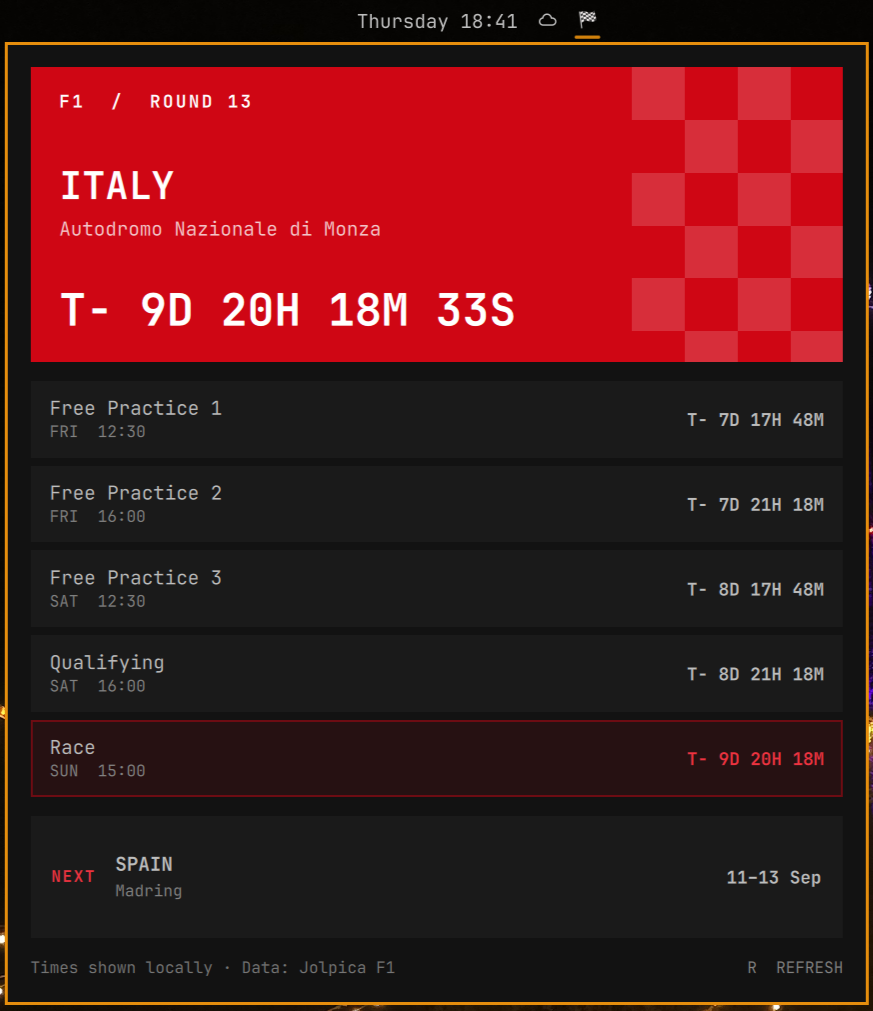
A focused Quickshell bar widget that shows one thing well: the upcoming Formula 1 race weekend. Every session appears in your local time with a live T− countdown, followed by a compact preview of the race after it.
Features
- Normal and Sprint weekend schedules (FP1–3, Sprint Qualifying, Sprint, Qualifying, Race)
- Local date/time and live countdown for every listed session
- Race-country hero with a chequered-flag treatment
- Following weekend with country, circuit, and start/end dates
- Offline cache and respectful six-hour refresh by default
- No API key, account, daemon, or telemetry
Install
omarchy plugin add https://github.com/spaceXrace/omarchy-f1.git --enable
Usage
- Left-click the chequered flag to open or close the calendar.
- Middle-click the flag to force a schedule refresh.
- Press
Rwhile the panel is open to refresh. - Press
Escapeto close the panel. - All session times are converted to your system's local time zone.
The refresh interval defaults to six hours and can be changed in the widget settings from 3–24 hours.
Update
omarchy plugin update spacexrace.formula1-calendar
Disable or uninstall
Temporarily remove the widget from the bar without uninstalling it:
omarchy plugin disable spacexrace.formula1-calendar
Enable it again later:
omarchy plugin enable spacexrace.formula1-calendar
Completely remove the plugin:
omarchy plugin remove spacexrace.formula1-calendar
Removal deletes the installed plugin checkout and its bar entry. The small schedule cache may remain under $XDG_CACHE_HOME/omarchy/formula1-calendar (or ~/.cache/omarchy/formula1-calendar) and can be deleted separately if desired.
Data and network use
Schedule data comes from the free, community-maintained Jolpica F1 API. The plugin requests one compact season schedule on startup when the cache is stale, then at the configured refresh interval. It caches the last successful response under $XDG_CACHE_HOME/omarchy/formula1-calendar (or ~/.cache). If there is no network connection or a refresh otherwise fails, the plugin continues using the previous cached schedule regardless of its age.
Jolpica is not official Formula 1 software. This plugin is unofficial and is not associated with Formula 1, the FIA, or their affiliates. Formula 1 and F1 are trademarks of their respective owners.
Requirements
- Omarchy Quattro / Omarchy Shell with third-party plugin support
curlandpython(included with Omarchy)- Network access only when refreshing schedule data
Validate
omarchy plugin validate .
qmllint -I /usr/share/omarchy/shell BarWidget.qml Panel.qml
Local development
Install from a local Git checkout with:
omarchy plugin add "$(pwd)" --enable
To validate the source, update the locally installed clone, and restart Omarchy Shell, run the development sync command explicitly:
./bin/dev-sync
Troubleshooting
- If the widget is installed but absent, run
omarchy plugin enable spacexrace.formula1-calendar. - If an updated widget still looks old, run
omarchy restart shell. - If schedule data cannot be refreshed, the last successful cached response remains available. Check network access and press
Rto try again.
License
MIT. See LICENSE.