
Screen Mirroring
An Omarchy Quattro bar widget for mirroring a Linux desktop to compatible receivers with doubletake.
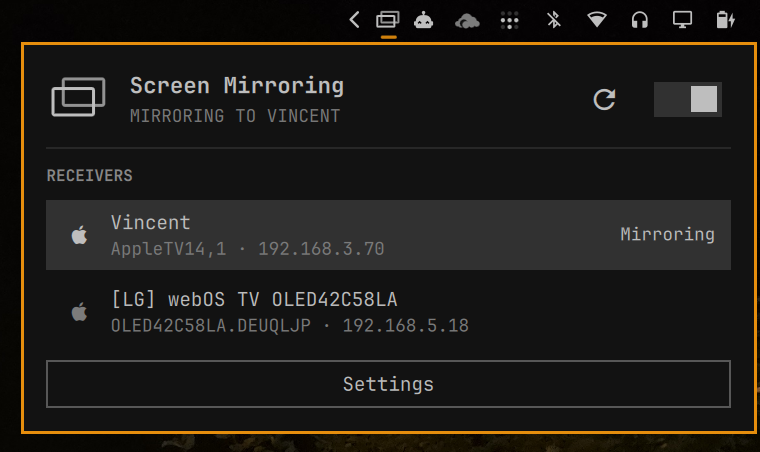
Features
- Discovers compatible receivers when the panel opens or Reload is selected.
- Mirrors a Wayland screen or window selected through the desktop portal.
- Shows connecting, credential, streaming, failure, and firewall-cleanup states.
- Reconnects to the last receiver from the hero icon or on/off switch.
- Supports one-time pairing PINs.
- Opens tagged, receiver-specific UFW rules for TCP and UDP ports
60000:60010. - Can retain rules per receiver to avoid repeated Polkit authentication.
- Cleans up temporary rules after disconnects, failures, and unexpected exits.
- Supports mouse and keyboard operation.
Requirements
All required dependencies can be installed automatically from within the plugin.
- Omarchy Quattro with the Omarchy shell.
- A receiver supported by doubletake.
- A working PipeWire screen-cast portal.
- UFW and a desktop Polkit authentication agent.
The widget checks all runtime dependencies before enabling receiver controls.
Official Packages
gstreamer
gst-plugins-base
gst-plugins-good
gst-plugins-bad
gst-plugins-ugly
gst-libav
gst-plugin-va
libva-utils
libpulse
pipewire
util-linux
xdg-desktop-portal
xdg-desktop-portal-hyprland
xdg-terminal-exec
ufw
polkit
python
AUR Package
doubletake-git
The dependency check also verifies doubletake, doubletake-ctl, pactl, pipewire, pkexec, ufw, vainfo, xdg-terminal-exec, and the required pipewiresrc and h264parse GStreamer elements. VA-API availability is reported separately by checking vah264enc.
Installation
omarchy plugin add https://github.com/spaceXrace/omarchy-screen-mirroring --enable
Usage
- Open the Screen Mirroring widget. It scans for receivers for approximately five seconds.
- Select a receiver.
- Approve the receiver-specific firewall rules through the Polkit dialog when requested.
- Select a screen or window in the desktop portal.
- Enter the pairing PIN shown by the receiver if doubletake requests one.
- Use the hero icon or switch to stop mirroring.
The hero displays the receiver name while connecting and streaming. When idle, its icon and switch reconnect to the last receiver. The screen or window choice is requested again for every connection; the plugin does not reuse a previous portal selection.
Keyboard Controls
- Arrow keys or
h,j,k,l: move between header actions, receiver rows, and Settings. EnterorSpace: activate the focused action or receiver.r: reload receivers.w: start or stop mirroring.Escape: close the panel.
The credential text field receives normal keyboard input while focused. Pressing Enter submits a pairing PIN.
Credentials
- Pairing PIN: a temporary code displayed by the receiver.
Pairing PINs are passed from the widget to its helper over standard input and then to the running doubletake process through a private FIFO. They are never placed in command-line arguments. Doubletake stores successful pairing credentials in its own credential store, normally ~/.config/doubletake/credentials.json.
Firewall
Doubletake reserves local ports 60000-60010. The widget validates the receiver IP and asks Polkit to run the system-owned /usr/bin/ufw executable with fixed TCP and UDP rules restricted to that address. Rules are tagged with spacexrace.screen-mirroring-<IP> so cleanup removes only rules owned by this plugin.
Before opening a temporary rule, the helper records its receiver in a durable, owner-only cleanup ledger under ~/.config/omarchy/screen-mirroring/. A detached supervisor removes the rules when doubletake exits even if the widget is disabled or unloaded. Interrupted cleanup is retried once on the next shell start; if Polkit authentication is dismissed or cleanup still fails, the panel displays Remove leftover firewall rules.
Enable Keep receiver ports open in Settings to retain the receiver-specific rules after the first approval. Turning it off removes all retained plugin-owned rules.
Settings
- Keep receiver ports open: retains receiver-specific UFW rules to avoid future firewall password prompts.
- VA-API status: reports whether the GStreamer
vah264encelement is available.
Plugin settings and the durable firewall-cleanup ledger are stored in ~/.config/omarchy/screen-mirroring/. Runtime files use the owner-only $XDG_RUNTIME_DIR/omarchy-screen-mirroring/ directory, falling back to /run/user/$UID/omarchy-screen-mirroring/ when the environment variable is unavailable. The plugin refuses shared or incorrectly owned runtime directories. Doubletake logs are written with owner-only permissions to ~/.cache/omarchy-screen-mirroring/doubletake.log.
Troubleshooting
Receiver Compatibility
Receiver support is provided by doubletake. Some third-party implementations require upstream protocol fixes. For example, LG webOS PTP support is currently tracked in doubletake PR #31.
Logs
tail -f ~/.cache/omarchy-screen-mirroring/doubletake.log
journalctl --user -u xdg-desktop-portal-hyprland.service -f
Remove
Stop any active stream before removing the plugin. Before uninstalling, open Settings and disable “Keep receiver ports open” so the plugin removes every retained firewall rule. The stream supervisor remains responsible for temporary rules if the widget is unloaded during a stream.
omarchy plugin remove spacexrace.screen-mirroring --yes
If the plugin was removed before cleanup completed, recover the recorded receiver IPs and delete only this plugin's tagged rules:
{
  python -c 'import json,pathlib; p=pathlib.Path.home()/".config/omarchy/screen-mirroring/pending-cleanup.json"; print(*(json.loads(p.read_text()) if p.exists() else []), sep="\n")'
  sed -n '/./p' ~/.config/omarchy/screen-mirroring/permanent-ips 2>/dev/null || true
} | sort -u | while IFS= read -r ip; do
  sudo /usr/bin/ufw --force delete allow from "$ip" proto udp to any port 60000:60010 comment "spacexrace.screen-mirroring-$ip"
  sudo /usr/bin/ufw --force delete allow from "$ip" proto tcp to any port 60000:60010 comment "spacexrace.screen-mirroring-$ip"
done
Development
omarchy plugin validate .
qmllint -I "$OMARCHY_PATH/shell" BarWidget.qml Panel.qml
bash -n bin/omarchy-screen-mirroring
tests/security-tests.sh
License
This plugin is MIT licensed. Doubletake is a separate LGPL-3.0-or-later dependency. AirPlay and Apple are trademarks of Apple Inc.; this project is not affiliated with or endorsed by Apple.