
Sportsbar
A bar widget for the Omarchy shell that tracks your favorite sports teams. Pick up to 6 teams and the trophy pill in your bar opens a popup showing each team's live/latest score and next upcoming game, pulled from ESPN's public API — no account or key required.
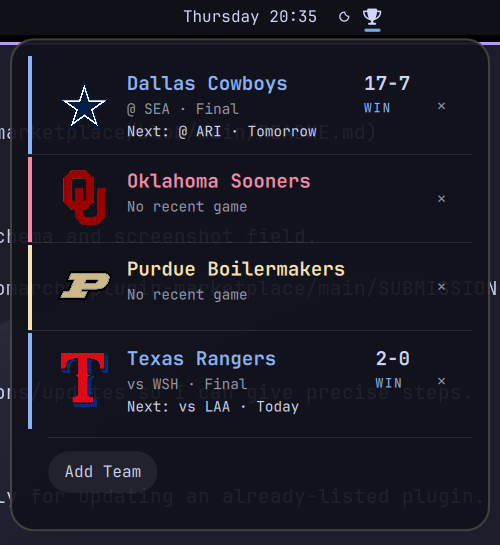
Supported sports: NFL, NBA, NHL, MLB, Premier League, College Football, College Basketball.
- Live scores: in-progress games show the current score and game state (e.g. "Top 9th", "Q3 4:12"), not just final results.
- Team logos: each card shows the team's real logo, or — if you added
the team with
--ascii— a plain-text ASCII rendering of it. - Theme-matched colors: each team's card is accented with its real brand color, automatically snapped to the nearest swatch in whatever Omarchy theme is active, so it never clashes and re-colors itself on a theme switch.
Settings
Configure from the bar widget's settings panel, or by editing its entry
under bar.layout in ~/.config/omarchy/shell.json.
| Key | Type | Default | Description |
|---|---|---|---|
colorizeTeams |
boolean | true |
Color each team's name and accent bar with its theme-matched brand color. Off shows plain text. |
Usage
- Click the trophy pill to open/close the popup.
- Middle-click the trophy pill to force a refresh.
- Add a team: open the popup → "Add Team" → pick a sport, then a team.
- Remove a team: click the ✕ next to a team's card in the popup.
- Scores refresh automatically every 60 seconds while the popup is open.
The same actions are available from the command line via the bundled
bin/omarchy-sportsbar script:
bin/omarchy-sportsbar add                    # interactive: pick sport, then team
bin/omarchy-sportsbar add --ascii            # same, but store an ASCII-art logo instead of the real one
bin/omarchy-sportsbar remove                 # interactive: pick a favorite to remove
bin/omarchy-sportsbar add-direct <sport> <teamId> [--ascii]
bin/omarchy-sportsbar remove-direct <sport> <teamId>
bin/omarchy-sportsbar clear                  # forget all favorites
bin/omarchy-sportsbar detail                 # print current state as JSON
sport is one of nfl, nba, nhl, mlb, prem, cfb, cbb; teamId
is ESPN's numeric team id (bin/omarchy-sportsbar teams <sport> lists them).
--ascii renders the team's logo as plain-text ASCII art at add time and
stores it instead of the logo URL, so the card shows the ASCII version
from then on. Requires img2txt (from caca-utils) and ImageMagick; if
either is missing, or the render fails, it falls back to the real logo.
Installation
omarchy plugin add https://github.com/cgmccarron/omarchy-sportsbar.git --enable
Removal
omarchy plugin remove sportsbar
This deletes ~/.config/omarchy/plugins/sportsbar/ and disables the widget.
It does not clear your saved favorite teams or schedule cache; remove those
too if you want a clean slate:
rm -rf ~/.local/state/omarchy/settings/sportsbar.json ~/.cache/omarchy/sportsbar
Dependencies
Everything below ships with a stock Omarchy install — nothing extra to install:
bash,curl,jqomarchy-menu-selectandomarchy-notification-send(Omarchy's own picker/notification helpers, used for the interactive add/remove flows)
Optional, only needed for --ascii:
img2txt(from thecaca-utilspackage)- ImageMagick (
magickorconvert)
Data & storage
- Favorite teams:
~/.local/state/omarchy/settings/sportsbar.json - Per-team schedule cache (60s TTL):
~/.cache/omarchy/sportsbar/ - Data source: ESPN's public
site.api.espn.comJSON endpoints
License
MIT — see LICENSE.