
Firewall
ufw status in the Omarchy bar.
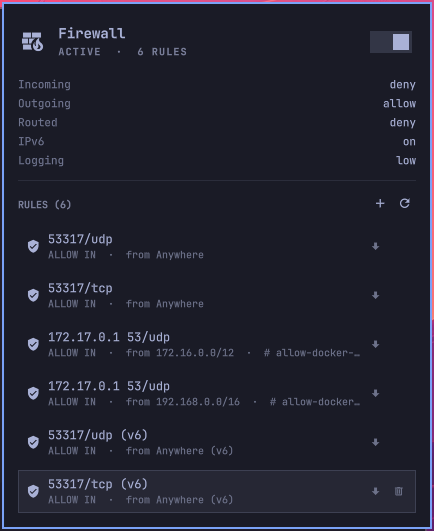
A wall with flames while the firewall is up; the same wall with the fire out, in the theme's urgent colour, while it is down. Click it for the default policies, the rules currently in place, and the controls that change any of it — the switch, a form that adds a rule, and a bin on each row that takes one away.
Installing
omarchy plugin add https://github.com/srozen/omarchy-ufw.git --enable
That clones it into ~/.config/omarchy/plugins/ and puts the icon in the right
section of the bar. Drop --enable to install it without turning it on, and
enable it later from Omarchy's widget settings or with:
omarchy plugin enable srozen.ufw right
ufw itself is a separate package — sudo pacman -S ufw if it is not already
there. The widget will sit in the bar dimmed and say so until it is.
Updating and removing go through the same command:
omarchy plugin update srozen.ufw
omarchy plugin remove srozen.ufw
What it shows
In the bar — one icon, three states:
| State | Icon | Colour |
|---|---|---|
| Active | wall with flames | bar foreground |
| Inactive | wall, no flames | bar urgent |
| Not installed, or not yet read | wall, no flames | dimmed |
Active, sitting among its neighbours at the right end of the bar:

Inactive — the flames are out and the wall has gone to the theme's urgent colour, which is the point: it should be the thing your eye lands on:

Hovering gives the same thing in words: active — 6 rules, inactive — nothing is being filtered, ufw is not installed.
In the panel — the switch, the default policies for incoming, outgoing and
routed traffic, whether IPv6 is on, the log level, and every rule ufw would
print, written the way ufw status writes it so the two can be checked against
each other. Click a rule to copy it, or use the two sections below to add one
and take one away.
Adding a rule
The + beside the RULES heading opens a form, or press a. Pick what the rule
does and which direction it applies to, give it a port, a source, or both, and
the line under the form fills in with the command it is about to run:
ufw allow 22/tcp
ufw limit out 8000:8010/udp comment 'test rig'
ufw allow from 192.168.1.0/24 to any port 22 proto tcp
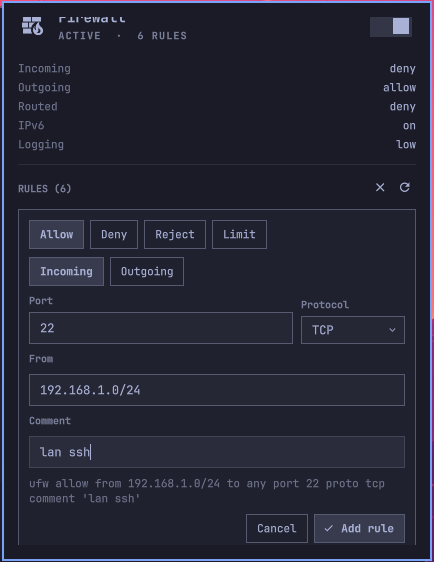
That line is the point of the form. The rest of the panel is careful to say things the way ufw says them so the two can be checked against each other, and a form that hid what it was about to run would be the one place that stopped. It also means the form teaches the command rather than replacing it.
The fields:
| Field | Takes |
|---|---|
| Action | allow, deny, reject, limit |
| Direction | Incoming or outgoing |
| Port | 22, a range 8000:8010, or a list 80,443 — ranges and lists need TCP or UDP, because that is a multiport match and iptables will only do those two |
| Protocol | TCP, UDP, or Any. Any and a port is two rules to iptables, which is what ufw allow 22 does too |
| From | Blank for Anywhere, or an address or CIDR block, v4 or v6. Not a hostname — a name that resolves differently tomorrow would silently be a different rule, and ufw stores what it is given |
| Comment | Anything but an apostrophe, which ufw's own parser refuses |
A rule with neither a port nor an address is refused: that is a rule about all traffic, which is what the default policies above it are for.
Application profiles — ufw allow CUPS — are shown and can be removed, but the
form does not offer them. They come from ufw app list, which needs root, and a
password prompt to populate a dropdown is a worse trade than typing the port.
Removing a rule
Put the cursor on a rule and a bin appears at its right edge; click it, or press
x. A dialog names the exact command first, and lands on Keep rather than
Remove, because that is the pause it exists to buy.
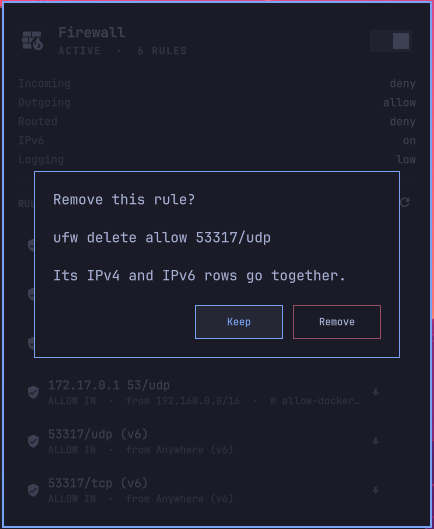
Rules are removed by rule, not by number. ufw delete 3 means "whatever is
third right now", and between reading the rule files and the password dialog
coming back, third can be something else — a rule added from a terminal, or the
firewall reloaded. Naming the rule cannot go wrong that way: if it is no longer
there, ufw says so and nothing is removed.
Writing a stored rule back out as the command that made it is a port of ufw's
own UFWCommandRule.get_command(), in Model.js, with tests that check the
awkward cases against what ufw produces — the short and long forms, log types,
interface clauses, app profiles with spaces in the name, and route rules.
The comment is deliberately left off the delete. ufw removes a rule whose only difference is the comment, but only when the delete carries none, so leaving it out matches the rule with or without one.
A rule written without an address is one rule to ufw and two rows here, since the v4 and v6 halves live in separate files. Removing either takes out both, and the dialog says so when that is what is about to happen.
Reading costs nothing; writing asks
ufw status needs root, but only because it shells out to iptables to confirm
the firewall is loaded. Everything it prints comes from files that a stock ufw
install leaves world-readable:
/etc/ufw/ufw.conf     ENABLED, LOGLEVEL
/etc/default/ufw      the three default policies, and IPV6
/etc/ufw/user.rules   the v4 rules, as `### tuple ###` lines
/etc/ufw/user6.rules  the v6 rules
So the widget reads those directly. No password to look, no polling a command that would need one, and no widget-shaped hole in the bar while it waits. The files are watched, so a rule added from a terminal appears in the panel without the panel being touched; the timer behind it is a safety net for a write that lands as a replace and slips past inotify.
Changing the firewall is a different matter, and stays one. The switch runs
ufw --force enable or ufw disable under pkexec, which puts Omarchy's own
authentication dialog in front of it — the same one every other privileged
action on the desktop uses. --force is there to skip ufw's "this may disrupt
existing ssh connections" prompt, which has no one to answer it here. Adding and
removing rules go through the same door.
The switch throws the moment it is clicked rather than a file-watch later. That
is an optimistic value, dropped as soon as ufw.conf agrees or after the
settle timer gives up, so a refused password leaves the switch where the
firewall actually is.
If your /etc/ufw/user.rules is not world-readable, the panel says so and
hides the rule list rather than claiming the firewall has none.
What guards the commands
Two rules cover everything that ends up in front of pkexec.
Arguments are a list, never a string. Nothing in Model.js or
UfwController.qml builds a command line, so there is no shell to quote for and
nothing a space or a semicolon in a comment could break out of. The one
exception is the terminal elevation setting, which has to hand a terminal a
line of shell — and that path quotes every argument individually on the way out.
The command shown in the panel is display only; the list is what runs.
Nothing reaches the list unvalidated. Argument vectors already close the
injection hole, but ufw has flags of its own — it strips --force, --dry-run
and -f off the front of its arguments — so a field allowed to start with a
dash would be choosing ufw's behaviour rather than filling in a rule. Every
value is checked against a shape it must have, every field refuses a leading
dash and control characters regardless, and a build that fails hands back an
empty list rather than a half-built one. run() re-checks the whole list one
step from the password dialog and refuses to run rather than run something odd.
The same check applies to rules read off disk. Those come from a root-owned file, so it is belt and braces — but a row the model cannot write back out safely is a row this widget offers no bin for, because guessing at an argument list is how the wrong rule gets deleted.
ufw itself, pkexec, sudo and sh are all named by absolute path and never
looked up in PATH, for the reasons in the header of UfwController.qml.
Settings
Set from Omarchy's widget settings, or in this widget's entry in
~/.config/omarchy/shell.json.
| Key | Default | Meaning |
|---|---|---|
elevation |
pkexec |
pkexec uses Omarchy's authentication dialog. terminal opens a floating terminal running sudo ufw …, for a session with no polkit agent. |
refreshIntervalSec |
30 |
How often to re-read the state files regardless of the watchers. |
Mouse and keyboard
| Input | Does |
|---|---|
| Left click on the bar icon | Open or close the panel |
| Middle click on the bar icon | Re-read ufw's state |
Click the hero, or t |
Toggle the firewall |
Click a rule, or Enter on one |
Copy it |
j/k, arrows |
Move the cursor |
+, or a |
Open the add-rule form |
The bin on a rule, or x |
Remove it, after confirming |
r |
Re-read |
Esc |
Close the form, then the dialog, then the panel |
While the form or the confirmation is up it owns the keyboard outright: Tab
walks the fields, h/l walks the chips within a group, Enter in any field
adds the rule, and Esc backs out with what was typed discarded. The panel's
own cursor is parked rather than moved, so nothing is ever highlighted in two
places at once.
Nothing on the bar icon itself turns the firewall off. That is a decision, and it belongs behind the switch in the panel where the current state is visible.
IPC
omarchy-shell srozen.ufw status     # active | inactive | unknown | not installed
omarchy-shell srozen.ufw rules      # one rule per line, as `ufw status` writes them
omarchy-shell srozen.ufw enable
omarchy-shell srozen.ufw disable
omarchy-shell srozen.ufw refresh
omarchy-shell srozen.ufw toggle     # the panel, not the firewall
Deliberately no add or delete. Anything on the session bus can reach these
handlers, and a rule is a decision that should be made by someone looking at the
panel. ufw itself is the interface for scripts.
Files
| File | Role |
|---|---|
manifest.json |
Plugin id, kind, entry point, settings schema |
Panel.qml |
Bar button and popup. Layout, cursor, keyboard, IPC surface |
UfwController.qml |
The state files, the optimistic state, and the two privileged commands |
Model.js |
Pure parsing and row-building. No QML, no side effects |
tests/run.js |
Everything Model.js assumes about ufw's on-disk format, and every rule it writes back out |
Working on it
QML files under ~/.config/omarchy/plugins/ hot-reload on save — but only the
entry point named in the manifest. A change to UfwController.qml or
Model.js needs the shell restarted before it takes:
omarchy restart shell
The shell writes to /dev/null under a normal session, so QML errors are
invisible. The running instance keeps a log regardless:
quickshell list --all                       # find the instance id
quickshell log -i <id> -t 200
Checks, run from the plugin directory and its parent respectively:
node tests/run.js
omarchy plugin validate .
Only the first of those runs in CI, on every push and pull request
(.github/workflows/tests.yml). The others need Omarchy and Qt on the machine,
which a runner does not have, so they stay local.
qmllint resolves qs.Commons and qs.Ui if it is given an import root that
contains a directory called qs, which the shell's own layout does not provide.
One symlink is enough:
mkdir -p /tmp/qsimports && ln -sfn /usr/share/omarchy/shell /tmp/qsimports/qs
/usr/lib/qt6/bin/qmllint -I /tmp/qsimports Panel.qml UfwController.qml
With that it really type-checks: a misspelled property on a Button or a
TextField is caught. What is left is noise from the singletons — Style.font,
Style.spacing and Color.popups are inline QtObjects that qmllint cannot see
into, and bar is an untyped QtObject, so every use of them reports as a
missing member. The first-party widgets produce the same. Compare the counts
before and after a change rather than reading the list.
To load the widget without taking over the bar — enough to prove the QML resolves, its bindings type-check and nothing throws — build it under a stand-in bar and never show it:
cat > /tmp/harness.qml <<'EOF'
import QtQuick
import Quickshell
ShellRoot {
  QtObject {
    id: fakeBar
    property color foreground: "#cacccc"
    property color urgent: "#a55555"
    property color barForeground: "#cacccc"
    property string fontFamily: "monospace"
    property string position: "top"
    function run(cmd) { console.log("bar.run:", cmd) }
    function switchPanelFrom(o, d) { return false }
  }
  Component.onCompleted: {
    var c = Qt.createComponent("Panel.qml")
    if (c.status === Component.Error) { console.log(c.errorString()); Qt.quit(); return }
    var it = c.createObject(null, { bar: fakeBar, settings: {} })
    console.log(it ? "loaded" : c.errorString())
    Qt.quit()
  }
}
EOF
cp /tmp/harness.qml ./harness.qml    # must sit beside Panel.qml to find UfwController
QML_IMPORT_PATH=/tmp/qsimports qs -p ./harness.qml
rm harness.qml
KeyboardPanel maps no surface while open is false, so nothing appears on
screen. Setting settings: { elevation: "terminal" } and giving the stand-in
bar a run() that only prints is how the shell-quoting on that path gets
checked without running ufw at all.
Why the glyphs are codepoints
String.fromCodePoint(0xF1A11) rather than the character itself, because
editing tools routinely mangle multi-byte sequences in QML and JavaScript.
The two that matter are md-wall_fire (U+F1A11) and md-wall (U+F07FE).
License
MIT. See LICENSE.