
Colophon
Colophon is an Omarchy shell bar widget that shows the state of your local Ollama server — running, stopped, or something in between — and lets you start it, stop it, restart it, choose whether it starts at boot, load or unload models, and edit a model's own parameters, without leaving the bar.
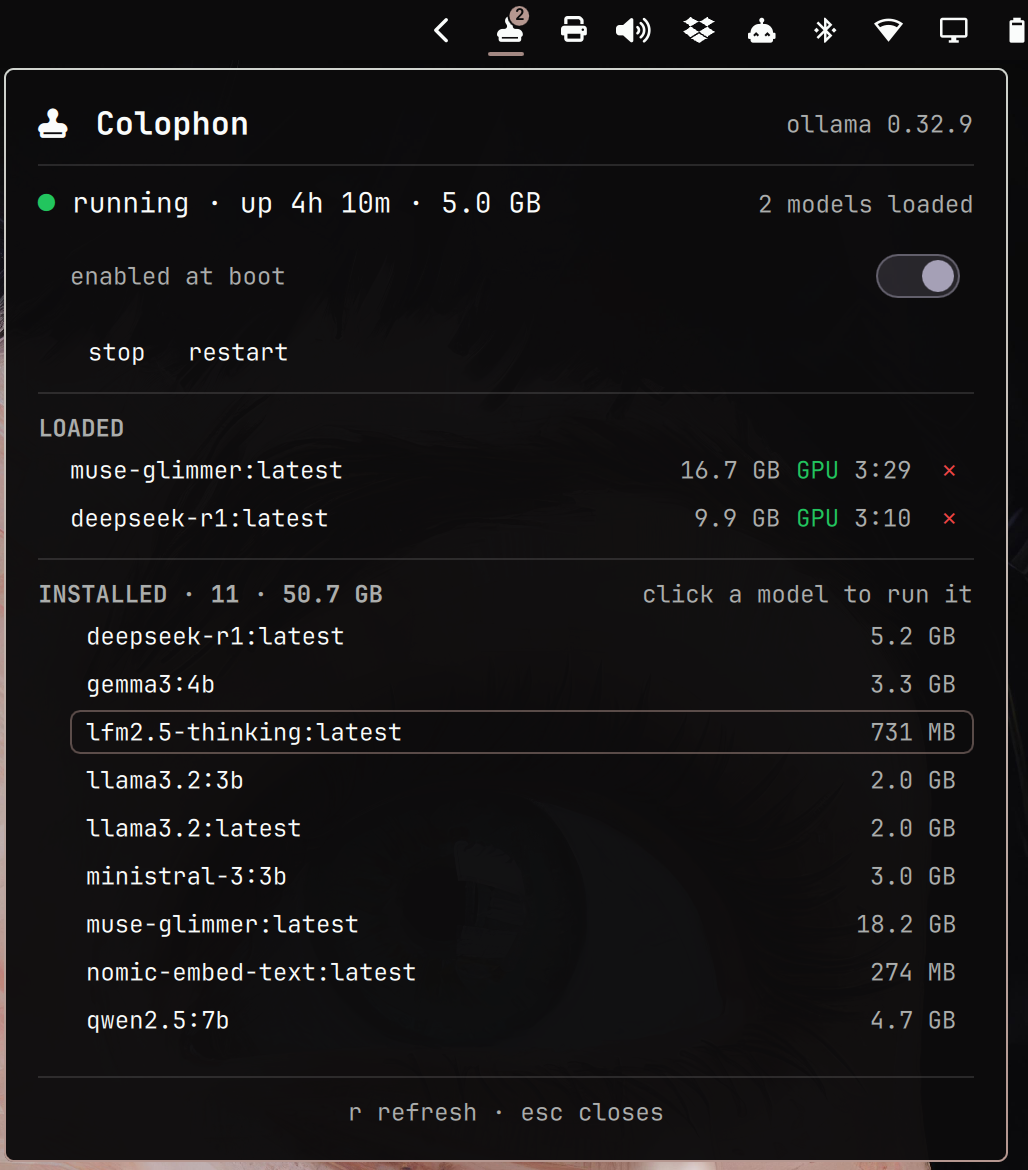
Above: the parameter editor open on gemma3:4b. The empty context field is
a model that does not set that parameter, so the field offers its valid range
rather than a value; temperature shows the 1 the model actually declares.
apply is dim because nothing has been typed — it lights only for a change
you made, and it is the only thing that writes. Every installed row carries
its own config, and the bar glyph carries a badge of 1 for the single
resident model. The glyph's color stays the default foreground while nothing
is wrong; severity reaches the bar as color, and the badge only ever carries
a count.
Prerequisites
Runtime — required:
| Program | Used for | Arch package |
|---|---|---|
ollama |
The server itself, and ollama --version as the client-version fallback when it's down |
ollama |
systemctl |
Reading and controlling ollama.service |
systemd |
python3 |
The collector and action scripts | python |
notify-send |
The "service died unexpectedly" notification | libnotify |
Also required: the Omarchy shell itself.
There are no pip or npm dependencies at runtime — the Python side is stdlib-only
by design (see CONTRIBUTING.md if you're extending it).
Install anything missing with omarchy pkg add <package>.
Colophon does not verify any of this at startup. A missing tool surfaces as a collector error in the panel (see Troubleshooting below), not as a friendly "please install X" message. An automated preflight check that maps a missing binary to its package is deliberately deferred — see Known Limitations.
Install
omarchy plugin add https://github.com/ssandys/colophon.git --enable
That clones the plugin into ~/.config/omarchy/plugins/ssandys.colophon/.
--enable does more than flip a flag: it runs through the shell's own
plugin-enable path, which places a not-yet-positioned bar widget into its
manifest's default section — right, for Colophon — the moment it's
enabled. If you run the command from an interactive terminal you'll be
asked which section to use first; either way, by the time the command
returns the widget is already somewhere on your bar. Nothing further is
needed if right (or whatever you picked) is where you want it.
To move it afterward, e.g. to the left section:
omarchy bar move ssandys.colophon --section left
(move repositions a widget already in the bar layout; put only adds one
that isn't there yet, so running put at this point would be a no-op.)
Authentication. Start, stop, and restart act on a system unit, so every one of them raises Omarchy's authentication dialog — fingerprint if you have one enrolled, password otherwise. Expect one prompt per click, not one per login. Nothing to install, and Colophon can't touch the service without you approving each action.
Reading the bar
| Status | Glyph color | Badge |
|---|---|---|
| running | default bar foreground | loaded-model count, when > 0 |
| stopped | dimmed | none |
| starting / stopping | amber | none |
| foreign (see Troubleshooting) | amber | loaded-model count, when > 0 |
| failed / missing | red | none |
The badge color deliberately never changes: severity reaches the bar entirely through the glyph's color, so a red glyph carrying a badge means "models loaded, and something is wrong."
Hovering the icon shows a tooltip summary, e.g. ollama 0.32.7 · up 14m · llama3.2:3b loaded (GPU) while running, or ollama 0.32.7 stopped · 9 models, 19.7 GB while not.
Using the panel
- Click an installed model to warm it — this starts the server first if it isn't already up, waits for it to answer, then loads the model. If the server was stopped, this also raises the same authentication dialog as clicking Start does. Starting the server and binding the port takes up to ~20 seconds; loading the model itself can take considerably longer for a large model on a cold page cache, and Colophon waits for that too rather than reporting a false timeout while the load is still quietly succeeding. The row reads "warming…" and the status line reads "starting…" for as long as either step takes.
config, beside an installed model's size, opens that model's parameter editor. The section only appears while the server is running — both reading a model's current parameters and writing new ones need it. Each field shows the value the model sets, or, if it doesn't set that parameter, the field is empty and shows its valid range as dim placeholder text instead (e.g.4096–131072), with a dim caption beside it saying what the parameter does. An embedding model showscontextonly —temperaturehas no effect on an embedding model and is hidden for it.applyis the only thing that writes; typing into a field only stages the edit until you do, and it stays dark until you actually change something — a model that declares a value Colophon cannot express (a context below4096, say) shows you that value but does not offer to rewrite it on your behalf. What a field displays is whatapplysends: type more decimals than the field shows and it settles to the number that will be written, the same way a value above the range settles to the maximum.- The switch on the boot line decides whether
ollama.servicestarts at boot. It moves the instant you click it, then asks you to authenticate — see Boot start below for what it does and does not change. ✕next to a loaded model unloads it immediately, freeing its memory.rrefreshes the panel right away.esccloses the panel — except while a parameter field has focus, where it abandons that field's edit instead and leaves the panel open.- Middle-click the bar icon starts Ollama if it isn't already running
(i.e. it's
stoppedorfailed) and just refreshes the snapshot otherwise. This is deliberately asymmetric: starting is harmless, but stopping on a stray middle-click could kill a generation in progress.
Boot start
Ollama's unit ships disabled, matching the on-demand design: the server
shouldn't come up automatically at boot. The boot line under the status
line shows the current state ("disabled at boot" / "enabled at boot")
next to a switch — flip it to change whether ollama.service starts at
boot.
Each flip raises the same authentication dialog as Start, Stop, and Restart — every time, not just the first. There's nothing remembered between clicks, so expect a prompt on every flip.
The switch only changes the boot setting, nothing else: enabling does not start the service right now, and disabling does not stop it. Use Start and Stop for that.
Some boot states — masked, static, and a few others — show their label
with no switch next to it. Systemd won't simply flip those, so there's
nothing for a click to do.
If you'd rather not use the switch, the equivalent terminal command still works:
sudo systemctl enable ollama.service
Configuration
Set these from the shell's widget settings panel for ssandys.colophon, or
directly in shell.json. Defaults and ranges below come straight from
manifest.json.
These are the widget's own settings, not a model's. The per-model parameter
bounds shown in each config editor (context's 4096–131072, temperature's
0–2) are a separate thing entirely: they live in the code, not
manifest.json, and there is nowhere to configure them beyond editing a
model itself.
| Key | Type | Default | Range | Effect |
|---|---|---|---|---|
pollIntervalOpenSec |
integer | 2 | 1–30 | Poll cadence (seconds) while the panel is open. |
pollIntervalRunningSec |
integer | 10 | 5–120 | Poll cadence while the panel is closed and the server is up. Also used during the brief starting/stopping transients — they resolve on their own, and a fourth interval key isn't worth having just for them. |
pollIntervalIdleSec |
integer | 30 | 5–300 | Poll cadence while the panel is closed and the server is down (stopped, failed, or missing). |
keepAliveMinutes |
integer | 5 | 1–120 | How long a model stays warm after loading, sent as keep_alive on every warm. |
apiBase |
string | http://127.0.0.1:11434 |
— | Where Colophon probes for the Ollama API. |
showInstalledModels |
boolean | true | — | Show the installed-model list in the panel. |
notifyServiceDied |
boolean | true | — | Desktop notification when the service dies unexpectedly. |
apiBase must be kept in sync with a custom OLLAMA_HOST. The
collector only ever probes apiBase; if you've pointed Ollama at a
different host or port via OLLAMA_HOST and don't tell Colophon the same
thing, Colophon has no way to discover the real server on its own — but
which wrong status you see depends on how OLLAMA_HOST was set. Set it
via a systemd override on the unit (sudo systemctl edit ollama.service,
the method Ollama's own docs recommend for persisting it), and
ollama.service stays genuinely active: the status resolves to
starting, relabeling itself after 15 seconds to "started, but not
answering on :11434" — it never reads stopped. Set it any other way,
with the unit itself never started, and it reads stopped instead, because
systemd genuinely has nothing running to report.
Troubleshooting
"not authorized — the authentication prompt was dismissed or denied" when you click start, stop, or restart. Omarchy's authentication dialog appeared and was cancelled, timed out, or the credential didn't match — not a missing setup step. Click the button again and complete the prompt (fingerprint if you have one enrolled, password otherwise).
The widget looks stale or wrong after an update. Quickshell doesn't re-create an already-running widget when the plugin's structure changes, so a new property or binding won't show up until the shell restarts:
omarchy restart shell
(This restarts your whole shell, not just Colophon — expect a brief flicker across the whole bar and any open panels.)
A server you started by hand shows up as "running — not managed by
systemd." That's the foreign status: Colophon found something
answering on apiBase that systemd doesn't know about — a hand-run ollama serve, or anything else bound to the same port. Stop and Restart are
disabled in this state on purpose: systemd genuinely cannot stop a process
it isn't tracking, so the widget doesn't offer to.
A server you know is running still reads as stopped, or gets stuck on
starting. Check that apiBase (above) actually matches wherever
OLLAMA_HOST points — Colophon probes exactly one address, and anything
else is invisible to it. Which of the two you see depends on how
OLLAMA_HOST was set: a systemd override keeps ollama.service itself
active, so the status reads starting (relabeling after 15s to "started,
but not answering on :11434") and never stopped; any other method, with
the unit itself never started, reads as stopped instead.
Per-row model sizes add up to more than the total shown. Expected, not
a bug. Models on disk share blobs (layers) — a base weight file reused
across two tags, say — and each row's size sums that model's own layers,
while the total (INSTALLED · N · size) sums each blob digest exactly
once. Two models sharing a layer will each report its full size while the
total counts it once.
Colophon's byte totals don't match du -sh /var/lib/ollama. Not a bug
— different unit systems. Colophon formats sizes in SI units (base 1000:
KB, MB, GB), the same convention ollama list and ollama ps themselves
use; du, df, and most file managers default to binary units (base
1024), often still labeled "KB"/"MB"/"GB" regardless. The same byte count
legitimately prints two different numbers depending which tool reports it.
Something looks wrong and you want to see the raw data. Run the collector directly — it's a standalone script, no widget required:
python3 ~/.config/omarchy/plugins/ssandys.colophon/scripts/colophon_collect.py
(or scripts/colophon_collect.py from a dev checkout). This prints the
exact JSON snapshot the panel is working from — unit state, API
reachability, loaded and installed models, and on error, the full message
the panel would otherwise truncate. Pipe it through jq . for something
readable.
Known limitations
- One local Ollama instance only; remote or multiple
OLLAMA_HOSTtargets are out of scope. If you point theapiBasesetting at another machine, Colophon will talk to it, butwarmwill no longer start a server for you: starting one is a local, privileged act, and a remote endpoint that doesn't answer is not a reason to start the service on this machine. foreigncannot distinguish a hand-runollama servefrom any other process bound to the same port. It reports "not managed by systemd," which is true either way.- Per-model sizes sum that model's own layers while the total sums unique blob digests, so the rows can add up to more than the total (see Troubleshooting).
- Warming routes on a
model_familylookup; an exotic family Colophon doesn't recognize falls through to/api/generateand surfaces Ollama's own error rather than guessing again. - No preflight dependency check. A missing binary surfaces as an ordinary collector error, not a "please install X" message — see Prerequisites.
- A newly pulled model keeps its shipped defaults until you open its
configeditor and apply a change yourself; there's no global default and no sweep across every installed model. - The parameter editor needs the server running, because both reading a model's current parameters and writing new ones go through the API.
- Parameters are read from the model's own manifest tree on disk, so a
change made outside Colophon —
ollama create/ollama cpfrom a terminal, say — appears after Colophon's next poll rather than immediately. stopsequences, template, system message and license aren't editable here.- Applying a parameter writes it to the model on disk; it does not reach into
a copy that is already running.
num_ctxis allocated when a model loads, so a model that is currently warm keeps the context window it was loaded with — unload it with✕and let it load again for the new value to take hold. Raised by @dchristensen8 in #6. - A staged edit you never applied outlives the row. Type a value, collapse
the model without pressing
apply, and re-opening it later shows what you typed rather than what the model declares — deliberately, so a refresh can never discard something you were in the middle of. Focus the field and pressescto discard it, or restart the shell. num_ctx's ceiling in the editor is a fixed bound, not the model's own trained maximum. A model trained at a smaller context will still accept a larger window you set and quietly degrade rather than error — the real trained maximum lives in GGUF metadata the manifest tree doesn't carry, so Colophon has no way to know it and cannot warn you before you set one too high.
Uninstall
omarchy plugin remove ssandys.colophon
Uninstalling the widget never touches ollama.service or anything under
/var/lib/ollama either way — your server and your models are untouched.
That cuts one way, though: any parameter edit you applied through config
was written into the model itself, not into the widget, so it persists after
uninstall too. Removing Colophon does not revert it.