
Galley
Galley is an Omarchy shell bar widget that shows the state of every CUPS printer and the active print queue, and lets you act on both without leaving the bar.
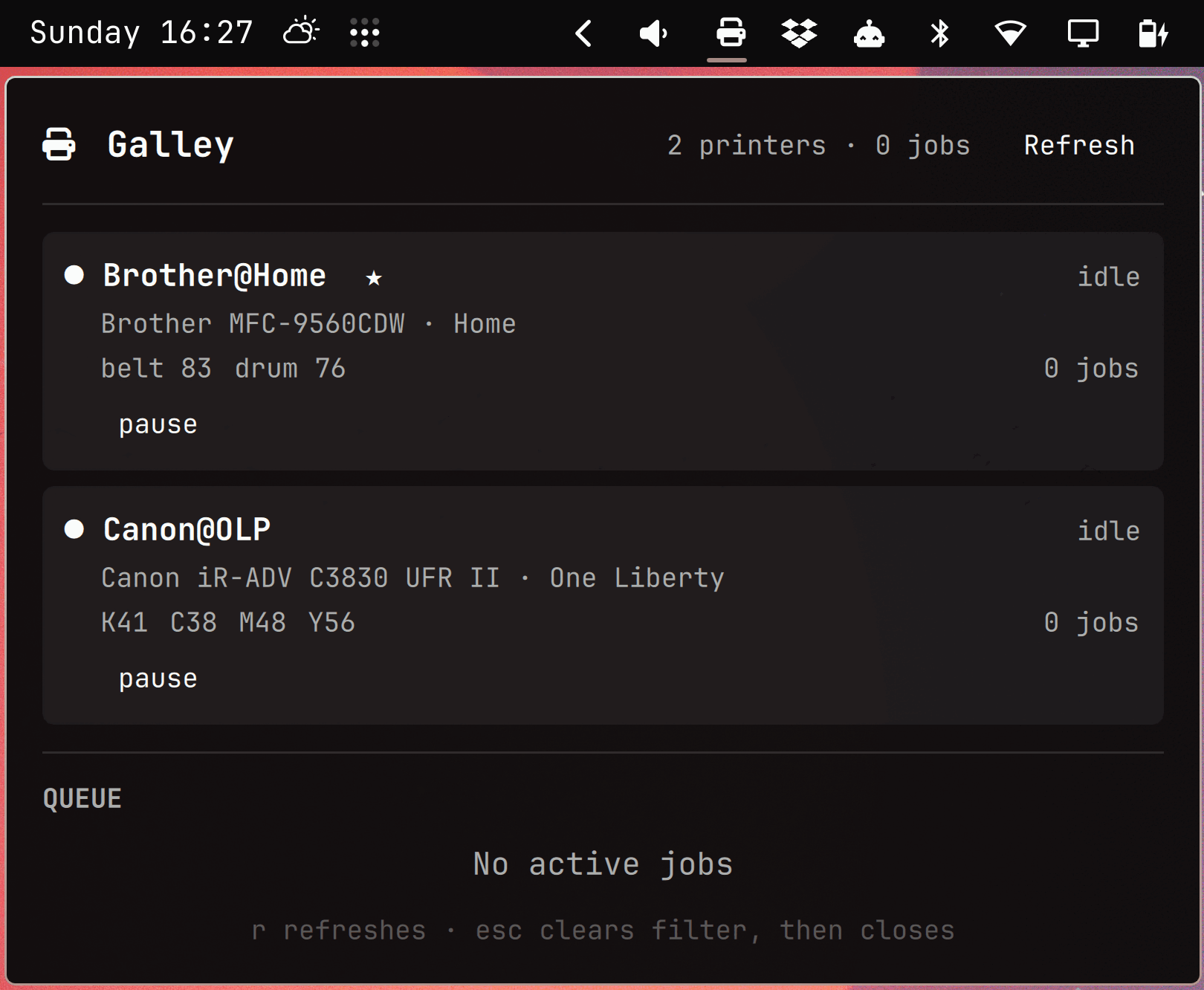
Above: the calm state — both printers idle, nothing queued. The bar glyph is
plain (no count badge), and the panel footer spells out the two keys that
matter, r and Esc.
Prerequisites
Runtime — required:
| Program | Used for | Arch package |
|---|---|---|
ipptool |
All printer and job queries | cups |
cancel |
Cancelling jobs | cups |
cupsenable / cupsdisable |
Resuming and pausing queues | cups |
python3 |
The collector | python |
systemctl |
Detecting whether cupsd is asleep | systemd |
notify-send |
Desktop notifications | libnotify |
Also required: CUPS ≥ 2.4 (for ipptool -X, the XML plist output format —
JSON output via -j didn't land until CUPS 2.5) and a running cups.service
or cups.socket. There are no pip or npm dependencies at runtime.
Install anything missing with omarchy pkg add <package>. On a machine where
python3 is managed by a version manager like mise rather than pacman,
pacman -Qo will report it as unowned — that's expected, not a sign anything
is broken. (Working on Galley itself needs a few more tools — see
CONTRIBUTING.md.)
Galley does not verify any of this at startup. A missing tool surfaces as a collector error in the panel (see Troubleshooting below), not as a friendly "please install X" message. An automated preflight check that maps a missing binary to its package is deliberately deferred — see Known Limitations.
Install
omarchy plugin add https://github.com/ssandys/galley.git --enable
That clones the plugin into ~/.config/omarchy/plugins/ssandys.galley/,
enables it, and puts it in the bar's right section — manifest.json
declares that as barWidget.defaultSection, and the shell honours it, so
there is nothing else to run.
To put it somewhere else, use the shell's settings panel or the command line:
omarchy bar move ssandys.galley --section center
To pick up later changes:
omarchy plugin update ssandys.galley
Working on Galley rather than just running it? See CONTRIBUTING.md for the
from-source setup and the edit/reload loop.
Reading the bar
| Bar shows | Meaning |
|---|---|
| Plain glyph | Idle — no active jobs |
Glyph + badge N |
N jobs currently active |
Glyph + badge 9+ |
Ten or more jobs active — hover for the exact count |
| Amber glyph | A job is held, or a supply is running low |
| Red glyph | A printer is stopped, or the collector itself failed |
The badge colour deliberately never changes: severity reaches the bar as the glyph's colour, so a red glyph with a badge means "jobs queued, and something is wrong".
Hovering the icon shows a tooltip summary, e.g. 2 printers · Canon@OLP printing · 3 jobs.
Using the panel
- Click a printer card to filter the queue to that printer's jobs; click
it again (or the
clear ✕button) to show every printer's jobs again. rrefreshes printers and the queue immediately.Escclears the printer filter if one is set; press it again (or press it with no filter set) to close the panel.- Middle-click the bar icon to refresh in the background without opening the panel.
Configuration
Set these from the shell's widget settings panel for ssandys.galley, or
directly in shell.json. Defaults and ranges below come straight from
manifest.json.
| Key | Type | Default | Effect |
|---|---|---|---|
pollIntervalOpenSec |
integer (1–30) | 3 |
How often (seconds) Galley polls CUPS while the panel is open. Also used while the panel is closed if a job is currently active, so the badge count stays current without waiting for the slow interval. |
pollIntervalIdleSec |
integer (5–300) | 30 |
How often (seconds) it polls while the panel is closed and nothing is active. Has no effect whenever the panel is open or a job is active — see pollIntervalOpenSec. |
showSupplies |
boolean | true |
Show ink/toner/drum levels on each printer card. |
supplyLowThreshold |
integer (5–50) | 15 |
Percent level below which a supply counts as low — drives the supply level colors on each card, the amber bar color, and the supply-low notification. |
notifyJobFailed |
boolean | true |
Desktop notification when a job stops or aborts. |
notifyPrinterError |
boolean | true |
Desktop notification when a printer stops or picks up an error reason. |
notifyJobCompleted |
boolean | true |
Desktop notification when a job finishes printing. |
notifySupplyLow |
boolean | true |
Desktop notification when a supply crosses below supplyLowThreshold. |
Supply-low notifications use hysteresis: once fired, the same supply won't
notify again until its level climbs back above supplyLowThreshold + 10.
This keeps a printer hovering right at the line from nagging you every poll.
Troubleshooting
The widget looks stale or wrong after an update. Quickshell doesn't re-create an already-running widget when the plugin's structure changes, so a new property or binding won't show up until the shell restarts:
omarchy restart shell
(This restarts your whole shell, not just Galley — expect a brief flicker across the whole bar and any open panels.)
A job shows as "Job 42" with no owner. The collector lost
requesting-user-name on that IPP request. With JobPrivateValues=default
(the CUPS default), cupsd redacts job-name and
job-originating-user-name from any request that omits it — you get a
queue of nameless, ownerless jobs instead of an error. If you've modified
scripts/get-jobs.test or galley_collect.py's run_ipptool, check that
-d user=$USER (or the requesting-user-name attribute in the .test
file) is still present.
A printer is missing some or all of its supply levels. A level of -1
means CUPS doesn't know the value, and Galley drops it rather than showing
an empty bar. This is normal for some hardware — one of the two printers
this plugin was built against reports -1 for all four toners while
reporting real levels for its waste box and drum, so seeing toner
percentages for one printer and not the other is expected, not a bug.
The panel is nearly empty, showing only "CUPS idle — nothing queued."
That's the calm/expected state when cups.service isn't currently running
(CUPS has an idle-exit timeout and can shut itself down between jobs — see
Known Limitations). Galley deliberately does not "poke" cupsd awake just to
poll it. Confirm with:
systemctl is-active cups.service
If it reports inactive and printing still works, this is expected — cupsd
will restart itself on the next real print job or IPP request. If it
reports failed, that's a real problem outside Galley's scope.
Something looks wrong and you want to see the raw data. Run the collector directly — it's a standalone script, no widget required:
python3 ~/.config/omarchy/plugins/ssandys.galley/scripts/galley_collect.py
This prints the exact JSON snapshot the panel is working from: printer
states, supplies, the active queue, and (on error) the full error message
the panel would otherwise truncate. Pipe it through jq . if you'd rather
read it formatted.
Known limitations
- Cancel is restricted to your own jobs by
_user_cancel_any=0. - Page counts are unavailable for pending jobs; size is shown instead.
- Waste-toner levels are displayed without interpretation.
- Local cupsd only. Remote
CUPS_SERVERis out of scope. - Job-completed notifications depend on the job appearing in the completed list; if cupsd is restarted mid-job the classification degrades to silence.
Uninstall
omarchy plugin disable ssandys.galley   # just take it off the bar
omarchy plugin remove ssandys.galley    # take it off and delete it