
Headway
An Omarchy shell bar widget showing minutes to the next NYC subway train at stations you've saved, with MTA service alerts for the lines you actually ride.
Headway is the transit term for the interval between successive trains — literally the number the widget puts in the bar.
Prerequisites
| Program | Used for | Arch package |
|---|---|---|
notify-send |
Desktop notifications | libnotify |
curl |
Fetching the GTFS-Realtime feeds | curl |
sh, dd, mktemp, printf, mkdir, mv, rm, dirname |
Reading and writing the saved-stations file | coreutils (in base) |
Plus the Omarchy shell itself. That is the whole list — no interpreter, no API key, no pip or npm packages, and no static GTFS download at runtime.
The coreutils row is not a real prerequisite in practice — those are in base,
so every Arch system has them — but it is listed because the plugin does shell
out for its state file. That is deliberate: FileView cannot bound a read, so
the file is read through a single dd open that carries its own guarantees and
written through mktemp-then-mv. See "State file" below.
Two of the read's flags (count_bytes, fullblock) are GNU dd extensions
rather than POSIX. That is a real narrowing, and it is fine here because the
plugin targets Arch, where coreutils is GNU and is in base.
That is deliberately not the same claim as "there are no prerequisites."
Service.qml spawns notify-send, and libnotify is in neither base nor
base-devel; it arrives as a dependency of other desktop software, so it is
near-universal but not guaranteed. Both sibling plugins list it too.
Without it, notifications silently do not appear and nothing else changes.
The spawn fails, onRunningChanged still fires, the queue drains, and the
widget carries on.
The MTA's GTFS-Realtime feeds need no key and no registration. Headway decodes
the protobuf itself in QML's JavaScript engine, which is why there is no
collector script and no language runtime to install — unlike its siblings
galley and colophon, which shell out to Python.
curl is the one prerequisite that is not optional. It is not in base
either, though it arrives with almost everything; without it the widget cannot
fetch a feed at all and the panel says so rather than degrading quietly, which
is the difference between it and the libnotify row above.
It is there because a poll must not reuse anything from the poll before it.
QML's XMLHttpRequest is backed by one long-lived QNetworkAccessManager
whose connection pool and DNS cache outlive any single request, so a routing
change underneath the running shell — switching a Tailscale exit node, moving
between networks, a VPN coming up — left every later poll reaching for sockets
and addresses that no longer routed anywhere, until the shell was restarted. A
curl process cannot carry that state across polls because it does not survive
the poll. It also lets the fetch carry a byte ceiling (--max-filesize) and a
timeout that is actually honoured (--max-time), neither of which QML's
XMLHttpRequest offers.
Note that curl is not a language runtime: the protobuf is still decoded in
QML's JavaScript engine, and there is still no collector script.
Install
omarchy plugin add https://github.com/ssandys/headway.git --enable
Reading the bar
A conductor glyph, plus a badge carrying minutes to the next train matching the active station's route and direction filter.
| State | Glyph colour | Badge |
|---|---|---|
| Normal | default bar foreground | minutes to next train |
| Active unplanned alert, amber, on a saved route | amber | minutes |
Data stale past staleAfterSec |
amber | last known minutes |
| Active unplanned alert, red, on the active route | red | minutes, or none |
| Feed unreachable | red | none |
| No trains scheduled | default | none |
The badge colour never changes. Severity reaches the bar entirely through
the glyph, so a red glyph carrying a number means "a train is coming, and
something is wrong". A train less than a minute out shows • rather than a
number — the badge is a circle sized for two characters, and the panel spells
out now where there is room for it.
Using the panel
Click the glyph to open it. Middle-click the glyph to force a refresh without opening anything.
| Key / action | Effect |
|---|---|
r |
Refresh now |
Esc |
Close the panel — or, while the search box has focus, clear the search and leave the box |
| Click a saved station's name | Make it the active station |
| Click a saved station's direction | Switch that station's direction. It does not become the active station — clicking its name does that. Terminals show one direction and are not clickable |
Click a saved station's ✕ |
Remove it |
| Type in the search box | Filter all 496 stations by name |
| Click a route bullet on a result | Include or exclude that route for the station you are about to save |
| Click a direction button on a result | Save that station with the selected routes and that direction, and make it active |
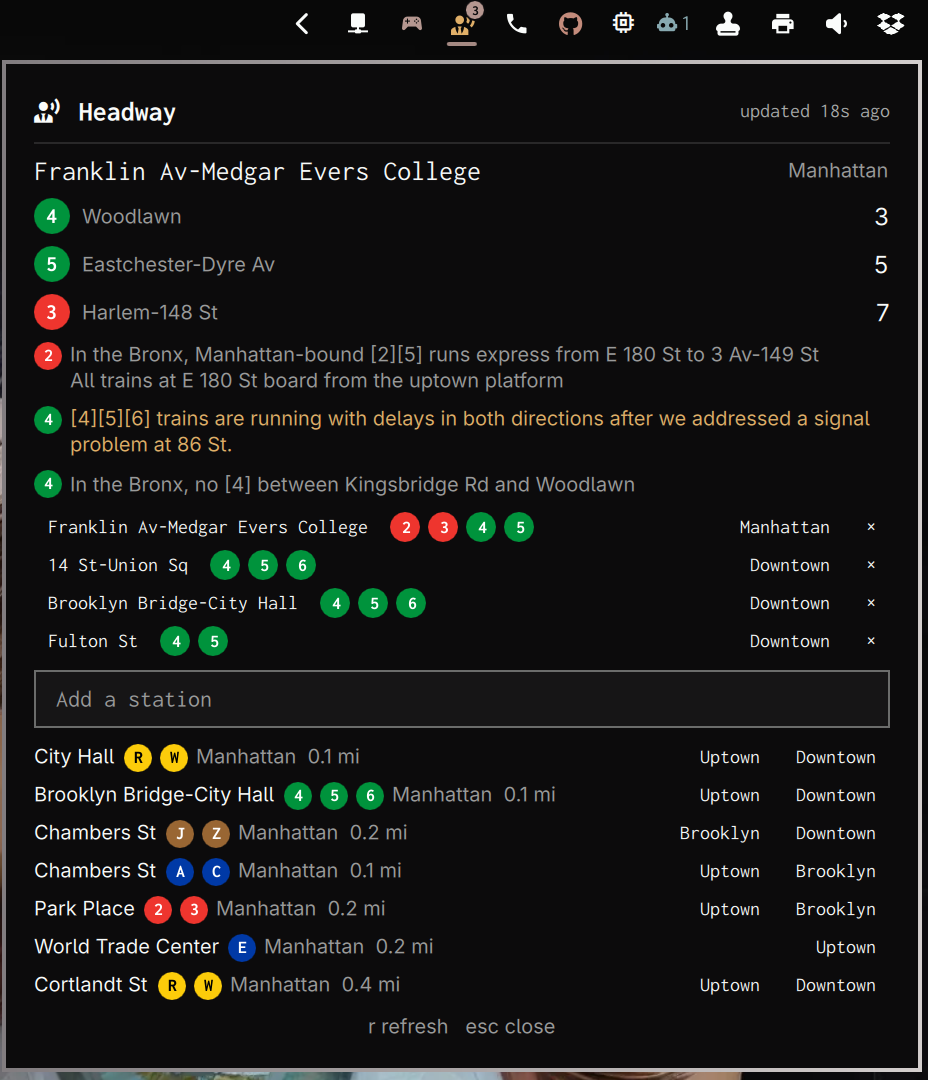
The panel shows, top to bottom: the active station and its direction filter; the next few arrivals, each with a coloured route bullet, its destination and a countdown; any live alerts for your saved routes; your saved stations; and the search box.
Each saved row carries its own direction, and clicking it switches. So one station saved twice — Union Sq inbound and Union Sq outbound — is not needed for a commute you ride both ways. 33 stations are terminals with only one usable direction; those show it greyed and do not respond, because pointing a terminal the other way would leave the widget blank with nothing to explain it.
Route bullets follow the MTA's colours, and an express train gets a diamond where a local gets a disc. Colour means identity here and never severity — the bar is where severity lives.
On a search result the bullets are also the route filter. Every route starts selected; click one to drop it, click it again to bring it back. Dimmed means excluded. So at 14 St-Union Sq you can save just the 6, Downtown, rather than the next of anything across seven routes — which at a large interchange is not a number anyone can plan around. Ignoring the bullets saves every route the station serves, which is the sensible default. You cannot deselect the last one: a station with no routes could never show an arrival.
Search results are ordered nearest-first using the location Omarchy already
knows, read from ~/.local/state/omarchy/settings/weather.json. Distances show
in miles.
Two things about that ordering are worth knowing, because both look like bugs and are not:
- Every result names its routes, borough and line. 76 station names are
ambiguous and six of them read exactly
86 St; a row showing only a name is not a choice anyone can make correctly. - A station complex's platforms stay together, anchored at the complex's nearest member. So per-row distances are not always ascending — Chambers St's J/Z platform can sit above its A/C platform. Burying one platform of a complex several rows from its neighbours would be worse.
Location is used for setup convenience only. It orders the picker once and is then never consulted again: nothing runs on a timer, and the bar cannot change out from under you.
Configuration
Configure per-widget through Omarchy's plugin settings.
| Setting | Default | Effect |
|---|---|---|
pollIntervalOpenSec |
30 |
Feed poll interval while the panel is open |
pollIntervalIdleSec |
90 |
Feed poll interval while idle |
alertsIntervalSec |
300 |
Service-alert refresh interval. A failed poll retries after 30s and doubles back to this value, so alerts recover with arrivals rather than up to an interval later |
staleAfterSec |
180 |
Treat data older than this as stale |
trainsPerDirection |
3 |
Arrivals to list per direction |
notifyRouteAlert |
true |
Notify on a new alert for a saved route |
notifyFeedStale |
true |
Notify when the feed goes stale or unreachable |
State file
Saved stations are not plugin settings. Omarchy's plugin settings are
read-only at runtime — the shell exposes no write-back API — so the saved list
lives in ~/.local/state/omarchy/settings/headway.json, beside the shell's own
weather.json and flight-radar.json.
It is read defensively, because a bar widget lives in the shared shell process and a stall there takes every other widget with it:
- One open, no stat first. The read is a single
ddwithiflag=nofollow,nonblock,count_bytes,fullblock, so its guarantees ride onopen(2)itself. There is deliberately no check-then-open pair, because that shape can be raced: the path can change between the check and the open. - A symlink fails at open with
ELOOP, so the path cannot be aimed at/dev/zeroor at someone else's file. - A FIFO cannot stall the shell.
nonblockmeans a planted pipe returns at once instead of blocking the shared process — measured at 3 ms even with a live writer holding it open, against a hang that would have been unbounded. - Capped at 64 KiB before a byte reaches QML. Four saved stations is ~1 KB.
- At most 50 stations are consumed, and every field is length-checked and type-checked. A malformed entry is dropped, not trusted.
- Nothing watches the file. Headway is its only legitimate writer, so it is read once at startup rather than re-read on every external change.
Writes are equally defensive. The payload goes to a temp file created by
mktemp — an unpredictable name, made O_EXCL at mode 0600, so there is
nothing to pre-plant — written with oflag=nofollow so that even a guessed
name cannot redirect it, fsynced, and then mv-renamed into place. rename(2)
replaces a symlinked destination rather than writing through it, and an
interrupted write leaves the real file untouched.
The commands themselves live in State.js, not as string literals in
Service.qml, so tests/state.test.js can execute them against a symlink, a
FIFO, an oversized file and a payload full of shell metacharacters.
Troubleshooting
Nothing in the bar. Run omarchy restart shell. The shell reads a
plugin's structure at startup, so a newly added or changed plugin needs one.
See the raw data. node scripts/collect.mjs prints the same snapshot the
widget works from, using the same Gtfs.js decoder rather than a parallel
reimplementation. Use it to tell "the MTA is not returning what I expect" apart
from "the widget is not rendering what it was given".
An amber glyph means either a service alert on one of your routes, or data
older than staleAfterSec. The panel's header says which: it reads
updated 45s ago normally and stale - 6m old once the feed has stopped
arriving.
A red glyph with no badge means the feed is unreachable. The panel says so explicitly, with the error.
Saved stations vanished. Check ~/.local/state/omarchy/settings/headway.json
is valid JSON. Headway falls back to an empty list rather than refusing to
start, so a corrupt file looks like lost stations rather than an error.
Known limitations
- One poll for every monitor, not one per monitor. The Omarchy bar
instantiates a widget once per bar surface, and a surface exists per monitor
— so a widget that polls from inside itself polls once per monitor, notifies
once per monitor, and writes its state file once per monitor with nothing
ordering the writes.
Service.qmlis a QML singleton for exactly that reason: one poll, one notification and one writer however many screens you have. Measured with a headless second output rather than assumed.docs/shared-state-in-omarchy-plugins.mdhas the portable version, since galley, colophon and tonearm all still have this.
Uninstall
omarchy plugin remove ssandys.headway
That leaves ~/.local/state/omarchy/settings/headway.json in place, so
reinstalling restores your saved stations. Delete it too for a clean slate.