
Dell Power Profiles for Omarchy
A Dell firmware power and charging-profile integration for Omarchy, distributed as two cleanly separated pieces:
- an Arch package that owns hardware detection, profile coordination, state, and udev permissions
- an optional Quattro power-panel replacement that preserves Omarchy's full battery UI while adding the Dell profiles
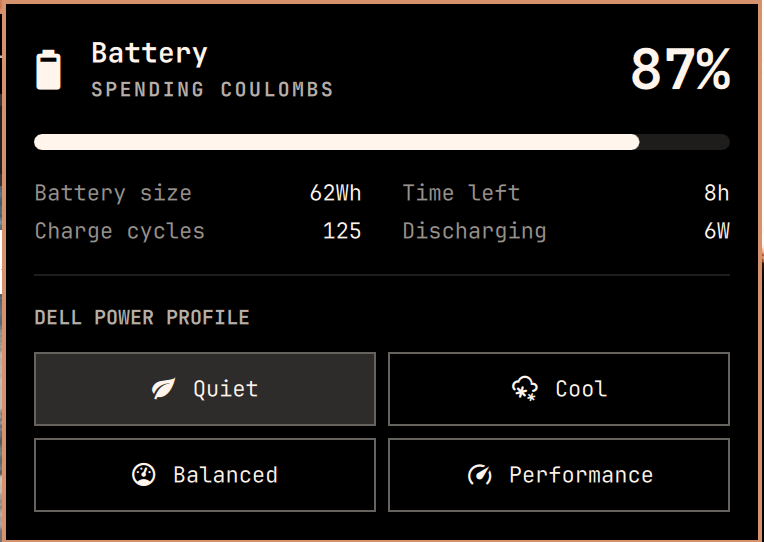
It exposes quiet, cool, balanced, and performance while coordinating
the Dell firmware controller with the OS power profile. It also reads and
changes Dell's Adaptive, Standard, ExpressCharge, Primarily AC, and
Custom battery-charging modes.
The provider coordinates each firmware mode with
power-profiles-daemon:
| Dell firmware mode | OS power profile |
|---|---|
quiet |
power-saver |
cool |
balanced |
balanced |
balanced |
performance |
performance |
Only modes supported by both the Dell firmware and
power-profiles-daemon are shown. A mode is marked active only when both
layers agree.
Install the backend
Clone the repository and build the Arch package:
git clone https://github.com/stappmus/omarchy-dell-power-profiles.git
cd omarchy-dell-power-profiles
makepkg --cleanbuild --install
The package installs:
/usr/lib/omarchy/powerprofiles.d/dell, the provider used automatically by compatible Omarchy versions/usr/bin/omarchy-dell-power-profiles, a direct CLI symlink/usr/lib/udev/rules.d/99-omarchy-dell-platform-profile.rules, which grants thewheelgroup access only to the Dell power-profile and battery-charging attributes used by the backendomarchy-dell-power-profiles-permissions.service, a device-triggered one-shot service that waits for Dell's charging attributes during boot and applies their scoped permissions
The package hook reloads the udev rule and runs the one-shot service immediately. The firmware device starts it again at boot, and package removal restores the sysfs permissions it changed.
Install the bar widget
Install the optional frontend, then replace the stock power widget so the bar has one complete power panel instead of two partial ones:
omarchy plugin add https://github.com/stappmus/omarchy-dell-power-profiles.git --enable
omarchy plugin disable omarchy.power
The replacement keeps the stock battery icon, charge state, percentage, progress, capacity, cycle count, time estimate, and charge/discharge rate. If it is installed before the backend, the panel keeps the standard OS power profiles available and explains what is missing. Once the backend is installed, it discovers the Dell modes automatically.
The selected charging profile appears in one compact row. Its available modes
stay hidden until the row is opened as a dropdown. A saved custom threshold is
shown in its label, for example Custom · 50–80%. Selecting Custom reveals
separate start- and stop-percentage fields. Values outside Dell's firmware
limits are adjusted automatically (25% becomes 50% on supported systems),
and the panel shows the active BIOS ranges and preserves at least a
five-percentage-point gap.
Right-click the bar widget to toggle its compact battery percentage, matching the current built-in Omarchy power widget.
The widget restores the saved AC or battery preference when it loads and when the power source changes. Compatible Omarchy versions can also discover the same packaged provider from the built-in power menu.
CLI
omarchy-dell-power-profiles probe
omarchy-dell-power-profiles list
omarchy-dell-power-profiles list --active-state
omarchy-dell-power-profiles set autodetect quiet
omarchy-dell-power-profiles set ac performance
omarchy-dell-power-profiles set battery cool
omarchy-dell-power-profiles charging probe
omarchy-dell-power-profiles charging list --active-state
omarchy-dell-power-profiles charging set adaptive
omarchy-dell-power-profiles charging set primarily-ac
omarchy-dell-power-profiles charging set custom 50 80
Selections are remembered independently for AC and battery operation under
$XDG_STATE_HOME/omarchy/powerprofiles.
Remove
Remove the frontend and backend independently:
omarchy plugin remove stappmus.dell-power-profiles
omarchy plugin enable omarchy.power --section right
sudo pacman -Rns omarchy-dell-power-profiles
The package does not overwrite files in a user's home directory. Its udev rule
grants the local wheel group write access only to the Dell platform power
profile, primary battery-charging mode, and its custom start and stop
thresholds.
Upstream
The panel frontend is derived from Omarchy's MIT-licensed omarchy.power
widget. It deliberately remains a separate plugin so Dell-specific behavior
does not need to live in Omarchy core.
Test
./provider-test.sh
./plugin-test.sh
qmllint -I /usr/share/omarchy/shell Panel.qml
omarchy plugin validate .
makepkg --cleanbuild
The backend suite uses temporary fake sysfs and powerprofilesctl
implementations; it does not change the host's power profile.