
Bookmarks for Omarchy
A quiet, keyboard-first bookmark launcher for Omarchy. It is a Quickshell overlay styled like a compact browser address bar, backed by a resident Rust worker and SQLite.
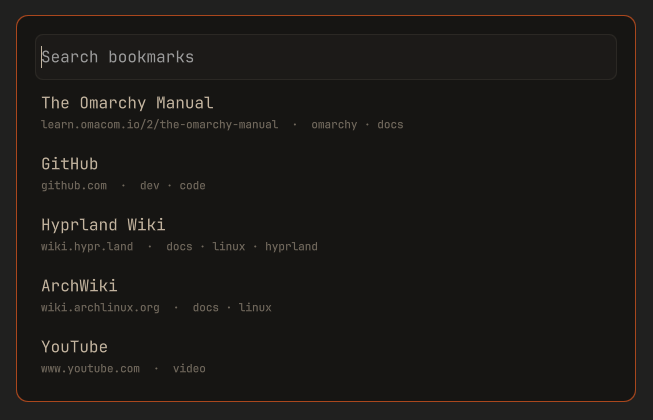
The closed launcher consumes no window space. When opened it shows a centered search field with the most-used bookmarks—or, when configured, the most recently used bookmarks—in individual result rows. Search results replace those rows after typing in a scrollable three-to-ten-row window, according to the user's setting. Literal query matches are highlighted in result titles and URLs.
Installation and first use
Install and enable the plugin from GitHub:
omarchy plugin add https://github.com/StefanMarAntonsson/omarchy-bookmarks.git --enable
Enabling an overlay makes it available to Omarchy, but does not open it or add a launcher. Open it once with:
omarchy-shell shell summon stefanmara.bookmarks '{}'
On first open, press Enter or choose Set up worker. Setup runs in a visible terminal and explains whether it downloaded the worker pinned by this plugin or built the bundled source. Read the result and close the terminal; Bookmarks then returns automatically. An existing v1 library is migrated at this point. A new empty library offers Add bookmark, Import from browser, and Load examples as its first actions.
Choose how to open Bookmarks
A main-menu entry is the recommended discoverable default. A keybinding is a useful optional shortcut. The plugin does not silently change either shared configuration file, so the choice and key combination remain yours.
To add a main-menu entry, edit
~/.config/omarchy/extensions/omarchy-menu.jsonc and add the following property
inside its outermost object (include a comma between it and another property):
"stefanmara-bookmarks": {
"icon": "",
"label": "Bookmarks",
"action": "omarchy-shell shell summon stefanmara.bookmarks '{}'",
"when": "omarchy plugin list --json 2>/dev/null | jq -e 'any(.[]; .id == \"stefanmara.bookmarks\" and .enabled == true)' >/dev/null"
}
Omarchy watches that file, so a valid edit appears without a restart. If the
file is new, wrap the property in { and }. Removing that property removes
the entry.
For a direct shortcut, first review the existing bindings with
omarchy-menu-keybindings, then add an unused combination to
~/.config/hypr/bindings.lua, for example:
o.bind(
  "SUPER + B",
  "Bookmarks",
  "omarchy-shell shell summon stefanmara.bookmarks '{}'"
)
Hyprland reloads this file automatically. Replace SUPER + B if it is already
assigned.
Upgrading from v1
The move from v1.0.4 to v2 is a major upgrade, but it does not require an export. Update the existing Git-managed installation with:
omarchy plugin update stefanmara.bookmarks
omarchy-restart-shell
omarchy-shell shell summon stefanmara.bookmarks '{}'
Review the displayed update diff and confirm it before restarting. The restart
is required because v1 keeps its service loaded; without it, the old v1 service
can remain active after the files have updated. After the shell returns,
summon Bookmarks and complete Set up worker as described above. On the first
successful v2 worker start, the version-3
bookmarks.json used by v1 is validated and migrated to SQLite. IDs, URLs,
titles, tags, keywords, usage scores, and last-opened times are retained. The
original JSON remains untouched and a private timestamped migration backup is
created before anything is imported.
The stable plugin ID is unchanged. Existing v1 main-menu entries and direct keybindings therefore continue to open v2 on supported Omarchy versions. These intentional behavior changes are worth knowing:
- Favicons are not imported or displayed. The rest of an entry containing a valid v1 favicon still migrates.
- The old
settings.jsonis left in place but is not imported. v2 starts with its new defaults, including website detail fetching off, so an old network opt-in never silently carries forward. - Keyword values remain searchable, but v1's parameterized keyword expansion is not yet exposed in the v2 interface.
Ctrl+Snow opens all settings and library actions. Import is under Settings → Library, deletion isCtrl+D, and adding a URL isCtrl+N. The oldCtrl+M,Ctrl+I,Ctrl+V,Ctrl+,, and plainDeletebehaviors are not carried forward.
Do not use v1 to make changes after v2 has migrated the library. v1 writes the preserved JSON while v2 writes SQLite, and the two stores are not synchronized; v1 changes made after migration will not appear in v2. If a rollback is necessary, treat it as a data restore and keep copies of both stores rather than switching versions back and forth.
Architecture
Bookmarks.qmlowns presentation, focus, keyboard handling, bounded result rows, selection previews in the input, and compact edit/delete modes.WorkerClient.qmlowns one managed child process, version-1 newline-delimited JSON framing, response validation, and stale-response IDs. Ordinary requests have a 20-second deadline and explicit library operations have a two-minute deadline. Requests queued behind library work share its longer deadline; a worker that stops responding is terminated and every outstanding request is resolved with an error. Crashes after a successful handshake restart with bounded exponential backoff (at most five times until the overlay is reopened); startup failures are reported and not retried in a loop.src/main.rsis the protocol/server loop. Linux parent-death signaling stops it whenomarchy-shellexits.src/repository.rsowns SQLite, numbered migrations, CRUD, foreign keys, legacy migration, and the refreshed in-memory index.src/search.rs,src/url_key.rs, andsrc/metadata.rsown ranking, conservative duplicate keys, and bounded HTTP metadata retrieval.
QML never reads SQLite, performs network requests, or scans the bookmark collection. Requests are limited to 64 KiB (measured in UTF-8 bytes, and read without buffering more than that) and responses to 256 KiB. Search returns at most ten bookmarks per page, shortened further when needed to stay within the response limit, and loads further matches while scrolling. A response that would still exceed the limit becomes an error for that request; the worker never exits because of it. All text, including bookmark titles, tags, browser names, and errors, is rendered as plain text.
Runtime requirements
The worker launches existing desktop tools and does not install software:
| Tool | Used for |
|---|---|
omarchy-launch-browser |
Opening URLs in the default browser |
wl-copy |
Copying a bookmark URL |
Launched helpers are waited on so the long-running worker does not accumulate zombie processes. URLs, including stored ones, are validated as HTTP(S) immediately before every launch.
Setup and launch require Python 3.10 or newer (standard library only), Linux
with executable sealed memory files (memfd), and sha256sum for source
fingerprints. Setup also uses curl for a pinned release, or a Rust 1.96 or
newer toolchain (cargo) when building from source, and omarchy-launch-tui
to show its terminal. Dependencies are not installed automatically.
Worker setup and verification
The plugin contains no executable. The first time Bookmarks opens without a
worker, it shows Set up worker. Pressing Enter opens a terminal running
scripts/install-worker.sh, which:
- Reads
worker-release.pin, which records the release version, the worker source fingerprint, and the SHA-256 of each released executable. The pin is part of the reviewed plugin commit. - If this checkout's worker source matches the pinned release, downloads that exact version (never "latest") for x86_64 or aarch64 from this repository's GitHub releases over HTTPS, with size and time limits.
- Installs it only if its SHA-256 equals the pinned hash. A mismatched download is discarded.
- Otherwise (no release pinned, unsupported architecture, no network, or a
mismatch) builds the plugin's own source with
cargo build --locked --releasein~/.cache/stefanmara.bookmarks/target. Without cargo, setup stops and says so. - Checks the verified candidate's version, then writes it and its record into
a private generation directory under
$XDG_DATA_HOME/stefanmara.bookmarks/bin/. An atomic replacement of thecurrentselection publishes both together. The current and previous generations are retained; older recognized generations are removed without recursive pathname traversal.
The shell entry points delegate installation and launch to
scripts/worker_setup.py. It opens directories one component at a time without
following symlinks, validates the opened objects, and keeps their descriptors
through download/build and publication. Replacing an ancestor pathname cannot
redirect installation writes or cleanup to a replacement directory. Data/cache
paths containing symlinks or .. are refused; use their real absolute paths.
Concurrent setups are refused. A separate short publication lock lets the old
worker launch while a new one is downloading or building, and coordinates
generation cleanup with launchers.
Setup only runs when you ask for it; loading the plugin never downloads or builds anything. After the setup terminal closes, the overlay returns and starts the newly installed worker. If setup failed, it returns to the setup prompt so you can retry after addressing the terminal's error.
worker-launcher.sh starts the worker only when the installed executable's
hash matches its record and the record's version and source fingerprint match this
checkout's source (scripts/worker-source-id.sh: Cargo.toml, Cargo.lock,
and every .rs file under src/). After a plugin update that changes the
worker, or if the executable is modified, the overlay asks for setup again
instead of running it. It copies the selected executable into a bounded,
sealed memory file, checks that snapshot's hash, and executes the same snapshot
through its descriptor. Replacing or writing the disk file after verification
cannot change the executed bytes.
The old flat bin/omarchy-bookmarks-worker layout requires setup once after
this update. Old flat files are left in place and are never executed by the new
launcher. Bookmark data and backups are independent of worker installation.
These checks protect installation path resolution and verified execution; they are not a sandbox against an unrestricted process running as your user. Such a process can also edit this plugin or both the worker and its record. Cargo manages its own build-cache descendants, and SQLite manages its own database and journal files; those operations are not covered by the installer's descriptor-relative publication guarantee.
The data, backup, and worker-install directories are kept at mode 0700. The worker refuses a symlinked data directory rather than following it.
To verify a release yourself:
gh release download v2.0.1 --repo StefanMarAntonsson/omarchy-bookmarks
sha256sum --check SHA256SUMS
gh attestation verify omarchy-bookmarks-worker-x86_64 \
  --repo StefanMarAntonsson/omarchy-bookmarks \
  --cert-identity https://github.com/StefanMarAntonsson/omarchy-bookmarks/.github/workflows/release.yml@refs/tags/v2.0.1 \
  --source-ref refs/tags/v2.0.1 --deny-self-hosted-runners
Then compare the hashes with worker-release.pin. How releases are built and
pinned is described in docs/RELEASING.md.
Development and validation
cargo fmt --all -- --check
cargo clippy --all-targets -- -D warnings
cargo test --locked --all-targets
cargo audit
shellcheck worker-launcher.sh tests/run scripts/*.sh
./tests/run
omarchy plugin validate .
The test suite uses temporary SQLite databases and deterministic loopback HTTP servers. It does not contact public websites or migrate the live store. The setup tests use isolated data directories and deterministic directory swaps; they never install into the live worker location. Node.js is needed to execute the QML JavaScript regression tests (otherwise those tests are skipped).
After changing worker source, install your build with:
scripts/install-worker.sh --from-source
The launcher refuses a worker built from different source, so the overlay asks
for setup until you do. cargo test and ./tests/run build inside target/
in the checkout; if the checkout is linked as your active plugin, Omarchy may
reload it while they run.
For local development, build and validate first. Only then link or install the
checkout under ~/.config/omarchy/plugins/stefanmara.bookmarks. Changing the
active shell configuration is deliberately not part of the build.
Open the enabled plugin with:
omarchy-shell shell toggle stefanmara.bookmarks '{}'
Keyboard controls
| Key | Action |
|---|---|
| Empty input | Show the configured number of most-used or recently used bookmarks as individual result rows |
| Type | Search; results replace the default rows |
Tab |
Switch between bookmark search and tag-only search |
Up / Down |
Change selection and preview its URL while searching |
| Edit a previewed URL | Clear the bookmark selection and use the field as a direct URL |
Enter |
Open the selected bookmark, the first search result when none is selected, or a valid HTTP/HTTPS URL in the field |
Ctrl+Enter |
Open the selected bookmark, first result, or direct URL using the opposite of the configured opening behavior |
Ctrl+1 – Ctrl+9, Ctrl+0 |
Open results 1–10 directly |
Ctrl+Alt+1 – Ctrl+Alt+9, Ctrl+Alt+0 |
Open results 1–10 using the opposite of the configured opening behavior |
Hold Ctrl |
Replace the selected row with its actions and reveal result-row shortcuts; an empty input shows add, paste, and settings shortcuts |
Hold Ctrl+Alt |
Reveal the inverse numbered shortcuts and whether they open in a new tab or window |
Ctrl+N |
Add a bookmark, prefilling a valid non-duplicate URL from the field |
Ctrl+S |
Open settings |
Ctrl+E |
Edit the selected bookmark |
Ctrl+D |
Request deletion of the selected bookmark; Enter confirms |
Ctrl+C |
Copy the selected URL |
Escape |
Step back from a URL preview/edit to the search, clear a non-empty search, then close from the empty view |
Settings use the same in-card form as adding a bookmark. They control the default search scope, whether an empty search shows the most-used (the default) or most recently used bookmarks, whether three through ten results are visible (the settings row shows as many choices as fit the window), whether bookmarks open in a new tab or a new browser window, and whether pasting a URL may contact its website to suggest a title and description. Changes are saved in the SQLite database and apply immediately after saving as well as on future launcher opens. Website lookups are off by default because they disclose the requested URL and the user's IP address to the destination.
Within Settings, Up and Down move to the closest control in the adjacent
row. Left and Right move within the current row and wrap at either end.
Normal Tab and Shift+Tab focus traversal remains available.
When page-detail fetching is enabled, metadata suggestions never block saving. A late response fills title or description only if the user has not edited that field. Suggested tags are local, deterministic, limited to four, and require a click to accept.
Library: import, backups, and examples
The Library section of Settings (Ctrl+S) has five actions. Lists use
Up/Down and Enter; Escape goes back one step.
- Import from browser lists detected profiles of Firefox, Zen, LibreWolf, Floorp, Waterfox, Chromium, Chrome, Brave, Vivaldi, Edge, Helium, Thorium, and Opera, including Flatpak installs. Choosing one shows how many bookmarks are new, already saved, or skipped, and nothing is written until you confirm. Only HTTP(S) bookmarks are added, with their titles, Firefox tags and keywords, and the date they were added. Bookmarks you already have are left unchanged.
- Back up now saves a copy of the library.
- Restore backup lists backups with their date, reason, and size, and replaces the bookmarks and tags with the chosen one after confirmation. Settings are kept.
- Load examples replaces the library with about two dozen example bookmarks, for trying the launcher or taking screenshots.
- Clear all deletes every bookmark after confirmation.
Import, restore, loading examples, and clearing each save an automatic backup first (unless the library is empty), so any of them can be undone with Restore backup.
Backups are complete SQLite copies made with VACUUM INTO, saved with mode
0600 in:
${XDG_DATA_HOME:-$HOME/.local/share}/stefanmara.bookmarks/backups/bookmarks-<UTC time>-<reason>.sqlite3
The newest 20 automatic and 50 manual backups are kept. A restore accepts only a backup name from that directory, opens the file read-only, and refuses it if SQLite's integrity check fails, the tables are missing, it comes from a newer schema, or it exceeds the store limits. Restores run in one transaction.
Browser data is read without changing it. Chromium-family Bookmarks files
are read directly. Firefox-family places.sqlite (and its write-ahead log) is
copied into a private temporary directory, read there, and deleted, so a
running browser is never affected. UUID-named scratch directories left by a
terminated worker are removed before the next import. Files are opened without
following symlinks and with size, entry-count, and folder-depth limits. The
worker only reads a profile that its own discovery found; a request cannot name
another file.
Data migration, rollback, and recovery
SQLite is authoritative at:
${XDG_DATA_HOME:-$HOME/.local/share}/stefanmara.bookmarks/bookmarks.sqlite3
The legacy source remains at:
${XDG_DATA_HOME:-$HOME/.local/share}/stefanmara.bookmarks/bookmarks.json
A worker refuses to open a database with a newer SQLite schema before making any migration or WAL changes. This protects against running an older v2 worker against a database created by a future worker; it does not make a rollback to the JSON-based v1 plugin safe. See Upgrading from v1 above.
On the first worker start, when no successful migration is recorded, a valid
legacy version-3 JSON file is opened without following symlinks or blocking
on FIFOs, read from the same descriptor, and fully validated using the existing 64 MiB,
50,000-bookmark, URL, field, and duplicate limits. The worker then creates a
timestamped bookmarks.json.migration-backup-* (mode 0600) from the bytes that
were validated, imports bookmarks, tags,
keywords, and usage data in one transaction, preserves the original JSON, and
records success in SQLite. It will not repeat the migration.
Malformed, unsafe, duplicate, or newer-format input stops migration without
overwriting the JSON or creating a misleading success marker. The worker
reports recovery guidance in the overlay. Repair the JSON or move it aside,
then remove only the incomplete bookmarks.sqlite3 files before restarting.
Keep the JSON and timestamped backup until the migrated library has been
verified.
The database is opened without following symlinks. Every load checks it against the same 50,000-bookmark, 64 MiB, and per-field limits applied to new input, so an externally edited or corrupted database fails closed instead of exhausting memory. Adding bookmarks beyond the limit is refused.
Foreign keys are enabled on every worker connection. Tags and bookmark-tag relations use separate indexed tables and cascade safely when a bookmark is deleted.
URL and metadata policy
Only fully qualified HTTP and HTTPS URLs (including the scheme) without embedded credentials are accepted. Duplicate keys lowercase schemes/hosts and remove only default ports. Query parameters, fragments, paths, percent encoding, and meaningful trailing slashes remain distinct.
Page-detail lookups are off by default. The worker itself checks the saved setting before any request, so missing or unreadable settings never authorize network access. When enabled:
- Only HTTP(S) URLs on default ports without credentials are contacted.
- The worker resolves host names itself and refuses the request if any resolved address is not public (loopback, private, link-local, carrier-grade NAT, multicast, documentation, and IPv6 unique-local, Teredo, 6to4, and IPv4-mapped private ranges). The connection uses exactly the checked addresses, which prevents DNS rebinding. IP-literal hosts are checked the same way.
- Every redirect is checked with the same rules, at most four are followed, and HTTPS-to-HTTP downgrades are refused.
- Proxies from the environment are ignored; no cookies, credentials, or referrer are sent.
- Timeouts are three seconds to resolve and connect and eight seconds overall.
Compressed responses are decoded incrementally, at most 1,000,000 decoded
HTML bytes are inspected, and reading stops once useful head metadata is
complete.
Only
text/htmlorapplication/xhtml+xmlresponses are accepted, and at most two lookups run at once. - Title and description are reduced to single-line plain text of at most 2,048 characters. Error messages never echo remote content.
It supports Open Graph title/description, standard description metadata, and
<title>, executes no JavaScript, and embeds no browser.
Remaining limitations
- Legacy keyword data is preserved and searchable. Parameter substitution for
%s,%S, and{searchTerms}is not yet exposed by the minimal UI. - Import reads installed browser profiles only; bookmark HTML export files and the old plugin JSON format cannot be imported. Browser folders are not turned into tags.
- Main-menu integration is a documented manual opt-in; the plugin does not edit shared Omarchy configuration. Favicons are not supported.
Performance
Measured on the development machine with a release build, warm filesystem cache, and a private SQLite migration of the real 1,181-bookmark library:
| Measurement | Result |
|---|---|
Worker startup through the hello response, 20-run mean |
5.25 ms |
| Idle worker RSS | 1,884 KiB |
| Empty search, 500 pipelined protocol round trips | 27.37 ms total (0.055 ms/response) |
github search, 500 pipelined protocol round trips |
417.04 ms total (0.834 ms/response) |
These are measurements, not promises. They include NDJSON encode/decode and SQLite/index startup where applicable, but the pipelined figures are throughput rather than interactive percentile latency. Hardware, library size, filesystem cache, and system load will change them. They predate the installer/launcher changes above and have not been remeasured for this revision.
Removal
Remove the plugin with:
omarchy plugin remove stefanmara.bookmarks
Remove any main-menu entry or keybinding you added manually. Plugin removal
does not delete the library, backups, installed workers, or build cache. To
remove those too, first export or back up any bookmarks you want to keep, then
delete the plugin-specific stefanmara.bookmarks directories under your data
and cache locations (normally ~/.local/share/ and ~/.cache/). Do not delete
the parent data or cache directories.