
Luma for Omarchy
A bar widget for the Omarchy Quattro shell that shows your upcoming Luma events. It works out of the box with the standard Omarchy community calendar, and connects to your personal Luma feed with one command.
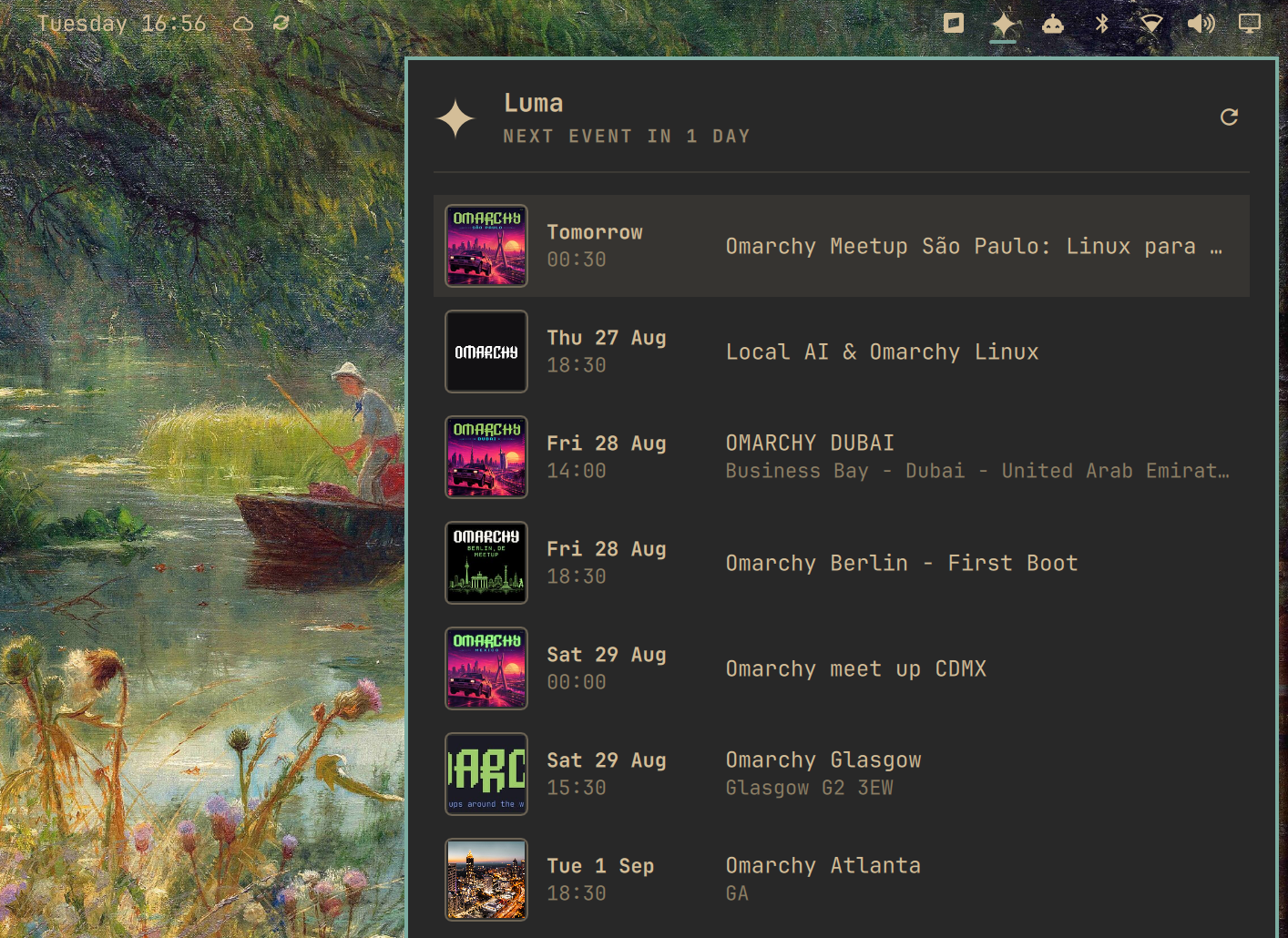
- The bar shows the Luma star mark in the same icon slot the built-in icon widgets use. The tooltip carries the countdown to the next event: the days until it, or the start time when it is today.
- The panel lists all upcoming events with cover art, date, time, name, and city, under a header with the next-event countdown and a refresh button.
- A click on a row opens the event page in the browser.
Install
omarchy plugin add https://github.com/Meet-Miles/omarchy-luma-plugin --enable
The widget works immediately: it shows the standard Omarchy community calendar
(luma.com calendar cal-SDGGMsEps9ExsrT) until you connect
your own feed.
The plugin needs curl, bash, and GNU coreutils — Omarchy includes all of them.
Connect your own calendar
Run the interactive setup and follow the prompts:
~/.config/omarchy/plugins/studiotwin.luma/setup
The script tells you where to find your iCal subscription link on luma.com, checks
that the link works, and stores it privately. Run it again at any time to change
the link, or type remove at the prompt to switch back to the community calendar.
- Open luma.com → profile Settings → Calendar Syncing (under Account Syncing).
- Click Add iCal Subscription and copy the link (right-click a calendar-app
option and select "Copy link address"). A
webcal://link is also fine; the plugin converts it. - Create the private secrets file and write the link to it:
install -m 600 /dev/null ~/.config/omarchy/luma.env
echo 'LUMA_ICS_URL=https://api.lu.ma/ics/get?entity=calendar&id=...' > ~/.config/omarchy/luma.env
The subscription link contains a secret token. Do not share it and do not put it
in a log or a repository. The plugin refuses a secrets file with permissions
wider than 600 and shows a hint in the panel.
Usage
| Input | Action |
|---|---|
| Left click | Open or close the panel |
| Right click or middle click | Refresh |
↑ / ↓ |
Move through the rows |
Enter |
Open the selected event page |
R or the header button |
Refresh |
Escape |
Close the panel |
Shell commands:
omarchy-shell shell summon studiotwin.luma '{}'
omarchy-shell shell hide studiotwin.luma
The footer shows the time of the last good refresh, prefixed with Omarchy calendar
while the widget runs on the community calendar. When the network is not available,
the widget keeps the last data.
Configure
Set the options in the bar layout entry for studiotwin.luma:
| Key | Type | Default | Description |
|---|---|---|---|
secretsFilePath |
string | ~/.config/omarchy/luma.env |
Path of the secrets file |
refreshIntervalSec |
integer | 1800 |
Feed refresh interval in seconds (minimum 300) |
maxEvents |
integer | 30 |
Maximum number of rows in the panel (the list scrolls) |
Remove
omarchy plugin remove studiotwin.luma
rm -f ~/.config/omarchy/luma.env
rm -rf ~/.cache/studiotwin.luma
The plugin writes no other files. Event data stays in memory only.
Privacy and security
- The plugin does not write event data or feed URLs to disk, and does not log them.
lib/luma-fetchreads the secrets file directly and hands the URL to curl over stdin (--config -): the feed URL never appears in any process's arguments — not the shell's, not curl's — so other processes cannot read the secret token from a command line.- Every network response is byte-capped at the OS level (
head -c, plus curl's--max-filesizefor the cover pages) before it reaches a shell variable or the shell process. - For the cover art, the plugin downloads each event's public page once per machine
and caches the resolved image URL in
~/.cache/studiotwin.luma(public image URLs only, nothing personal); thumbnails load straight from Luma's image CDN. - Demo mode uses fictional data only and contacts no network.
Development
# Run the widget against fictional fixture data (no network, no secrets):
demo/run
demo/run --screenshot

# Data-layer tests:
node --test tests/model.test.js

# Validation:
omarchy plugin validate ~/.config/omarchy/plugins/studiotwin.luma
qmllint -I /usr/share/omarchy/shell BarWidget.qml Panel.qml LumaMark.qml
qmllint reports unqualified-access warnings for the shell singletons (Style,
Color, …); the built-in plugins show the same warnings and the shell resolves
them at runtime.
Notes for anyone touching the feed code, verified against live Luma feeds:
- Real feeds carry no
URLproperty; the event page link is taken fromDESCRIPTION, and a venue-less event carries its own page URL asLOCATION. - Real feeds mark events
STATUS:TENTATIVE; onlyCANCELLEDis dropped. - Event pages embed the square cover as
cover_urlin their JSON payload;og:imageis the 800×420 social-card fallback. - Cloudflare rate-limits the event pages (429). The cover queue fetches one page every 1.5 s and, on a 429, pauses with a doubling backoff (2 min up to 20 min) — keep it that way, or repeated testing gets the machine's IP limited for a while.
- Resolved cover URLs persist in
~/.cache/studiotwin.luma/covers(one file per slug, written bylib/luma-cover-store), so each event page is fetched once per machine — not once per shell restart, which matters at install-base scale. Delete that directory to force a refetch while testing.
License
MIT. See LICENSE.