
GitNotice
An Omarchy 4 bar-widget plugin. Add the local paths of your git repos (your notes vault, side projects, etc.) and GitNotice watches them for uncommitted changes.
- A git-branch glyph sits in the bar. It uses the bar's foreground colour at reduced opacity when every tracked repo is clean, and uses the active bar accent colour with a count (N) when N repos have uncommitted changes.
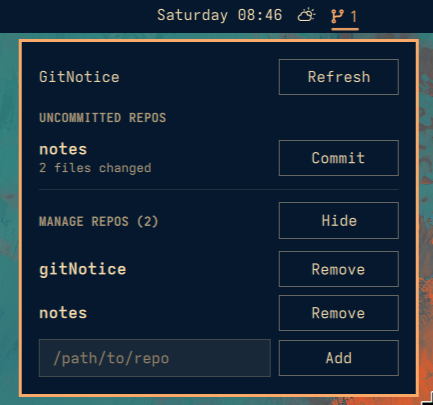
- Click the icon to open the panel: it lists only the dirty repos with how many files changed in each, plus a manual Refresh button next to the heading if you don't want to wait for the periodic check.
- Pick a repo, type a commit message, hit Push — GitNotice runs
git add -A && git commit -m "…" && git pushfor you. - A collapsible "Manage repos" section lets you add new repo paths or remove ones you no longer want tracked.
- The panel content scrolls (instead of overflowing) once the repo list gets long.
Screenshot
How it works
All the git plumbing lives in gitnotice.sh, a small bash +
jq helper invoked from QML via Quickshell.Io.Process. It keeps the tracked
repo list in ~/.config/gitnotice/repos.json and always prints JSON, so the
QML side (BarWidget.qml / Panel.qml) never touches the filesystem or git
directly. Requires bash, git, and jq — all ship with Omarchy by default.
BarWidget.qml re-runs gitnotice.sh list on a timer (default every 120s,
configurable via the widget's settings) and also on demand — via the panel's
Refresh button or the sudhakar.gitnotice refresh IPC call. The bar glyph
colour follows the current bar theme: clean uses the bar foreground with 60%
opacity, while dirty uses the active accent colour.
Install
omarchy plugin add https://github.com/sudhakarkarunaiprakasam/gitNotice --enable
Uninstall
omarchy plugin remove https://github.com/sudhakarkarunaiprakasam/gitNotice