
Mirror Android
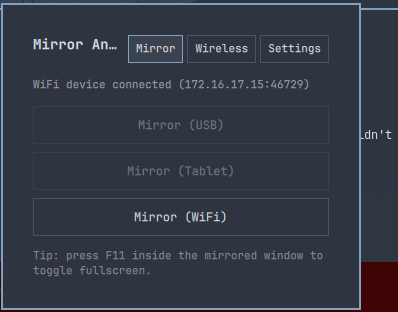
A bar widget for Omarchy 4 that mirrors an Android phone or tablet as a normal, resizable floating window — over USB or Wi-Fi — without ever touching a terminal.
Click the bar icon to open the panel: pick a mirror profile, pair and connect a device wirelessly, or tune quality/audio/screen-off settings, all from one popup.
Features
- Three mirror profiles — Mirror (USB), Mirror (Tablet, higher resolution + audio), Mirror (WiFi) — each disabled until a matching device is actually detected.
- In-panel wireless pairing. Pair and connect to an Android 11+ Wireless
Debugging device directly from the panel — no
adb pair/adb connecttyping. The last successful connect address is remembered for next time. - Live status. Connection state polls every 2 seconds while the panel is open, so plugging in a device updates the buttons immediately — no closing and reopening the panel.
- Configurable quality. A Battery/Balanced/High preset scales resolution, bitrate, and frame rate together across all three profiles, plus independent Audio and Turn-screen-off-while-mirroring toggles — all persisted.
- Native Hyprland behavior. The mirrored window floats, centers, and resizes like any other window — press F11 inside it to toggle fullscreen.
Install
omarchy plugin add https://github.com/sumdahl/omarchy-plugin-mirror-android.git --enable
Pick a bar section when prompted (right is the default). Then enable it later,
move it, or change its position from Omarchy menu → Setup → Bar.
Remove
omarchy plugin remove sumiran.mirror-android
That deletes ~/.config/omarchy/plugins/sumiran.mirror-android/ and drops the
widget from the bar. Nothing outside the plugin's own directory and its own
shell.json bar entry is touched.
Requirements
- Omarchy 4 (Quickshell-based shell) on Hyprland
- scrcpy — not bundled, install with:
omarchy pkg add scrcpy - android-tools (
adb) — usually already present on Omarchy; if not:omarchy pkg add android-tools - An Android device with USB debugging (and, for wireless, Wireless Debugging) enabled in Developer options
How it works
Every action runs through one bundled script, bin/mirror-phone, which:
- Parses
adb devices -lto detect connected USB/wireless devices and their state (ready, unauthorized, offline). - On Pair/Connect, shells out to
adb pair/adb connectwith the address and code entered in the panel — arguments are passed as an argument array, never interpolated into a shell string, so typed input can't be interpreted as shell syntax. - On Mirror, launches
scrcpydetached (setsid ... &) with a flag set built from the chosen profile and the persisted Quality/Audio/Screen-off settings, so the panel never blocks for the length of a mirroring session.
Recommended: float the mirrored window
This plugin doesn't modify your Hyprland config automatically. Without a window
rule, scrcpy's window may tile like any other window instead of floating. Add
this to ~/.config/hypr/hyprland.lua for a floating, centered, freely resizable
mirror window instead:
o.window({ class = "^(scrcpy)$" }, { float = true, size = { 420, 900 }, center = true })