
Omahub
← All plugins
S

FluxCast

by syntaxboybe

Cast your desktop screen to a Miracast smart TV from the Omarchy bar.

Security review

Review recommended · 2 findings

Deterministic scan — not a security guarantee

Low
Risk level
Low
Analyzed commit
71c49e3
Scanned
1 month ago

Flagged patterns appear only in documentation files (README / docs) — descriptive examples, not executable code.

  • Command runs with sudo, elevating the process beyond the plugin environment.

    sudo pacman -S wf-recorder`). Casts Wayland screen to Miracast smart TVs via `fluxcast` CLI. Includes live screencast duration timer.
  • Docs sudo README.md:12

    Command runs with sudo, elevating the process beyond the plugin environment.

    sudo pacman -S wf-recorder`).

Automated analysis only — not a security guarantee.

AI advisory review

No obvious issues detected

Language-model assessment · ~deepseek/deepseek-v4-flash-latest — advisory only

Low
AI risk level
Low
Recommendation
install
Model
~deepseek/deepseek-v4-flash-latest
Analyzed commit
71c49e3
Reviewed
1 month ago

The plugin is a bar widget that uses the fluxcast CLI to cast the screen to a Miracast TV. It runs fluxcast processes without sudo. The sudo commands flagged by the deterministic scan are installation instructions for dependencies in the README/SUBMISSION.md, not executed by the plugin itself. No malicious behavior detected.

  • The README includes sudo commands for installing dependencies (fluxcast, wf-recorder), but these are not run by the plugin.
How this check works

This review combines the deterministic scan (the rule-based results above) with an independent look at the plugin's code by a language model. The model reads a trimmed sample of the repository's files, the manifest, and the README, then gives a plain-language risk level and a recommendation: install (no notable danger), review (look closer first), or avoid (clearly dangerous).

It runs on the same analyzed commit as the deterministic scan and is strictly advisory — it is not a security guarantee and never blocks a plugin by itself. A human moderator still reviews plugins before they are listed.

AI advisory only — automated analysis, not a security guarantee.

Install
$ omarchy plugin add https://github.com/syntaxboybe/omarchy-fluxcast --enable
Desktop #bar #quickshell #media

FluxCast

Cast your Linux desktop to a Miracast smart TV from the Omarchy bar. One icon, one popup — scan for your TV, click to start casting, click to stop. Includes live screencast duration timer.

Screenshot
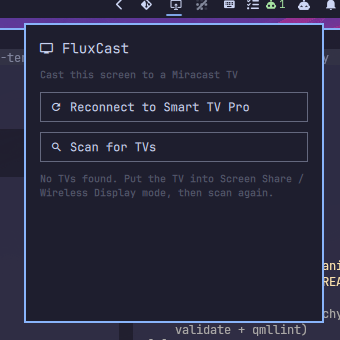
FluxCast panel

Requirements

  • fluxcast — Miracast/DLNA streaming tool (fluxcast must be on PATH). Install via AUR: yay -S fluxcast-git.
  • wf-recorder — Wayland screen capture (sudo pacman -S wf-recorder).
  • A Miracast-capable TV. Put the TV into Screen Share / Wireless Display mode before scanning.

Install

omarchy plugin add https://github.com/syntaxboybe/omarchy-fluxcast --enable

Usage

  • Left click the TV icon to open the panel.
  • Scan for TVs, then click your TV to start casting.
  • Stop casting from the panel, or right-click the icon to stop.
  • Right click re-casts to your last TV; middle click rescans.

The bar icon displays live casting duration (📺 04:12) while streaming.

Configure

The monitor to cast defaults to eDP-1. Change it per monitor name:

omarchy bar set syntaxboybe.fluxcast monitor DP-1

Remove

omarchy plugin remove syntaxboybe.fluxcast

License

MIT