
Omahub
← All plugins
S

Git Switcher

by syntaxboybe

View and switch between Git identities (user.name / user.email) from the bar.

Security review

No obvious issues detected

Deterministic scan — not a security guarantee

None
Risk level
None
Analyzed commit
6470635
Scanned
4 weeks ago

No potentially dangerous behavior detected in the analyzed commit.

Automated analysis only — not a security guarantee.

AI advisory review

No obvious issues detected

Language-model assessment · ~deepseek/deepseek-v4-flash-latest — advisory only

None
AI risk level
None
Recommendation
install
Model
~deepseek/deepseek-v4-flash-latest
Analyzed commit
6470635
Reviewed
4 weeks ago

The plugin is a straightforward Git identity switcher that reads a user-managed JSON config and runs `git config --global` commands. User-supplied values are passed as argv arguments rather than interpolated into shell strings, preventing command injection. The code includes defensive limits on config size and account count, and the included test-security.sh enforces the absence of update mechanisms or remote code execution.

How this check works

This review combines the deterministic scan (the rule-based results above) with an independent look at the plugin's code by a language model. The model reads a trimmed sample of the repository's files, the manifest, and the README, then gives a plain-language risk level and a recommendation: install (no notable danger), review (look closer first), or avoid (clearly dangerous).

It runs on the same analyzed commit as the deterministic scan and is strictly advisory — it is not a security guarantee and never blocks a plugin by itself. A human moderator still reviews plugins before they are listed.

AI advisory only — automated analysis, not a security guarantee.

Install
$ omarchy plugin add https://github.com/syntaxboybe/omarchy-git-switcher --enable
Developer Tools #bar #quickshell

Git Switcher

View and switch between Git identities from the Omarchy bar. One icon — click it, pick the account, and the global user.name / user.email update instantly.

Screenshot
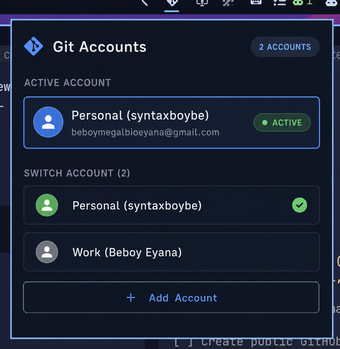
Git Switcher panel

Requirements

Install

omarchy plugin add https://github.com/syntaxboybe/omarchy-git-switcher.git --enable

Usage

  • Left click the git icon to open the account list.
  • Click an account to set it as the global Git identity (git config --global user.name / user.email).
  • The active account is marked with a green dot.
  • Right click the icon to refresh.

Configure accounts

Accounts live in ~/.config/omarchy/git-switcher.json:

{
  "accounts": [
    { "label": "Personal", "name": "syntaxboybe", "email": "you@example.com" },
    { "label": "Work",     "name": "Jane Doe",     "email": "jane@company.com" }
  ]
}
  • label — friendly name shown in the popup.
  • name — the git user.name.
  • email — the git user.email.

The file is re-read every time the panel opens, so edits apply immediately. You can also open it from the popup via the Add Account button.

Remove

omarchy plugin remove syntaxboybe.git-switcher

License

MIT