
Omahub
← All plugins
S

Pomodoro

by syskey8

Pomodoro focus timer with live countdown in the bar.

Security review

No obvious issues detected

Deterministic scan — not a security guarantee

None
Risk level
None
Analyzed commit
9d1d785
Scanned
1 month ago

No potentially dangerous behavior detected in the analyzed commit.

Automated analysis only — not a security guarantee.

AI advisory review

No obvious issues detected

Language-model assessment · ~deepseek/deepseek-v4-flash-latest — advisory only

None
AI risk level
None
Recommendation
install
Model
~deepseek/deepseek-v4-flash-latest
Analyzed commit
9d1d785
Reviewed
1 month ago

The plugin is a straightforward Pomodoro timer implemented in QML/JavaScript. It only runs fixed, benign commands (pw-play for a system sound and omarchy-notification-send for notifications) and performs no network access, persistence, or destructive actions. The deterministic scan found no issues, and manual review found nothing suspicious.

How this check works

This review combines the deterministic scan (the rule-based results above) with an independent look at the plugin's code by a language model. The model reads a trimmed sample of the repository's files, the manifest, and the README, then gives a plain-language risk level and a recommendation: install (no notable danger), review (look closer first), or avoid (clearly dangerous).

It runs on the same analyzed commit as the deterministic scan and is strictly advisory — it is not a security guarantee and never blocks a plugin by itself. A human moderator still reviews plugins before they are listed.

AI advisory only — automated analysis, not a security guarantee.

Install
$ omarchy plugin add https://github.com/syskey8/omarchy-pomodoro --enable
Productivity #quickshell

Omarchy Pomodoro Plugin

A native, first-class Pomodoro focus timer for the Omarchy top bar.

Built entirely with standard Omarchy qs.Ui components and Quickshell, this plugin perfectly matches your system theme, typography, and colors out of the box.
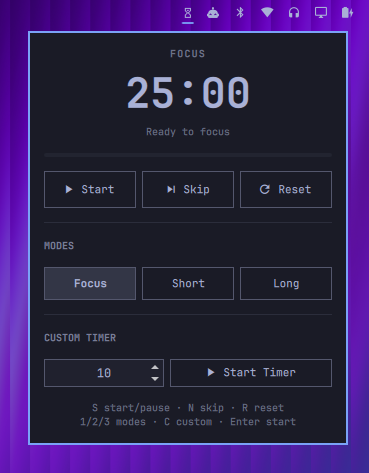
Preview

Features

  • Standard Pomodoro Flow: Automatically handles 25m focus sessions, 5m short breaks, and 15m long breaks (after 4 sessions).
  • Custom Timer: A built-in NumberField to spin up a custom timer for any duration.
  • Native UI: Beautiful dropdown panel with live countdown, progress bar, and mode selection.
  • Alerts: Triggers desktop notifications and the system alarm sound (pw-play) when a phase completes.
  • Settings GUI Integration: Change your default durations directly in the Omarchy Settings app.

Installation

Install the plugin directly from GitHub using the Omarchy CLI:

omarchy plugin add https://github.com/syskey8/omarchy-pomodoro

Then, enable it and place it on the right side of your bar:

omarchy plugin enable pomodoro right

Shortcuts (When panel is open)

  • S or Space or Enter — Start / Pause
  • N — Skip to the next phase
  • R — Reset timer
  • Right-Click the bar icon to Start/Pause without opening the panel.

License

MIT