
Omahub
← All plugins
D

System Monitor

by dbohry

CPU and memory usage in the bar

Security review

Review recommended · 1 finding

Deterministic scan — not a security guarantee

Low
Risk level
Low
Analyzed commit
7f1101e
Scanned
1 month ago

Flagged patterns appear only in documentation files (README / docs) — descriptive examples, not executable code.

  • Docs external_hosts README.md:10

    Downloads or connects to an external HTTP(S) host.

    git clone https://github.com/dbohry/omarchy-sysmon ~/.config/omarchy/plugins/sysmon

Automated analysis only — not a security guarantee.

AI advisory review

No obvious issues detected

Language-model assessment · ~deepseek/deepseek-v4-flash-latest — advisory only

None
AI risk level
None
Recommendation
install
Model
~deepseek/deepseek-v4-flash-latest
Analyzed commit
7f1101e
Reviewed
1 month ago

The plugin is a simple bar widget that reads /proc/stat and /proc/meminfo via a small bash script and displays CPU/memory usage. The only deterministic finding is a git clone command in the README, which is documentation and not executed by the plugin. No obfuscation, persistence, credential access, or destructive behavior was found.

How this check works

This review combines the deterministic scan (the rule-based results above) with an independent look at the plugin's code by a language model. The model reads a trimmed sample of the repository's files, the manifest, and the README, then gives a plain-language risk level and a recommendation: install (no notable danger), review (look closer first), or avoid (clearly dangerous).

It runs on the same analyzed commit as the deterministic scan and is strictly advisory — it is not a security guarantee and never blocks a plugin by itself. A human moderator still reviews plugins before they are listed.

AI advisory only — automated analysis, not a security guarantee.

Install
$ omarchy plugin add https://github.com/dbohry/omarchy-sysmon --enable
System #bar

System Monitor

Omarchy shell bar widget showing live CPU and memory usage.
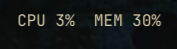
System Monitor bar widget

Install

git clone https://github.com/dbohry/omarchy-sysmon ~/.config/omarchy/plugins/sysmon
omarchy plugin enable sysmon
omarchy-shell shell rescanPlugins

Then add the widget to the bar: open the Omarchy settings panel (or run omarchy bar) and enable System Monitor under the System category.

Uninstall

omarchy bar remove sysmon   # or disable it from the settings panel first
rm -rf ~/.config/omarchy/plugins/sysmon
omarchy-shell shell rescanPlugins

No other files are touched — the plugin only reads /proc/stat and /proc/meminfo and does not write any state outside its own directory.

What it does

  • Polls CPU and memory usage every 2 seconds.
  • Displays CPU X% MEM Y% in the bar.
  • Left-click: opens btop in a floating terminal.
  • Middle-click: forces an immediate refresh.

How it works

bin/sysmon-stats is a small bash script that:

  • Samples /proc/stat over a 0.3s window to compute CPU usage percentage.
  • Reads /proc/meminfo (MemTotal vs MemAvailable) to compute memory usage percentage.
  • Prints <cpu_pct> <mem_pct> to stdout.

BarWidget.qml runs that script on a timer and renders the result as a bar widget.

Files

  • manifest.json — plugin metadata (id: sysmon)
  • BarWidget.qml — bar widget entry point
  • bin/sysmon-stats — stats-gathering script

Requirements

  • btop installed (only needed for the click-to-open action)

License

MIT — see LICENSE.