
Logitech G Mouse
English | 繁體中文
An Omarchy Quattro bar widget and control panel for Logitech G gaming mice. It reads battery status and lets you adjust DPI, report rate, and—on supported mice—HITS analog-switch settings without Logitech G HUB.
Requirements
- Omarchy Quattro on x86_64 Linux.
- A Logitech G mouse reachable through
/dev/hidraw; G304/G305 is supported through its LIGHTSPEED USB receiver.
The plugin includes its native controller. Bun, Node.js, Python, and Rust are not required to use it.
Install
From GitHub
omarchy plugin add https://github.com/ttymayor/oma-logitech-g-mouse.git --enable
omarchy restart shell
From a local checkout
mkdir -p ~/.config/omarchy/plugins/tantuyu.logitech-g-mouse
cp -a . ~/.config/omarchy/plugins/tantuyu.logitech-g-mouse/
omarchy plugin validate ~/.config/omarchy/plugins/tantuyu.logitech-g-mouse
omarchy-shell shell rescanPlugins
omarchy plugin enable tantuyu.logitech-g-mouse --section right
omarchy restart shell
Use
- Left-click the bar widget to open the control panel.
- Right-click it to toggle battery percentage text.
- Use Sensor to select DPI presets, set DPI in 50-DPI steps, and choose a supported report rate.
- Use Buttons on compatible analog-switch mice to set Actuation Point, Rapid Trigger, and Click Haptics per button.
The widget automatically reconnects after startup or a receiver reconnect. It waits up to five seconds for the receiver to become ready.
Screenshots
| Sensor tab | Buttons tab |
|---|---|
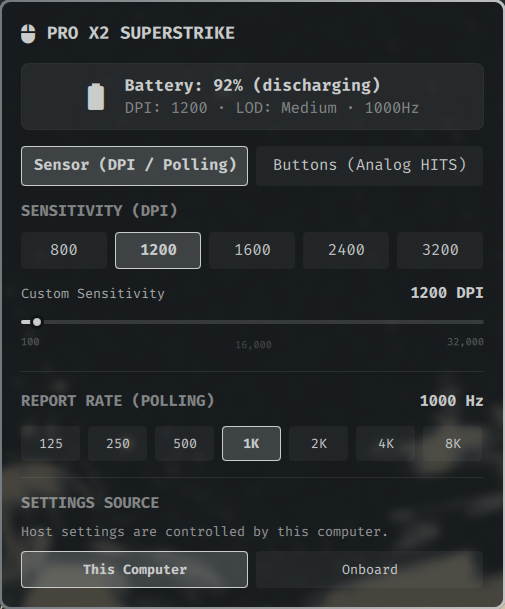 |
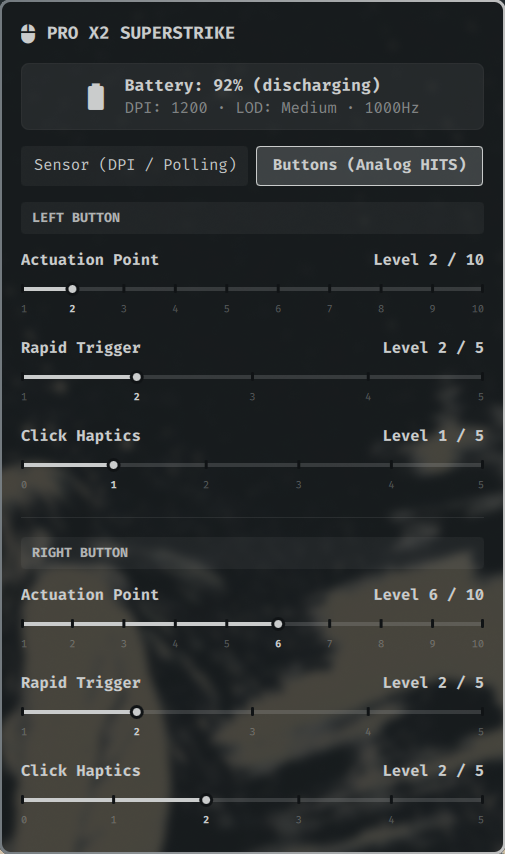 |
Troubleshooting
On Omarchy and other systemd desktop sessions, systemd-logind normally grants the logged-in user access to /dev/hidraw* through uaccess.
If the widget stays disconnected, first check whether the native controller can see the mouse:
~/.config/omarchy/plugins/tantuyu.logitech-g-mouse/bin/logitech-g-daemon --once
If it returns EACCES: Permission denied, your session lacks HID device access. This can occur in containers, headless sessions, or systems without systemd-logind. Keep the normal uaccess path when available. For a headless system, grant access only to a dedicated local group:
sudo groupadd --system logitech-hidraw
sudo usermod -aG logitech-hidraw "$USER"
sudo tee /etc/udev/rules.d/42-logitech-mouse.rules << 'EOF'
SUBSYSTEM=="hidraw", ATTRS{idVendor}=="046d", GROUP="logitech-hidraw", MODE="0660"
EOF
sudo udevadm control --reload
sudo udevadm trigger
Log out and back in before using the new group membership.
Uninstall
omarchy plugin disable tantuyu.logitech-g-mouse
omarchy plugin remove tantuyu.logitech-g-mouse --yes
omarchy restart shell
For a manually installed plugin:
omarchy plugin disable tantuyu.logitech-g-mouse
rm -rf "${XDG_RUNTIME_DIR:-/run/user/$UID}/omarchy-logitech-g-mouse"
omarchy restart shell
Development
See DEVELOPMENT.md for building the native controller, protocol notes, verification, and release automation.
License
MIT License. Logitech, G PRO, and SUPERSTRIKE are trademarks of Logitech. This project is an independent third-party open-source plugin and is not affiliated with Logitech.