
Omarchy Taskwarrior

A native Omarchy QuickShell plugin for managing Taskwarrior from the bar.
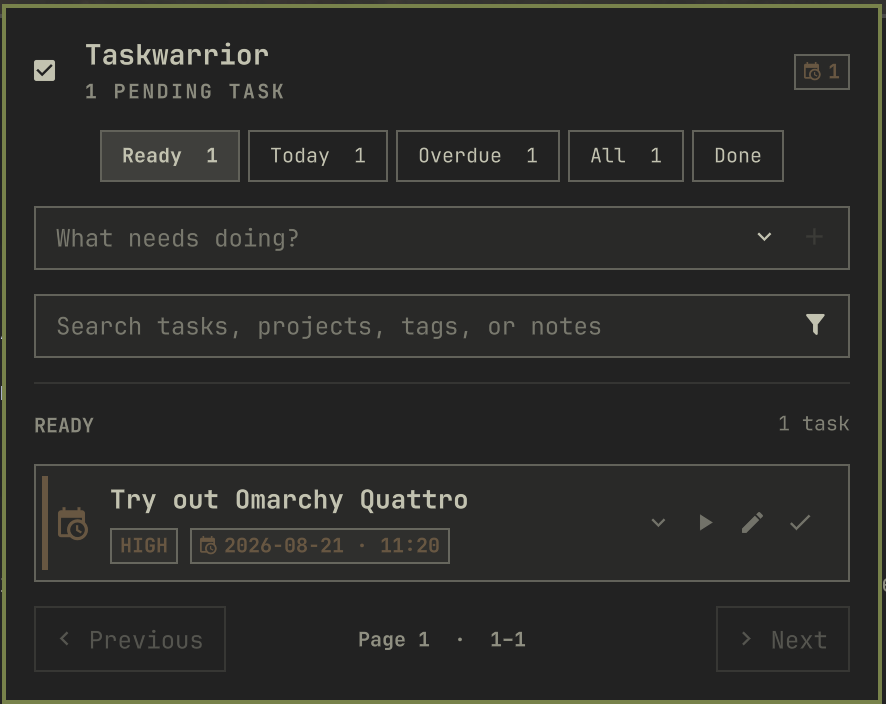
Features
- Ready, Today, Overdue, All, and Done views
- Quick task creation with optional project, tag, priority, and due-date controls
- Search across descriptions, projects, tags, and annotations
- Filter chips for active, blocked, waiting, project, and tag views
- Task completion with a timed Restore action and restore controls in Done
- Start and stop Taskwarrior time tracking
- Inline task editing for description, project, priority, and due date
- Two-line task previews with a full in-panel detail view
- Native calendar and time picker
- Active and overdue bar indicators
- Paginated pending and completed task lists
- Theme-aware Omarchy controls and colors
- In-panel Taskwarrior installation prompt when
taskis unavailable
Install
omarchy plugin add https://github.com/AliSayyah/omarchy-taskwarrior.git --enable
Run this from an interactive terminal: Omarchy will ask whether to place the widget on the left, center, or right of the bar. Right is preselected as the default, but you can choose any section.
For an existing installation, move it at any time:
omarchy bar move taskwarrior --section left
omarchy bar move taskwarrior --section center
omarchy bar move taskwarrior --section right
Taskwarrior is available from Arch's task package; if it is missing, the plugin offers to install it through omarchy pkg add task.
Use
- Left-click the bar widget to open the panel.
- Right-click the widget to refresh.
- Use the filter buttons to switch task views.
- Search tasks directly or open the filter control for state, project, and tag chips.
- Expand the add field to set project, tags, priority, and due date before creating a task.
- Use the row actions to start or stop tracking, edit, or complete a task.
- Restore a completion from its confirmation message or from the Done view.
- Open the detail chevron on any task to read its full description and annotations.
- Use Previous and Next to move through task pages.
Update
omarchy plugin update taskwarrior
Remove
omarchy plugin remove taskwarrior
Requirements
- Omarchy 4.0 or newer
- Taskwarrior 3.x; the plugin can install it when missing
Development
The repository root is the plugin root. Runtime boundaries are intentionally small:
Panel.qmlcomposes the bar widget and popup.TaskwarriorController.qmlowns Taskwarrior subprocesses and state.Model.jshandles parsing, filtering, and datetime conversion.components/contains independent visual components.
Run all local checks on Omarchy:
./scripts/check
Pull requests and pushes run portable model, structure, manifest, shell, and QML syntax checks in a clean Arch Linux container. A validated push to main publishes a GitHub Release for manifest.json's version when that release does not already exist.
Saved QML files hot-reload. If QuickShell retains an older component instance, run:
omarchy restart shell