
IP Info
A bar widget for the Omarchy Quattro shell that shows your local network interface IP addresses and your public IP.
The bar item is just an icon — a Nerd Font glyph (md-earth), themed like
every other Omarchy bar icon, rather than a fixed-color emoji — with no
address shown in the bar itself.
Click it to open a panel with your public IPv4 and IPv6 (with rough
geolocation) at the top, followed by every local interface and its
addresses. Every address has a copy button next to it (via wl-copy).
Docker-created interfaces (docker0, br-*, veth*) are hidden by
default. If your network has no IPv6 connectivity, the panel just says so
under "IPv6" — that's expected and not treated as an error.
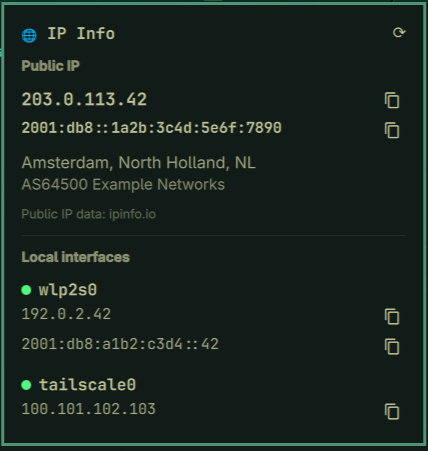
(addresses shown are RFC 5737/3849/5398 documentation examples, not a real machine's data)
Requires
ip(iproute2) — reads local interface addresses, read-only, no network access.curl— fetches the public IP/geolocation JSON.wl-copy(wl-clipboard) — writes an address to the clipboard when you click its copy button.
All three ship by default on Omarchy. No other external dependencies.
Data sources
- Local addresses:
ip -j addr show(iproute2's JSON output), run locally — nothing leaves the machine for this part. - Public IPv4:
https://ipinfo.io/json, a free, unauthenticated endpoint that returns your public IP plus a rough geolocation (city/region/country) and network org, based on the connection making the request. No API token is used. - Public IPv6:
https://v6.ipinfo.io/json, the same service on an AAAA-only hostname, so it only ever answers over IPv6 and reports your public IPv6 address specifically rather than whichever family the OS happened to routeipinfo.iothrough. Fails to connect (silently, no error shown) on an IPv4-only network — that's normal. - ipinfo.io's free tier is rate-limited, so keep
pollSecondsat 30 or above.
Privacy note: whenever the public-IP lookup is enabled, ipinfo.io (and
v6.ipinfo.io) sees the request's source IP address on every poll, the same
as visiting either URL in a browser would. Turn off showPublicIP for a
local-interfaces-only widget that never makes an outbound request.
Install
omarchy plugin add git@github.com:taufderl/omarchy.taufderl.ipinfo.git --enable
Configure
Settings are edited through Setup → Plugins (or directly in
~/.config/omarchy/shell.json on the widget's bar.layout entry):
| Setting | Description | Default |
|---|---|---|
pollSeconds |
How often to re-scan interfaces and re-query ipinfo.io | 300 |
showPublicIP |
Look up public IP/geolocation via ipinfo.io (off = local-only, no outbound requests) | true |
showLoopback |
Include the loopback interface (lo) |
false |
showIPv6 |
Include IPv6 addresses | true |
showDocker |
Include Docker-created interfaces (docker0, br-*, veth*) |
false |
Move it around the bar with:
omarchy bar move taufderl.ipinfo --section right
Remove
omarchy plugin remove taufderl.ipinfo