
Pomodoro — focus timer for the Omarchy bar
A pomodoro timer for the Omarchy shell. A countdown sits in the bar next to the clock, a click opens the controls, and every break takes over the screen with a progress ring so you actually step away. Notifications are silenced while you focus, a chime marks the end of each block, and the timer survives shell restarts, theme switches and suspend.
Classic rhythm out of the box: 25 min focus · 5 min break · 15 min long break after every 4th block. Everything is a setting.
The popup
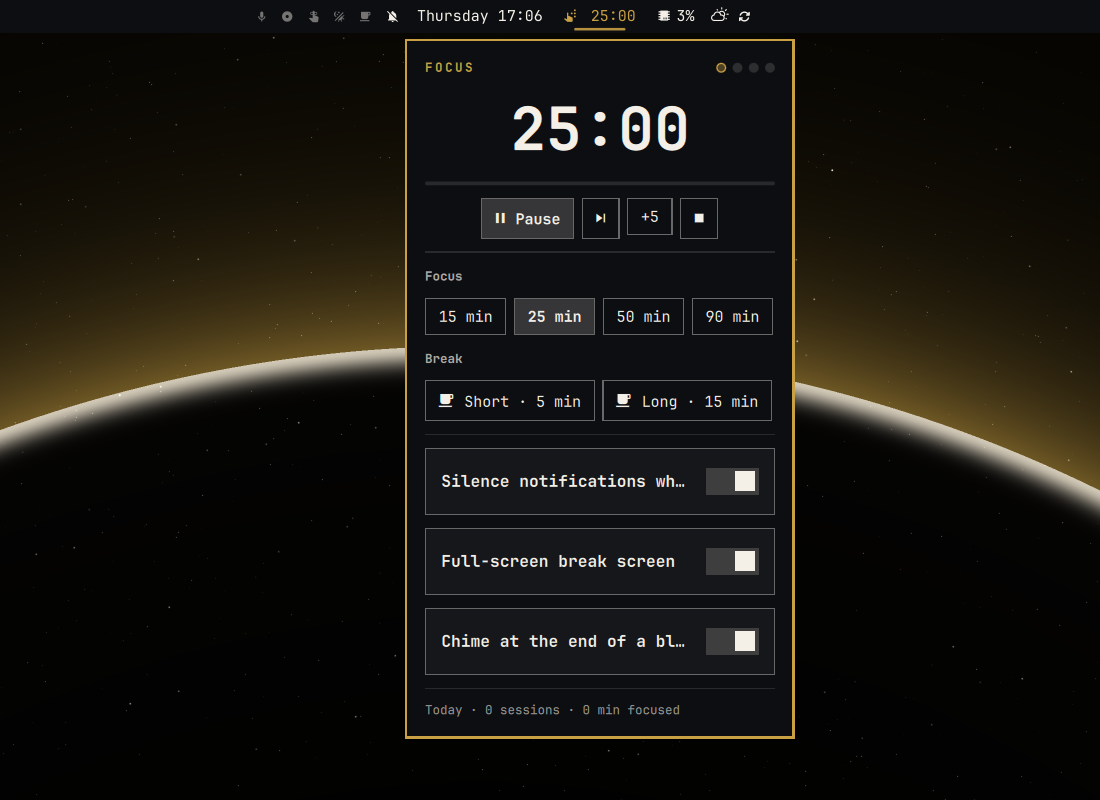
- Big countdown with a progress line and session dots (one per focus block in the current set).
- Start / Pause / Resume, skip the current block, add five minutes, stop.
- Focus presets (
15 · 25 · 50 · 90min by default — right-click one to make it the default length). - Start a short or long break on demand.
- Three toggles: silence notifications while focusing, full-screen break screen, chime at the end of a block.
- Today's sessions and focused minutes.
The break screen
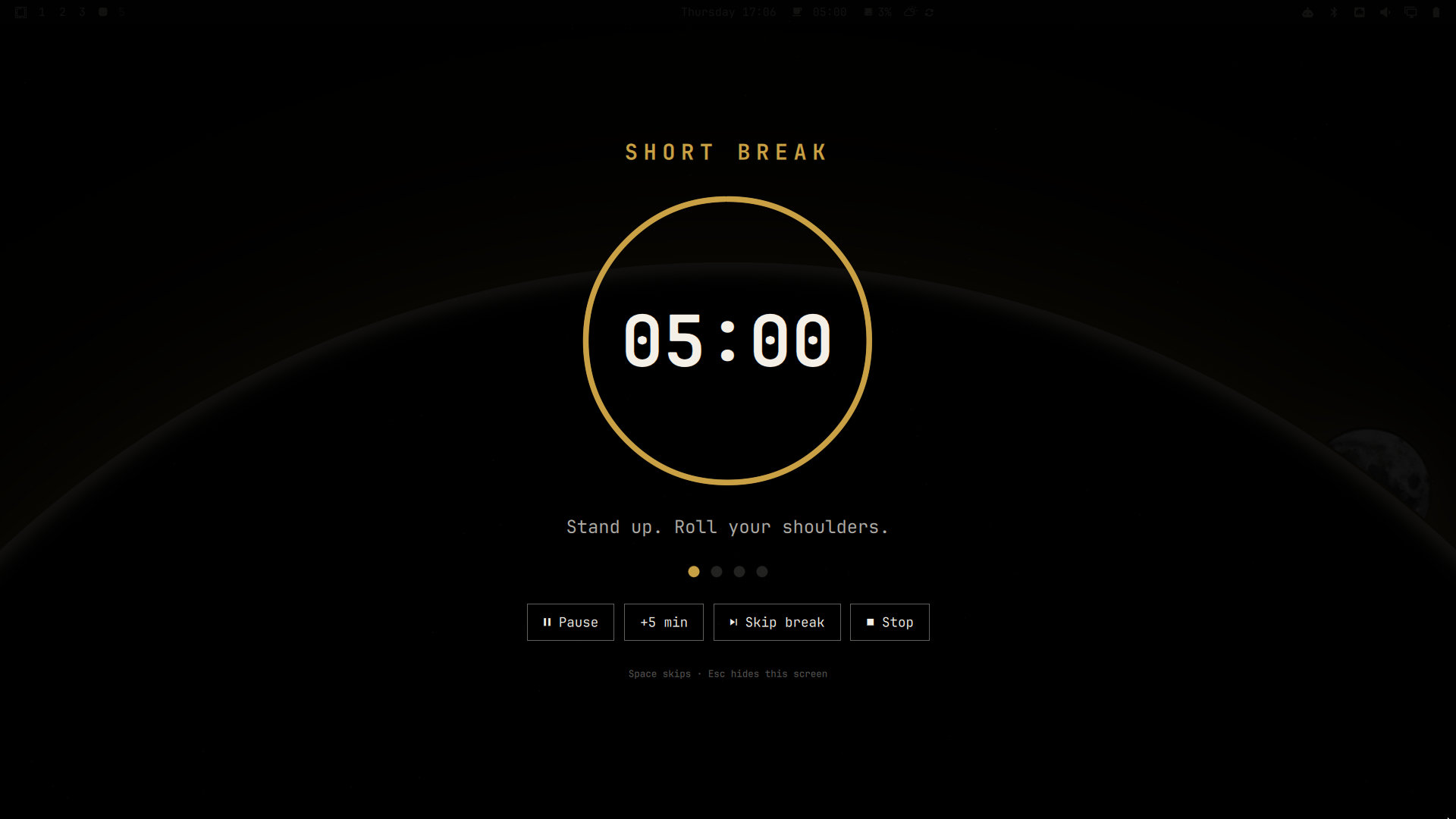
When a focus block ends the break screen covers every monitor: phase title, a progress ring counting the break down, a short tip, the session dots, and buttons for Pause, +5 min, Skip break and Stop.
Press Esc to get out of the break screen at any time — it hides the
overlay for the rest of that break while the timer keeps running in the bar.
Space (or Enter) skips the break and starts the next focus block. When the
break is over the screen waits for you with a Start 25 min focus button
(press Enter) rather than starting the next block on its own, so a break that
runs long never silently eats into a focus block. Turn the break screen off
entirely with the popup toggle or the overlay setting.
Bar widget
The bar shows a timer icon when idle, a brain icon plus the countdown during focus, a coffee cup plus the countdown during a break, and a thin progress hairline under the label while a block runs.
| Action | Result |
|---|---|
| Left click | Open / close the popup |
| Right click | Start (or pause / resume) |
| Middle click | Skip the current block |
| Scroll | ± 1 minute on the running block |
Requirements
- Omarchy with the Quattro shell (
omarchy-shell, Quickshell based). pipewire(pw-play) orpulseaudio(paplay) for the chime, and the freedesktop sound theme (/usr/share/sounds/freedesktop) — all standard on Omarchy. Setsoundtofalseif you have neither.python3(standard library only) for the bundled state reader — a hard dependency of Omarchy itself, so nothing extra to install.- Optional, for the CLI:
jq(standard on Omarchy).
No sudo or pkexec is required.
Install
omarchy plugin add https://github.com/techywilbur/omarchy-pomodoro.git --enable
--enable places the widget in the bar's center section (you can choose a
section when prompted). To add it later, or move it next to the clock:
omarchy plugin enable techywilbur.pomodoro
omarchy bar move techywilbur.pomodoro --section center
Update
omarchy plugin update techywilbur.pomodoro
Remove
omarchy plugin remove techywilbur.pomodoro
That deletes the plugin folder and its bar entry. The only other thing the
plugin creates is its state file, ~/.local/state/uni-pomo/state.json, which
you can delete by hand. If you installed the optional CLI, menu entries or
keybinds below, remove those the same way you added them.
Settings
Settings live inline on the widget's entry in ~/.config/omarchy/shell.json
and can be edited from the Omarchy bar settings panel or the popup toggles.
Changes apply immediately.
| Key | Default | Meaning |
|---|---|---|
focus |
25 |
Focus block length in minutes |
shortBreak |
5 |
Short break length |
longBreak |
15 |
Long break length |
longEvery |
4 |
Long break after every Nth focus block (0 = never) |
presets |
[15, 25, 50, 90] |
Focus preset buttons in the popup |
dnd |
true |
Turn on Do Not Disturb during focus, restore afterwards |
overlay |
true |
Full-screen break screen |
overlayDim |
0.93 |
Darkness of the break screen (0.3–1) |
sound |
true |
Chime at the end of a block |
notify |
true |
Desktop notification at the end of a block |
autoStartBreak |
true |
Focus done → break starts by itself |
autoStartFocus |
false |
Break done → next focus starts by itself (off: wait for you) |
soundFocusEnd |
freedesktop complete.oga |
Sound file played when focus ends |
soundBreakEnd |
freedesktop message.oga |
Sound file played when a break ends |
staleAfter |
30 |
Minutes after which a restored, already-ended block is dropped |
Example entry:
{ "id": "techywilbur.pomodoro", "focus": 50, "shortBreak": 10, "presets": [25, 50, 90], "dnd": false }
Optional: CLI, keybinds and menu entries
The repository ships uni-pomo, a small bash CLI that talks to the plugin over
IPC. Nothing installs it for you — copy it if you want it:
install -m 755 ~/.config/omarchy/plugins/techywilbur.pomodoro/uni-pomo ~/.local/bin/uni-pomo
uni-pomo help
uni-pomo                     short human status
uni-pomo status [--json]     status (JSON with --json)
uni-pomo start | toggle | pause | resume | stop | skip
uni-pomo focus [min]         start a focus block
uni-pomo break [min]         start a short break
uni-pomo long [min]          start a long break
uni-pomo extend <min>        add (or subtract) minutes on the running block
uni-pomo hide | show         hide / show the break screen
uni-pomo panel               toggle the bar popup
uni-pomo get <key>           read a setting
uni-pomo set <key> <value>   write a setting (edits shell.json with jq)
uni-pomo settings            print all settings
With the CLI in place, extras/bindings.lua adds SUPER+SHIFT+P (start /
pause), SUPER+SHIFT+CTRL+P (stop) and SUPER+SHIFT+ALT+P (popup) — append it
to ~/.config/hypr/bindings.lua. Note that stock Omarchy binds SUPER+SHIFT+P
to Google Photos; the snippet unbinds it first, so pick other keys if you use
that. extras/omarchy-menu.jsonc adds a Pomodoro entry to the Omarchy menu
(SUPER+SPACE) with start / pause, skip, stop, focus lengths, breaks and
✓ toggles — merge it into ~/.config/omarchy/extensions/omarchy-menu.jsonc.
IPC
omarchy-shell pomodoro status                # JSON status
omarchy-shell pomodoro toggle                # start / pause / resume
omarchy-shell pomodoro focus 50              # also: shortBreak, longBreak, extend <min>
omarchy-shell pomodoro skip | stop | pause | resume
omarchy-shell pomodoro hideBreak | showBreak # break screen
omarchy-shell shell toggle techywilbur.pomodoro   # open / close the popup
How it works, and what it touches
Service.qmlis the engine: one instance per shell keeps the phase, an absolute end time, the set counter and today's stats, and draws the break screen on every monitor.BarWidget.qml(one per monitor) renders the bar label and the popup.PomoModel.jsis the pure logic.- Time is stored as a wall-clock end, so a block keeps counting correctly
through suspend and shell restarts. State is written to
~/.local/state/uni-pomo/state.jsonon every transition (atomically, via a temp file and rename). It is read back only through the bundledpomo-state-readhelper, which opens the directory and file withO_NOFOLLOW(the file alsoO_NONBLOCK), checks the open descriptor is a regular file owned by you and at most 16 KiB, caps the read, and hands the shell a whitelisted, range-checked object. A planted FIFO, symlink or oversized file cannot block or bloat the shell at startup; the timer just starts fresh. - Do Not Disturb goes through the shell's own notifications service; the state you had before the focus block is restored when it ends.
- The chime is played with
pw-play(falling back topaplay); notifications useomarchy-notification-send. - The plugin writes to
~/.config/omarchy/shell.jsononly when you change a setting from the popup, and only its own widget entry. - No sudo or pkexec is required. Nothing is installed outside the plugin folder unless you copy the optional CLI yourself.
Files
manifest.json        plugin manifest (kinds: service + bar-widget, settings schema)
Service.qml          engine, persistence, DND, break screen; IPC target `pomodoro`
BarWidget.qml        bar label + popup; IPC target `techywilbur.pomodoro`
PomoModel.js         pure logic: settings parsing, phases, formatting
pomo-state-read      bounded, non-following state reader (python3, stdlib only)
uni-pomo             optional bash CLI
extras/bindings.lua  optional Hyprland keybinds
extras/omarchy-menu.jsonc  optional Omarchy menu entries
screenshots/         popup.png, break.png
preview.png          marketplace preview
License
MIT © 2026 Wilbur Lindqvist