
Minesweeper
Minesweeper in a terminal, for Omarchy. The board follows the theme you already have selected. It plays the way minesweeper.online does: left click opens, right click flags, middle click chords, the first click is never a mine, and the timer starts when you open the first cell. Best times, win streaks, 3BV and efficiency are kept per level on your own machine.
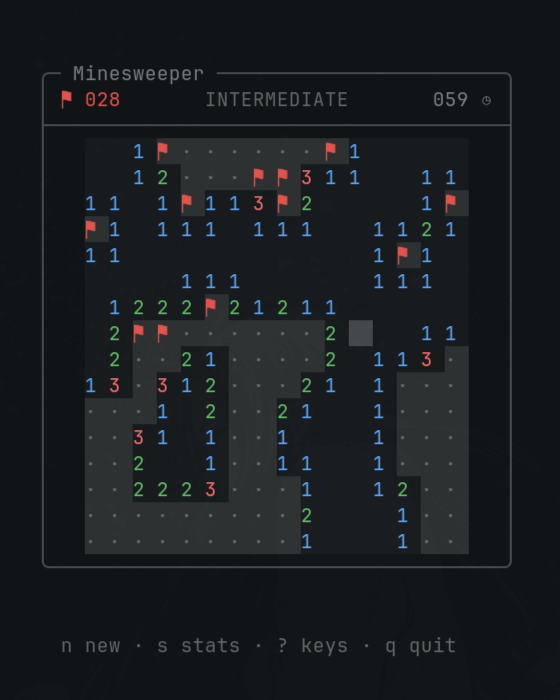
Python 3 and the standard library. No dependencies, no network, no build step.
Install
omarchy plugin add https://github.com/acobrerosf/omarchy-minesweeper.git --enable
That clones the repo into ~/.config/omarchy/plugins/terminal.minesweeper/ and puts a flag icon on
the bar. Left click it for the panel, right click it to start playing.
To get a minesweeper command in any terminal, put the game on your PATH:
ln -sf ~/.config/omarchy/plugins/terminal.minesweeper/omarchy-minesweeper ~/.local/bin/minesweeper
Levels
| Level | Board | Mines |
|---|---|---|
| Beginner | 9 × 9 | 10 |
| Intermediate | 16 × 16 | 40 |
| Expert | 30 × 16 | 99 |
Expert needs a window at least 66 columns by 24 rows. The game says so if the window is too small, and picks the layout back up as soon as you resize.
Controls
| Mouse | Action |
|---|---|
| left click | open the cell |
| right click | flag the cell |
| middle click | chord — open every unflagged neighbour of a satisfied number |
| wheel | zoom the board in and out |
| Key | Action |
|---|---|
← ↑ ↓ → or hjkl |
move the cursor |
| space or enter | open the cell, or chord it when it is a satisfied number |
f |
flag |
n |
new board |
r |
replay the same board — practice, so it doesn't count toward stats |
1 2 3 |
Beginner, Intermediate, Expert |
g |
no-guess boards on or off |
+ and - |
zoom the board in and out, 1× to 4× |
c |
classic or theme number colors |
s |
stats |
? |
the key list |
q or esc |
quit |
The legend under the board shows as much of this as the window has room for, down to [n] new,
[?] keys and [q] quit on the narrowest one. Its mouse glyph is a Nerd Font icon, which every
Omarchy terminal has.
Chording is the same move you know from the browser: when a number already has that many flags around it, opening it opens everything else it touches. If one of those flags is wrong, it ends the way it deserves to.
Zoom draws every cell as a bigger block — 2×1 terminal cells at 1×, up to 8×4 at 4× — so a board on
a big screen stops looking like a postage stamp. The game opens at the largest zoom the window has
room for, and remembers the level you pick after that. Glyphs are still the terminal font, so
ctrl + and ctrl - in Ghostty or Alacritty are worth pairing with it when you want the
numbers themselves bigger.
No-guess boards
Ordinary Minesweeper boards are laid at random, and random boards contain positions logic cannot finish. Two covered cells, one mine between them, nothing else on the board to tell them apart — you flip a coin, and half the time an expert run dies on the last move through no fault of yours. Only about 3% of random expert boards can be cleared without one of those.
Press g, or use the switch in the bar panel, and every board you are dealt is guaranteed clearable
by deduction alone. It is off by default; the normal game is still the normal game.
The generator lays a random board, plays it with a solver, and where the solver gets stuck it moves a mine or two at that spot and carries on from there rather than starting over — so a guaranteed expert board costs about 7ms, not the thousands of discarded boards a retry loop would need. The whole thing happens inside your first click, before the clock starts. On a machine slow enough to blow the one second budget it deals a plain board and says so, because a window that stops repainting would be the worse outcome.
The solver knows the three things a person uses: a number with nothing left to find, a number with nowhere left to hide one, and one number's covered cells sitting inside another's. It deliberately stops there. Enumerating every arrangement of the frontier would certify boards whose ending needs combinatorics nobody does in their head, which would defeat the point — so the guarantee is that every board is solvable the way you actually play.
No-guess boards are the easier game, so they keep their own best times, streaks and win rates rather
than take the crown from a run that had to sweat a 50/50. The header shows · NG when the board in
play is a no-guess one, and the stats page shows that board's records — pressing g mid-game never
re-deals, so both keep describing the game in front of you until the next board.
Colors
Numbers use the classic palette by default — 1 blue, 2 green, 3 red, and so on, brightened on dark
themes. Several Omarchy themes are near-monochrome, where mapping numbers onto theme colors would
make 1, 3 and 4 impossible to tell apart, so flags stay red and numbers stay distinct no matter
which theme is active. Press c if you would rather have the numbers follow the theme exactly.
Everything else — frame, board, cursor, text — comes from the theme and repaints the moment you
run omarchy theme set.
Stats
s opens the table: games, wins, win rate, best time, best 3BV/s, best efficiency and best streak
per level. No-guess boards keep a second set of records, and the table shows whichever mode you are
in.
3BV is the smallest number of clicks a board can be cleared in; efficiency is that number over the clicks you actually spent, so opening with a chord instead of three separate clicks shows up there.
Command line
omarchy-minesweeper [--difficulty beginner|intermediate|expert] [--no-guess | --guessing]
                    [--stats] [--version] [--help]
--stats prints the table without starting a game. --no-guess and --guessing pick the board
generator for that game, whatever the saved setting says.
Files it owns
| Path | What |
|---|---|
~/.local/state/omarchy/minesweeper.json |
level, color choice, no-guess, and zoom, shared with the bar panel |
~/.local/share/omarchy-minesweeper/stats.json |
best times, streaks, and the last 20 games |
Both are plain JSON under your home directory. Delete them to reset.
Optional extras
Neither of these is installed for you — they live in your own config, and a plugin has no business editing that. Both are one paste.
A menu entry, in ~/.config/omarchy/extensions/omarchy-menu.jsonc (it hot-reloads on save):
"games": {"icon":"","label":"Games"},
"games.minesweeper": {"icon":"","label":"Minesweeper","action":"omarchy-launch-or-focus-tui --app-id=org.omarchy.minesweeper ~/.config/omarchy/plugins/terminal.minesweeper/omarchy-minesweeper"},
A keybinding, in ~/.config/hypr/bindings.lua:
o.bind("SUPER + SHIFT + M", "Minesweeper", { tui = "~/.config/omarchy/plugins/terminal.minesweeper/omarchy-minesweeper", focus = true })
An app-launcher entry:
cp ~/.config/omarchy/plugins/terminal.minesweeper/Minesweeper.desktop ~/.local/share/applications/
cp ~/.config/omarchy/plugins/terminal.minesweeper/icon-white.svg \
   ~/.local/share/icons/hicolor/scalable/apps/omarchy-minesweeper.svg
(use icon.svg instead on a light theme).
Why this is safe
omarchy plugin add only clones the git repo. It does not run install scripts and it does not ask
for elevated privileges.
The game is Python 3 and the standard library. It never opens the network. It reads the colors of the current theme, writes the two files listed above, and runs exactly one command — the Omarchy terminal launcher, to open its own window. The bar widget is QML that reads those same two files and launches that same command. Plugins stay off until you enable them.
Remove
omarchy plugin remove terminal.minesweeper
Your stats and settings files stay behind on purpose; delete them if you want them gone.
Ideas
Not built yet, and pull requests are welcome: custom board sizes and question marks.
License
MIT.