
Proton VPN Omarchy bar widget
Status and one-click fastest-server connection for Proton VPN in the menu bar.
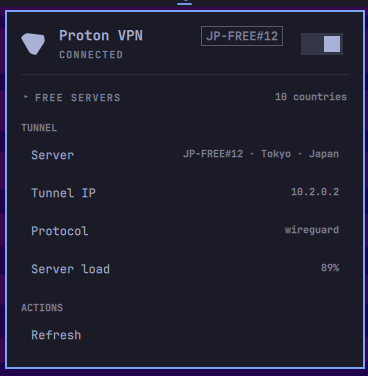
Features
- Bar icon: theme-colored Proton VPN mark with connected/disconnected state.
- Details panel with:
- Connected server and location
- Server load and protocol
- Session uptime ("Connected for 2h 13m")
- Live download/upload rates
- Tunnel IP
- Collapsible list of free-server countries (click the header or press
s) - Refresh action
- Desktop notifications when the VPN connects, disconnects, or a command fails (goes through the shell's notification daemon, so do-not-disturb applies).
- Left click opens the panel. The panel's on/off switch responds to the click instantly (optimistically) and reconciles with the real VPN state.
- Right click connects to the fastest eligible Proton server or disconnects.
- Middle click refreshes status.
- Keyboard navigation:
j/k,enter,t,c,s,r, andesc.
Backend
This plugin uses Proton's official Linux CLI. It does not use wg-quick,
static WireGuard files, downloaded server configs, or custom DNS commands.
protonvpn connect       # fastest eligible server
protonvpn disconnect
protonvpn status
The official CLI performs server selection, NetworkManager setup, DNS, and
firewall handling. On a Free plan, Proton selects the fastest available free
server. The GUI and CLI cannot run simultaneously; close protonvpn-app
before using the bar toggle with this backend.
Requirements
proton-vpn-cliinstalled and signed inwl-copyfor copy actionsnotify-sendfor desktop notifications (disable with thenotificationsEnabledsetting if it is not installed)
Install the official Arch package with:
omarchy pkg add proton-vpn-cli
protonvpn signin
Setup
ln -s "$(pwd)" ~/.config/omarchy/plugins/tharin.protonvpn
omarchy plugin enable tharin.protonvpn
omarchy bar move tharin.protonvpn --section right
The shell hot-reloads changes. Force discovery if needed:
omarchy-shell shell rescanPlugins
Settings
| Key | Type | Default | Meaning |
|---|---|---|---|
refreshIntervalSec |
integer | 30 | CLI status poll interval |
notificationsEnabled |
boolean | true | Desktop notifications on connect/disconnect/failure |
Set it with:
omarchy bar set tharin.protonvpn refreshIntervalSec 30
Removal
omarchy plugin disable tharin.protonvpn
rm ~/.config/omarchy/plugins/tharin.protonvpn   # symlink or copied folder
To also uninstall the CLI dependency:
omarchy pkg drop proton-vpn-cli