
Theme Picker
A bar widget for Omarchy that lets you change the Hyprland theme right from your bar, with live preview images and theme colors.
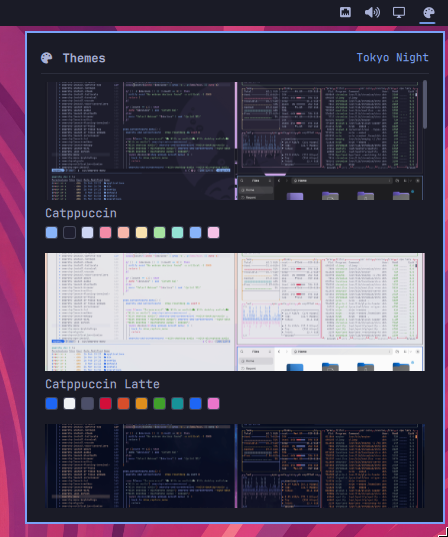
Features
- Browse every installed theme with a preview image and its color palette
- Click a card to apply the theme instantly (
omarchy theme set) - Highlights the currently active theme with an accent border and badge
- Fetches previews from
preview.pngor the theme'sbackgrounds/folder - Detects user themes in
~/.config/omarchy/themes(they override stock themes) - Scrollable list, works with the Omarchy shell theme system
Requirements
- Omarchy with the Quickshell-based shell
jq(used by the theme discovery script)- Hyprland (Omarchy's window manager)
Installation
Install from the plugin repository (recommended):
omarchy plugin add https://github.com/archlatam/omarchy-theme-picker.git --enable
--yesskips the interactive placement prompt and uses the manifest's default section (right). Omit it to choose the bar section interactively.
Or clone manually and enable it:
git clone https://github.com/archlatam/omarchy-theme-picker.git ~/.config/omarchy/plugins/theme-picker
omarchy plugin enable theme-picker --section right
To update an already installed plugin:
omarchy plugin update theme-picker
Bar placement
The widget lives in the right section of the bar by default. To place it in the right section before the power widget (matching the recommended setup):
omarchy plugin enable theme-picker --section right --before omarchy.power
To move it after the plugin is already enabled:
omarchy bar move theme-picker --section right --before omarchy.power
Other placement options: --after <widget-id>, --index <n>, or sections
left/center.
Uninstall
omarchy plugin disable theme-picker
omarchy plugin remove theme-picker
Then remove the entry from ~/.config/omarchy/shell.json.
Usage
Click the palette icon in the bar to open the picker. Select any theme card to apply it. The current theme is marked with an accent border and a "Current" badge.
How it works
ThemePicker.qml— the bar widget UI (Quickshell/BarWidget)scripts/themes— discovers themes and emits a JSON list of{slug, name, preview, current, colors}
The script scans themes from $OMARCHY_PATH/themes and ~/.config/omarchy/themes. When a user theme has the same slug as a stock theme, the user copy wins.