
omarchy-ring-cameras
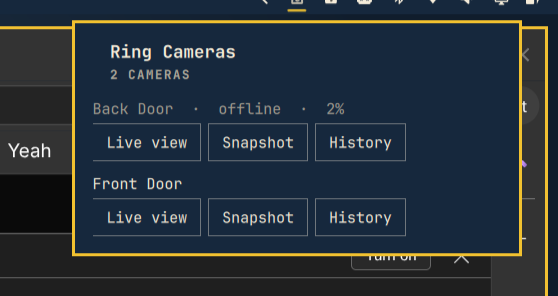
Local Ring camera browser for the Omarchy desktop. Lists your Ring cameras
in a bar dropdown and opens a live view (in mpv), a snapshot, or recent
event history (motion/ding/on-demand clips, also played in mpv) on demand.
This repo is the plugin — clone it straight into
~/.config/omarchy/plugins/ (or install via omarchy plugin add, see
Setup below) and it's both the bar widget (Panel.qml, manifest.json,
id tim.ring-cameras) and the daemon it talks to (src/, bin/).
How it works
src/creds.mjs— stores your RingrefreshTokenin~/.local/share/omarchy-ring-cameras/creds.json, mode 0600. Plain file, no passphrase vault: a Ring refresh token is a session credential (like an AWS/gh CLI token), not a signing key, so filesystem permissions are the chosen trust boundary rather than encryption-at-rest with an unlock step.src/daemon.mjs— the long-running process. Wrapsring-client-api, exposes a control protocol over a Unix socket (~/.local/state/omarchy/ring-cameras/control.sock, mode 0600), and persists the refresh token every time Ring rotates it (onRefreshTokenUpdated) so restarts don't need a re-login. Both ends of that socket protocol (control-socket.mjs's server loop andctl.mjs's client loop) cap how much they'll buffer waiting for a newline at 1 MiB — found by review: without it, a malfunctioning local peer, or Ring itself returning an oversized camera name/prompt/error, could grow the daemon's buffer,ctl.mjs's buffer, or the amount QML'sStdioCollectorretains without bound. Verified live against both directions: flooding the daemon's socket with 2 MiB and no newline gets it closed withmessage_too_largewell before the full flood lands, and pointing realctl.mjsat a fake server doing the same getsresponse_too_largeinstead of hanging or growing.- Live view:
camera.streamVideo()spawns ffmpeg internally and hands the daemon raw MPEG-TS bytes viastdoutCallback, which get piped straight into anmpv -window. One live view at a time — starting a new one stops whatever was already playing. - Snapshot:
camera.getSnapshot()writes a JPEG to~/.local/state/omarchy/ring-cameras/snapshots/and the panel opens it withxdg-open. - History:
camera.videoSearch({ dateFrom, dateTo, order })lists recent events (last 48 hours, capped at 30) with a directly playable URL per clip — no ffmpeg piping needed, justmpv <url>, since these are plain HTTPS mp4s. Those URLs are presigned and expire in ~15 minutes (Ring setsX-Amz-Expires=900), so the panel fetches a fresh list each time you open the history section rather than caching it. - Motion notifications:
RingCameraauto-subscribes itself to Ring's push (ding/motion) stream on construction, andRingApiauto-registers the push receiver too — both using Ring's own embedded Android-app Firebase credentials, no setup needed on our end. The daemon listens on each camera'sonNewNotification, and on a motion event firesnotify-send -A "default=View clip" ..., which blocks and prints the chosen action to stdout — clicking the notification body plays the clip inmpv; dismissing/ignoring it does nothing further. Motion→clip resolution triescamera.getRecordingUrl(dingId)first (targets Ring's short-lived "recent dings" feed) and falls back to avideoSearchover the last 15 minutes matched by ding id if that 404s — verified live thatgetRecordingUrlreally does reject an aged-out ding ("Url not found") and that thevideoSearchfallback recovers a valid URL for the exact same id. bin/ctl.mjs(installed asomarchy-ring-cameras-ctl) is a thin CLI over the control socket, same shape as the QML panel uses. Commands with secrets (link_start,link_2fa) take--stdininstead of a JSON argv payload — argv is readable by any other process on this machine via/proc/<pid>/cmdlinefor as long as the (short-lived) ctl process is alive, so the QML panel writes those to the child's stdin instead (stdinEnabled: true+write(), the same pattern Omarchy's own Wi-Fi panel uses for passphrase entry).src/fetch-fix.mjs— forces the globalfetchto undici's own implementation.ring-client-apibuilds its network Agent from its own npm-installedundicidependency but calls the globalfetchto use it as a dispatcher; on Node v26 (this machine) that global fetch is backed by a different internal undici version, and the mismatch doesn't error — it silently never dispatches the request. Without this fix, every login and API call hangs forever with zero network activity. Imported first, before anyring-client-apiimport, in bothdaemon.mjsandbin/setup.mjs.
Setup
Either install through Omarchy's plugin marketplace:
omarchy plugin add https://github.com/ninepointlabs/omarchy-ring-cameras --enable
cd ~/.config/omarchy/plugins/tim.ring-cameras
npm install
./install.sh
...or clone it yourself anywhere and symlink it in:
git clone https://github.com/ninepointlabs/omarchy-ring-cameras
cd omarchy-ring-cameras
npm install
ln -s "$PWD" ~/.config/omarchy/plugins/ring-cameras
./install.sh   # symlinks omarchy-ring-cameras-ctl onto PATH, generates
               # and enables the systemd --user service
omarchy plugin add only clones and validates — it doesn't run npm install or install.sh for you, so that second step is required either
way. install.sh resolves node from your PATH and the repo's actual
location at install time (not hardcoded), so it works regardless of which
Node version manager you use or where you cloned it.
Then open the "Ring Cameras" bar icon (right section). If no account is
linked yet, the panel itself prompts for email/password (and a 2FA code if
your account uses it) — no terminal step needed. bin/setup.mjs still
exists as a CLI fallback with the same login logic, useful for debugging
from a terminal with visible output.
Operating it
systemctl --user status omarchy-ring-cameras.service
tail -f ~/.local/state/omarchy/ring-cameras/daemon.log
omarchy-ring-cameras-ctl status
omarchy-ring-cameras-ctl list_cameras
Not done yet / caveats
- Verified against a real account: login (both
bin/setup.mjsand the in-panel form),list_cameras,snapshot,history, and live view have all been used successfully against a real Ring account (multiple start/stop cycles logged with no errors). - Motion notifications are unverified against a real event yet — the
daemon starts cleanly with the new subscription code,
notify-sendfires correctly (confirmed structurally), and the click→play resolution logic was verified piece-by-piece against real historical data, but nobody has triggered a real motion event and actually clicked the resulting notification end to end. - Playing a history clip via the panel's Play button is likewise
unverified —
mpv <url>against a real presigned S3-style URL hasn't been watched end to end, only confirmed the URLs come back well-formed. - If login ever fails with
Cannot use 'in' operator to search for 'error' in ..., that's Ring's edge/WAF returning a plain-text (non-JSON) body, which the library's error formatting doesn't handle — seen once with an obviously-fake test email, not with the real account. - Only one live view at a time; starting a second stops the first.
Recording playback is independent of live view — each clip opens its own
mpvwindow and isn't tracked or stoppable from the panel; close it like any other video window. - No light/siren toggle yet, even though
RingCamerasupports both (setLight,setSiren) — straightforward to add todaemon.mjsand the panel if wanted. package.jsonpinsring-client-api@^13.0.0, which warns it wants Node 18/20/22; this was developed and tested on Node 26. The undici/fetch mismatch above was a direct consequence of that gap — worth assuming there could be others.npm auditoriginally reported 7 transitive vulnerabilities, all several layers deep insidewerift(the WebRTC library behind live view) andsocket.io-client. Triaged:uuidandparseurihad patched versions, now pinned viapackage.json'soverridesfield, which fixed 4 of the 7 — live view re-tested afterward (start, confirmed streaming, stop) to make sure pinning them didn't break the WebRTC signaling path, since that's exactly where they sit. The remaining 3 are all the sameippackage SSRF advisory (counted once per dependency path): it has no patched version at all (npm auditlists it asip *— every published version matches), so there's nothing to update to. Low real-world risk here regardless, since it's only used internally against Ring's own relay servers, never attacker-controlled input.- The systemd unit sets
LimitCORE=0,NoNewPrivileges=true, andPrivateTmp=true, but intentionally skipsProtectHome/ProtectSystemsandboxing (unlike a headless daemon) because it needs to spawnmpvagainst your live Wayland session, and doing that safely needs careful path allow-listing (Wayland/audio sockets under/run/user/<uid>, plus this project's own data/state dirs under~/.local/) that hasn't been worked out yet.