
Theme Rotate
A bar widget plugin for Omarchy that randomizes or auto-rotates your theme, optionally following sunrise and sunset.
Features
- Monochrome bar icon (a shuffle glyph, a pause glyph while paused) with a popup panel. Icons are Nerd Font glyphs, so they take the theme's bar foreground instead of an emoji font's own colors.
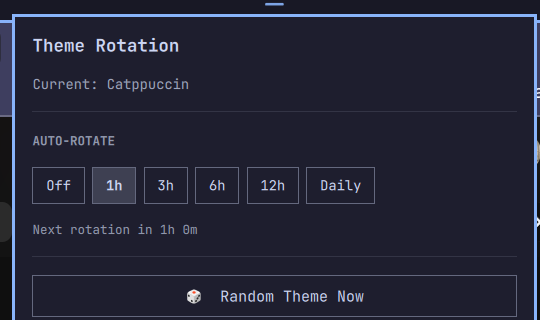
- Random Theme Now — manually shuffle to a random installed theme different from the current one.
- Auto-rotate on a schedule: Off / every 1h / 3h / 6h / 12h / Daily.
- Pause — freeze on the current theme without losing your schedule. Nothing rotates while paused, not even the day/night swap; resuming starts a fresh interval rather than firing for the time you were away.
- Choose themes — a fullscreen wallpaper grid for picking which installed themes the rotation is allowed to use. Click a tile to include or exclude it, or use All / Dark only / Light only. Leaving everything selected means "all themes", so themes you install later join in automatically.
- Follow the sun — optional: pick a random light theme after sunrise
and a random dark theme after sunset. Uses the same location as Omarchy
weather (
omarchy weather location, otherwise wttr.in by IP) and switches as soon as day becomes night (including after sleep/resume). - Wall-clock based scheduling, so a laptop that sleeps through part of the interval still catches up correctly on resume instead of losing that time.
- Settings persist across shell restarts, stored in the widget's own
shell.jsonentry — the same mechanism Omarchy's built-in widgets use — and survive a multi-monitor setup, where one copy of the widget runs per bar (see Several copies, one rotation).
Requirements
- Omarchy Linux (Quickshell-based bar/shell).
- More than one installed theme for rotation to have something to rotate to
(
omarchy theme list).
Install
omarchy plugin add https://github.com/ninepointlabs/omarchy-theme-rotate.git --enable
Or manually:
git clone https://github.com/ninepointlabs/omarchy-theme-rotate.git ~/.config/omarchy/plugins/tim.theme-rotate
omarchy plugin enable tim.theme-rotate
Remove
omarchy plugin remove tim.theme-rotate
This disables the widget and deletes its plugin folder. It does not revert your currently applied theme.
Usage
Click the shuffle icon in the bar:
- Random Theme Now rotates immediately to a random theme (or a random day/night theme when Follow the sun is on).
- The Auto-rotate row picks how often it rotates on its own: Off, every 1/3/6/12 hours, or Daily.
- Pause rotation stops the clock and keeps the theme you are on. The bar icon turns into ⏸ so you can see it at a glance. Resume when you want the schedule back.
- Follow the sun limits those picks to light themes during the day and
dark themes at night. Theme light/dark comes from each theme's
colors.tomlmodefield. - Choose themes… opens the wallpaper grid. Selections combine with everything else: the rotation picks from your chosen themes, narrowed to the light or dark half when Follow the sun is on. If that leaves nothing (say you picked only dark themes and the sun is up), it falls back to your chosen set rather than getting stuck.
Keyboard and scripting
The widget answers on its own IPC target, so anything in the popup can be bound to a key or driven from a script:
omarchy-shell tim.theme-rotate toggle       # the popup
omarchy-shell tim.theme-rotate themes       # the wallpaper grid
omarchy-shell tim.theme-rotate togglePause  # pause / resume
omarchy-shell tim.theme-rotate pause
omarchy-shell tim.theme-rotate resume
omarchy-shell tim.theme-rotate random       # rotate now
Set a weather location if you want sunrise/sunset for a specific place instead of IP geolocation:
omarchy weather location --set "Tyler" 32.35,-95.30
How it works
A background timer inside the widget polls once a minute and compares the
current time against "last rotated + configured interval". When due, it runs
bin/rotate-random.sh, which asks Omarchy for the
installed theme list and the current theme, picks a different one at random,
and applies it with omarchy theme set.
When Follow the sun is on, bin/sun-status.sh resolves
today's sunrise and sunset (cached for the day) and the rotator keeps the
current theme in the matching pool — switching as soon as the sun does.
Several copies, one rotation
Omarchy runs one bar per monitor, so there is one copy of this widget per monitor, each with its own due-check timer and its own copy of the settings the shell handed it. Two things keep them from fighting:
- Writes can't lose a setting. The shell hands each copy a settings
snapshot when it is built, and a copy that merges its change onto its own
snapshot writes back whatever that snapshot still says about every other
key — undoing another copy's change. Instead, every write merges onto the
live
~/.config/omarchy/shell.jsonentry, keeping any key only the snapshot knows about, and every read prefers the live entry too, so editingshell.jsonby hand shows up in the popup without a restart. The rules live inSettingsMerge.js. - Only one rotation happens. Automatic rotations pass
--debounce-msto the rotator, which takes a lock before it reads the current theme and records when it last applied one. Copies that reach the same deadline in the same instant queue on the lock and then keep the theme instead of shuffling on top of each other. Rotations you ask for yourself never debounce.
Tests
node --test tests/
Covers the settings merge rules: which source wins, that no key is ever
dropped whichever side holds it, and that false/0 are values rather than
missing settings.
How it works (scripts)
The picker grid is built by bin/list-themes.sh,
which prints every installed theme with its light/dark mode, its first
wallpaper, and its background color. Both scripts share the theme
classification in bin/theme-lib.sh, so the grid can
never disagree with the rotator about what a theme is.
License
MIT — see LICENSE. No external dependencies beyond Omarchy itself
(the omarchy CLI) and standard bash.