
Calendar for Omarchy
Your Google Calendar, in your Omarchy bar. A month view with your real events on it, a bar that tells you what is coming before it starts, and a form to create or edit events without opening Google.
Not a Google user? It reads a plain JSON file, so khal, vdirsyncer, Nextcloud or an ICS feed work just as well. See Use another source.
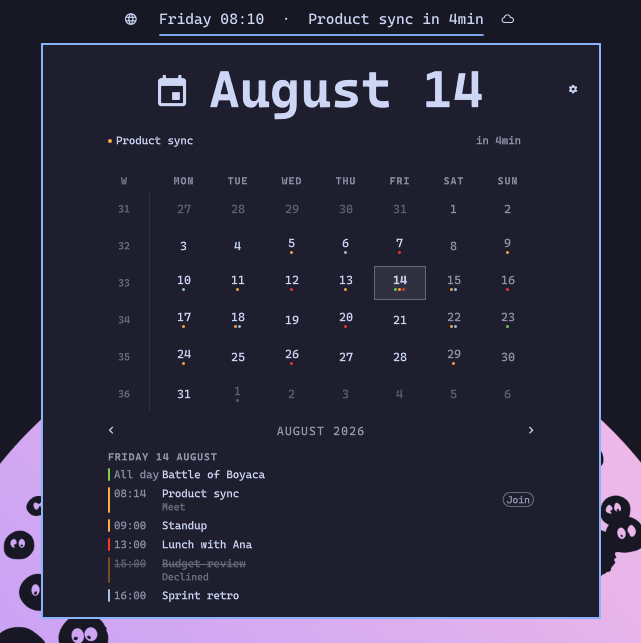
It replaces the built-in clock rather than sitting beside it, so you keep one icon. Left click opens a month calendar with your real events on it. When something is close, the bar itself stops being just a clock and tells you:

The clock stays. This widget takes the desktop clock's place, so trading the time away for an event title would be a downgrade you pay for all day.
Features
- Month grid with ISO week numbers, coloured dots per calendar
- The selected day's agenda under the grid, click any day to see it
- Today's agenda reads as a timeline: a line at the current time, past events faded, the event in progress highlighted, and a countdown on the next one
- Create, edit and delete events from the panel (press
n), with a form like Google's: date picker, times in 15-minute steps, repeat, guests with suggestions, Google Meet, notifications, colour. Off by default, see Create and edit events - The bar label announces what is next, minutes before it starts
- A Join button on meetings that have a video link, shown only from 15 minutes before the start until 15 minutes after the end
- Clicking any event opens it in your calendar
- Per-calendar visibility, week start, countdown lead time and a 24 h or 12 h time format
- Google's working-location markers hidden by default, declined invitations struck through
- Everything the built-in Omarchy clock does: label formats, right click to cycle them, the year and life progress bars if you want them back
- Theme aware, light themes included, because it is a fork of the built-in clock
- No Google Cloud project needed if you read your calendars through Evolution Data Server (community-maintained), or any other source that writes the events file
Requirements
Omarchy 4 with Quickshell. Google Calendar is optional, see Use another source. A Google Cloud project is optional too, see Sync without a Google Cloud project.
Install
omarchy plugin add https://github.com/tmn73/omarchy-calendar.git --enable
This widget replaces the built-in clock. In ~/.config/omarchy/shell.json,
remove the omarchy.clock entry from bar.layout.center and point
bar.centerAnchor at tmn73.calendar:
{
  "bar": {
    "centerAnchor": "tmn73.calendar",
    "layout": {
      "center": [
        {
          "id": "tmn73.calendar",
          "format": "dddd HH:mm",
          "eventTimeFormat": "HH:mm"
        }
      ]
    }
  }
}
Then:
omarchy restart shell
Installing is not the whole job. At this point you have a working clock and an empty calendar, because nothing is feeding it yet. Connect Google Calendar below, or point any other source at the file. The widget says as much when you open it, with the command to run.
Sync your Google Calendar
~/.config/omarchy/plugins/tmn73.calendar/sync/setup
Run it in a real terminal. It pauses for input, and four steps have to be done by hand in the Google Cloud Console.
You need your own Google OAuth client. There is no shared one, and that is
not laziness. calendar.readonly is a Google sensitive scope, so a publicly
distributed client would need Google verification and is capped at 100 users
until it gets it. This is exactly why gcalcli's shared token is currently
restricted. Every user brings their own credentials.
The script automates what has an API:
- an isolated
gcloudconfiguration, so your other projects are untouched - creating the Google Cloud project
- enabling the Calendar API
- installing the downloaded client secret, with the right permissions
- the scoped login, and verifying the scope was actually granted
- the systemd timer
It stops and waits for the four things Google exposes no API for: the consent screen, declaring the calendar scope, publishing the app, and creating the Desktop OAuth client. Each one prints the exact URL and the exact values.
Two of those steps are traps, and the script says so at the time:
- Declaring the scope under Data Access is not optional. A scope that is
not declared there is never offered on the consent screen, so there is no box
to tick, Google silently grants only your email address, and every sync then
fails with
403 insufficient scopeswhile the login reports success. - Publish the app. While it sits in Testing, Google expires refresh tokens after seven days and your calendar quietly stops updating. Unverified production apps show a one time warning screen and then work indefinitely.
When it finishes, events land in ~/.local/state/omarchy/calendar-events.json
every five minutes and the widget picks them up without a restart.
Create and edit events
Off by default. Turn it on and the panel gets a + next to the day's
agenda (or press n), and a pencil and a trash can when you hover one of
your own events.
It needs one more Google scope, calendar.events. That scope can see and
edit events. It cannot change sharing or delete a calendar.
New setup: answer yes when sync/setup asks, or run sync/setup --write.
Already set up:
-
In the Cloud Console, under Data Access, add
calendar.eventsnext tocalendar.readonly. -
Log in again with both scopes. The
rmdrops the cached token, which gws would keep serving without the new scope:rm -f ~/.config/gws-omarchy-calendar/token_cache.json GOOGLE_WORKSPACE_CLI_CONFIG_DIR=~/.config/gws-omarchy-calendar gws auth login \ --scopes https://www.googleapis.com/auth/calendar.readonly,https://www.googleapis.com/auth/calendar.events -
Set
"write": truein~/.config/omarchy/calendar-sync.json.
Only calendars you own or can edit get the pencil and the trash can. The
form follows Google's: start and end dates with a date picker, times in
15-minute steps in your eventTimeFormat, all day, repeat, guests, Google
Meet, location and description. Under "More options": notifications, busy
or free, visibility, colour and guest permissions.
With guests, the panel asks whether to send invitation emails. For a recurring event, it asks whether the change is for this event or all events. To move an event to another calendar, use Google Calendar. A repeat rule the menu cannot show, or a notification it has no entry for, stays as it is unless you pick another one.
The EDS backend cannot write yet, so the panel shows none of this there.
Sync without a Google Cloud project
Community-maintained. The author does not run Evolution Data Server, so the people who use this backend are the ones who test it. When you open an issue about it, say that you are on the EDS backend.
The setup above needs a Google Cloud project because calendar.readonly is a
Google sensitive scope, so a publicly distributed client would need
verification. There is a way around that: read the calendars out of
Evolution Data Server, which signs in with GNOME's already-verified OAuth
client. No project, no consent screen, no scope declaration, no
client_secret.json, and no Testing-mode refresh token expiring after seven
days. Just a browser sign-in.
The trade is roughly 20 packages, and a GUI is needed once to sign in.
sudo pacman -S evolution-data-server evolution
Describe the account in ~/.config/evolution/sources/google.source:
[Data Source]
DisplayName=Google (you@example.com)
Enabled=true
Parent=

[Collection]
BackendName=google
Identity=you@example.com
CalendarEnabled=true
ContactsEnabled=false
MailEnabled=false

[Authentication]
Method=Google
User=you@example.com
Host=www.google.com
RememberPassword=true
Writing that by hand is not laziness either. Evolution's Collection Account wizard resolves a custom Workspace domain to Google's mail servers and then asks for a password to discover CalDAV, rather than reusing the Google OAuth2 provider it already ships. It offers no calendar at all, and the wizard is a dead end. The file skips it.
Then sign in once:
evolution -c calendar
Its credential prompter opens Google's sign-in, EDS discovers the calendars over CalDAV, and the refresh token goes to your keyring. Evolution is not needed again unless Google later wants a re-auth and needs a window to ask in; the data server keeps running headless.
Finally point the sync at it in ~/.config/omarchy/calendar-sync.json:
{
  "backend": "eds",
  "identity": "you@example.com"
}
identity is the address whose invitation answers count as yours, which is
what makes "hide declined events" work. Leave it out and responseStatus is
left unset rather than guessed from the first attendee.
The same systemd timer drives it, calendars.include/exclude and window
behave identically, and the file written is the same contract, so switching
backends changes nothing the widget can see.
One known limit: clicking an event opens nothing on this backend, because CalDAV does not carry Google's link to the event.
Use another source
The widget has no idea Google exists. It reads one file and renders it:
~/.local/state/omarchy/calendar-events.json
Anything that writes that file works: khal, vdirsyncer, Nextcloud, an ICS feed,
a shell script, a cron job of your own. No credentials, no network, no gws.
{
  "version": 1,
  "syncedAt": "2026-08-10T16:42:00+00:00",
  "source": "whatever produced this",
  "events": [
    {
      "id": "any-stable-id",
      "calendarId": "work@example.com",
      "calendarName": "Work",
      "color": "#f83a22",
      "dateKey": "2026-08-10",
      "start": "2026-08-10T19:15:00-05:00",
      "end": "2026-08-10T20:15:00-05:00",
      "allDay": false,
      "title": "Tax filing",
      "location": ""
    }
  ]
}
These extra fields are optional. Omit them and everything still works:
| Field | Effect |
|---|---|
meetingUrl |
Shows the Join button around the event's time. Must be https, anything else is dropped |
eventUrl |
Clicking the row opens this. Must be https |
eventType |
workingLocation is hidden by default, outOfOffice is labelled |
responseStatus |
declined is struck through, and can be hidden entirely |
A top-level writableCalendars list (id, name, color) turns on the
panel's edit buttons for those calendars. Only the bundled sync should write
it: the panel sends its edits to the bundled event command, not to your writer.
Rules a writer has to follow:
dateKeyisYYYY-MM-DDin local time, and it is what the grid keys on.- A multi-day event is emitted once per day it covers, each row with its own
dateKey. Those rows share anid, so the unique key for a row isid + dateKey. allDayevents are excluded from the countdown, since counting down to midnight tells you nothing.- Write the file atomically, temp file then rename. The widget watches it.
- Unknown fields are ignored, so you can add your own.
tests/fixtures/calendar-events.json is a valid two-event file to start from.
Writers other people have built:
- Thunderbird by @marijn070. A Nushell script that reads Thunderbird's local calendar, so every source you already aggregate in Thunderbird shows up in the widget.
Settings
Click the clock, then the gear icon in the panel header.
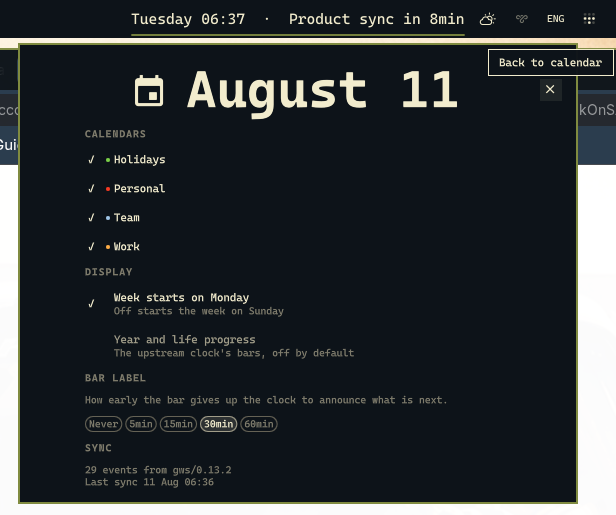
| Section | What it does |
|---|---|
| Calendars | Show or hide each calendar. The list comes from your own events, so it needs no configuration |
| Week starts on Monday | Off starts the week on Sunday |
| Working location events | Google's work-from-home markers. Hidden by default because they are all-day rows describing no commitment |
| Declined invitations | On lists them struck through, off hides them entirely |
| Year and life progress | Brings back the built-in clock's bars, off by default |
| Bar label | How early the bar announces what is next: never, 5, 15, 30 or 60 minutes |
| Event times | Set eventTimeFormat in shell.json to a Qt date-time format such as HH:mm or h:mm AP |
| Sync | Event count, source and last sync time, for diagnosing a quiet calendar |
Hiding a calendar is instant and does not change what the sync fetches, so bringing one back does not wait for the next run.
Sync behaviour lives in ~/.config/omarchy/calendar-sync.json:
{
  "profile": "~/.config/gws-omarchy-calendar",
  "gwsPath": "/absolute/path/to/gws",
  "calendars": { "include": [], "exclude": [] },
  "window": { "pastDays": 7, "futureDays": 60 }
}
include: [] means all of them. Names and ids both match. gwsPath has to be
absolute: a systemd user service does not inherit your shell's PATH, so a
gws installed by bun, cargo or pipx is invisible to it under its bare name.
Troubleshooting
journalctl --user -u omarchy-calendar-sync -f
systemctl --user list-timers omarchy-calendar-sync.timer
| Symptom | Cause |
|---|---|
403 insufficient scopes |
The calendar scope was never granted. Check gws auth status; if it only lists openid and email, declare the scope under Data Access in the console, then run sync/setup again |
401 invalid_grant |
The refresh token expired. Almost always an app left in Testing, which caps refresh tokens at seven days. Publish it, then log in again |
gws is not installed or not on PATH from the timer, but it works in your terminal |
gwsPath is not absolute. sync/setup writes it for you |
| "Write access not granted" in the event form | The token has no calendar.events scope. See Create and edit events |
| "Google refused the change: Shared properties can only be changed by the organizer" | The event is an invitation. Only its organizer can change its title, time or guests. Your own colour, notification and busy or free still change |
cannot parse gws version from the timer, with exec: node: not found |
gwsPath is absolute but points at an npm wrapper that needs node on your shell PATH. With mise, use its shim: ~/.local/share/mise/shims/gws. sync/setup checks this and records the shim for you |
Not in a workspace during setup, or setup says gws is not the Google Workspace CLI |
Another program named gws comes first on your PATH, for example the git workspace helper. Pass the right one: GWS=/absolute/path/to/gws sync/setup |
| The panel says "No calendar synced yet" | The events file does not exist. The sync has never completed |
| The panel says the calendar may be out of date | The file exists but syncedAt is old. Check the journal above |
| An event shows up twice | Two of your calendars both carry it. Hide one in settings. The sync already drops exact duplicates by iCalUID and start time |
The project ID you specified is already in use during setup |
Fixed in 0.1.1. Google Cloud project ids are unique across all of Google, and older versions hardcoded one. Update the plugin, or pass your own: PROJECT_ID=something-unique sync/setup |
| Clicking an event opens your calendar but not the event | The link resolves only for the Google account the sync authenticated as. If your browser opens it in a profile signed into a different account, Google falls back to the calendar root. Route google.com/calendar to the profile holding that account |
| The Join button never appears | It only shows from 15 minutes before the start until 15 minutes after the end, and only when the event has a video link |
| Events are off by a day | Report it. Timezone handling resolves a named IANA zone precisely to avoid this, and there is a regression test for daylight saving transitions |
Uninstall
systemctl --user disable --now omarchy-calendar-sync.timer
rm ~/.config/systemd/user/omarchy-calendar-sync.{service,timer}
systemctl --user daemon-reload
omarchy plugin remove tmn73.calendar
Then put omarchy.clock back in shell.json and omarchy restart shell.
Your Google credentials live in the gws profile directory and are not touched
by any of this. Delete that directory to revoke locally, and remove the project
from your Google Cloud console to revoke properly.
Development
cd sync && PYTHONPATH=. python3 -m unittest discover -s ../tests -t .. -v
node --test tests/model.test.js
No dependencies, no dev dependencies. The Python sync is standard library only
and the QML logic lives in Model.js, which loads under Node precisely so it
can be tested.
Panel.qml and BarWidget.qml are not unit tested. Quickshell widgets need a
live shell to render, and building that harness would cost more than it catches.
Anything worth testing was deliberately pushed down into Model.js.
License
MIT. Derived from Omarchy's built-in clock plugin, whose copyright notice is
kept in LICENSE.