
LTE
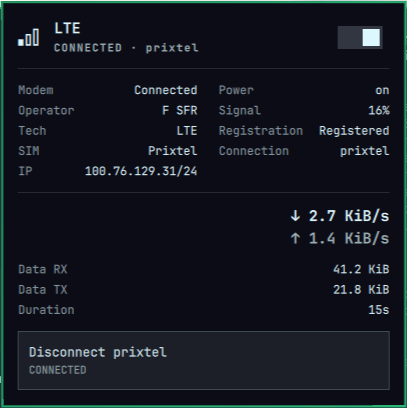
Omarchy bar widget to control your cellular modem (LTE/4G). The bar shows a signal glyph — dimmed while LTE is off — and left-clicking opens a panel with a master on/off switch, a Connect/Disconnect action for your cellular profile, and per-session data usage (RX/TX bytes, live rates, duration).
Install
omarchy plugin add https://github.com/OverStyleFR/omarchy-lte.git --enable
If the bar does not pick it up automatically:
omarchy restart shell
Usage
Click the widget to open or close the panel. The switch toggles the WWAN
radio and the modem (lte-toggle, via nmcli + mmcli). The
Connect/Disconnect row manages the cellular profile itself (nmcli connection up/down <profile>) — the two are independent on purpose.
Keyboard: j/k move the cursor between the switch and the connect row,
Enter activates, Escape closes, r refreshes, right-click on the bar
widget also refreshes.
Getting online, step by step
The panel splits "powering the modem" from "establishing the data connection", so going online takes three steps:
- Switch ON – turns the modem on: WWAN radio on, ModemManager modem enabled. The bar glyph stops being dimmed.
- Wait for registration – the modem scans the network; the panel shows
SearchingthenRegistered(with the operator name and signal %). This can take a few tens of seconds after a cold start. - Connect to your profile – press the
Connect <profile>row (e.g.Connect prixtel). The profile is your NetworkManager cellular connection (anygsmconnection; the first one found is shown in the row). It is brought up withnmcli connection up <profile>and the panel switches toCONNECTED · <profile>with your IP and the live Data usage counters.
You now have internet over the cellular link. To disconnect, press
Disconnect <profile> (the modem stays on); to cut everything, flip the
switch OFF (the modem powers down and any active connection drops).
The two controls are linked one way only: the Connect/Disconnect row only appears while the modem is on. If you connect and then toggle OFF, the connection is dropped by the modem power-down.
The panel shows:
- Modem / Power / Operator / Signal / Tech – live state, signal quality in percent.
- Registration –
Registered,Roaming,SearchingorDenied. - SIM / Connection / IP – SIM carrier, active NM connection, IPv4 (click to copy).
- Data usage – RX/TX bytes of the current session, live
↓/↑rates and connection duration. Counters come from/sys/class/net/<iface>and reset on each new connection.
Configure
omarchy bar set tomv.lte refreshIntervalSec 2   # poll interval (default 2)
omarchy bar move tomv.lte --section right
Remove
omarchy plugin remove tomv.lte
Dependencies
mmcli(ModemManager) andnmcli(NetworkManager).wl-copy(wl-clipboard) for the copy-IP action.- Works with ModemManager modems (MBIM/QMI serial, …) that NetworkManager
exposes as a
gsmdevice.
License
MIT — see LICENSE.