
Omarchy Dictionary
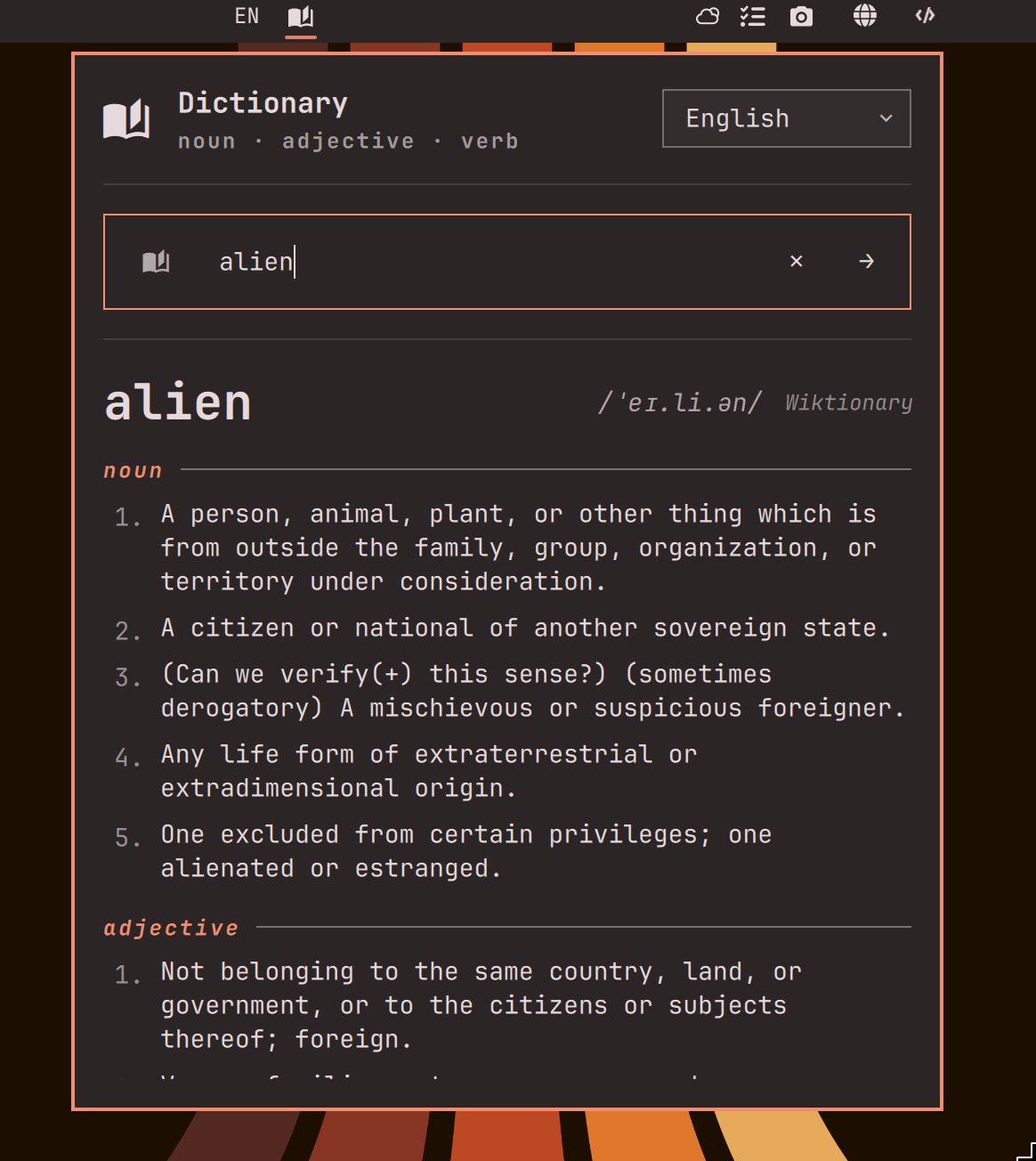
A Quickshell bar widget for Omarchy that looks up word definitions, with support for 23 language editions, fuzzy "did you mean?" suggestions, and a global hotkey for looking up highlighted text anywhere on your system.
English works fully offline via a bundled Webster's 1913 dictionary; other
editions use Wiktionary over the network. Dictionary sources are pluggable
adapters tried in order — English resolves to
[Webster's 1913 → Wiktionary], so a word missing from the 1913 text (or
any local miss) falls back to the network when you're online.
Click the bar icon to open a search field. Type a word and press Enter to look it up. Use the language dropdown in the panel header to switch editions between supported languages. When no match exists, up to three similar words are suggested as clickable chips.
Requirements
- Omarchy (uses the Quickshell bar plugin system)
wl-clipboardfor the global selection hotkey — preinstalled on Omarchy- Network access to
*.wiktionary.org— only needed for non-English editions and as a fallback when a word isn't in the offline dictionary; English lookups work with no network at all
Offline support
English definitions ship with the plugin: 108,181 headwords from
Webster's New International Dictionary (1913), via the GCIDE XML dataset,
compressed into per-letter files under data/webster/ (~6 MB total).
Lookups read the one relevant letter file with gzip — no new runtime
dependencies.
Dictionary sources are adapters (Model.js: ADAPTERS). Each adapter
declares the languages it serves plus an argsFor/parse pair, and the
panel tries them in order until one succeeds. Adding a future source is a
new adapter object and one line in the registry.
To rebuild the data files from the upstream source:
scripts/build-webster.py # downloads GCIDE XML, writes data/webster/*.json.gz
The raw XML is gitignored; only the generated files are committed.
Licensing: the 1913 Webster's core text is public domain, but GCIDE's
markup and additions are GPL — see data/webster/LICENSE-DATA.txt.
Install
omarchy plugin add https://github.com/tristonarmstrong/omarchy-dictionary.git --enable
Optionally place it in the center section after the clock:
omarchy bar move tristonarmstrong.dictionary --section center --after omarchy.clock
Usage
Bar search
- Click the bar icon to open the search panel
- Type a word and press Enter to look it up
- Use the language dropdown in the panel header to switch editions
- When no match exists, up to three similar words appear as chips you can click to retry
- Press Esc to close the panel
Global selection hotkey
Bind SUPER + D in ~/.config/hypr/bindings.lua to look up the highlighted
word in any application:
o.bind("SUPER + D", "Look up selection in dictionary", "omarchy-dictionary-lookup")
The plugin bundles scripts/omarchy-dictionary-lookup but never installs
it on its own. Open the dictionary panel and use the
Install hotkey script section at the bottom (border-separated footer
with an Install button) to copy it to ~/.local/bin/ (idempotent —
re-runs only when the bundled copy changes). Once installed, the footer
dismisses itself — the plugin re-verifies the installed copy against the
bundled script at startup (via cmp) and keeps the footer hidden while
they match, so the prompt doesn't reappear after a shell restart. If the
bundled script ever changes, the footer returns to offer the update.
The script reads the
Wayland primary selection (highlighted text), falls back to the clipboard
if empty, extracts the first word, and opens the dictionary panel with that
word pre-filled. With nothing selected it just opens the empty panel.
Word extraction is script-agnostic — Chinese, Japanese, Korean, Greek, Cyrillic, Arabic and accented Latin all work. Note that CJK and Thai have no word delimiters, so a selection spanning several terms is sent as one string and will miss; highlight the single term you want.
Note: A desktop notification confirms when the script is installed. You may want to inspect it before use — review
scripts/omarchy-dictionary-lookupin the plugin repo, or runcat ~/.local/bin/omarchy-dictionary-lookupto see what was installed.
IPC
External callers can drive the plugin via omarchy-shell:
omarchy-shell tristonarmstrong.dictionary search <word>   # search and open
omarchy-shell tristonarmstrong.dictionary open           # open empty panel
omarchy-shell tristonarmstrong.dictionary toggle         # toggle panel
omarchy-shell tristonarmstrong.dictionary close          # close panel
Validate
omarchy plugin validate ~/.config/omarchy/plugins/tristonarmstrong.dictionary
qmllint -I "$OMARCHY_PATH/shell" \
  ~/.config/omarchy/plugins/tristonarmstrong.dictionary/BarWidget.qml \
  ~/.config/omarchy/plugins/tristonarmstrong.dictionary/Panel.qml
Tests
bash tests/run.sh
Runs four suites — QML lint checks (2), Model.js unit tests (273),
the lookup-script tests (41), and the install-stage tests (25) — 341 tests
total. Model.js is parsed
in-process; the lookup script's pure functions are exercised in a
subprocess with stubbed wl-paste and omarchy-shell so the suite
needs no Wayland session or running shell.
Remove
omarchy plugin remove tristonarmstrong.dictionary --yes
rm ~/.local/bin/omarchy-dictionary-lookup
omarchy plugin remove drops the plugin files; the lookup script at
~/.local/bin/omarchy-dictionary-lookup stays (the plugin doesn't know
when it's being removed). Remove it manually with the second command.
Supported languages
23 Wiktionary editions, alphabetically by English label:
| Language | Code |
|---|---|
| Arabic | ar |
| Bengali | bn |
| Chinese | zh |
| Dutch | nl |
| English | en |
| French | fr |
| German | de |
| Hindi | hi |
| Indonesian | id |
| Italian | it |
| Japanese | ja |
| Korean | ko |
| Malay | ms |
| Persian | fa |
| Polish | pl |
| Portuguese | pt |
| Russian | ru |
| Spanish | es |
| Swahili | sw |
| Swedish | sv |
| Thai | th |
| Turkish | tr |
| Vietnamese | vi |
To add another edition, append it to the LANGUAGES array in Model.js.
License
MIT.