
OmaClock
A simple, minimal desktop clock widget for Omarchy that renders behind all of your open windows on the bottom layer — a clean, click-through time display living on your desktop like a wallpaper.
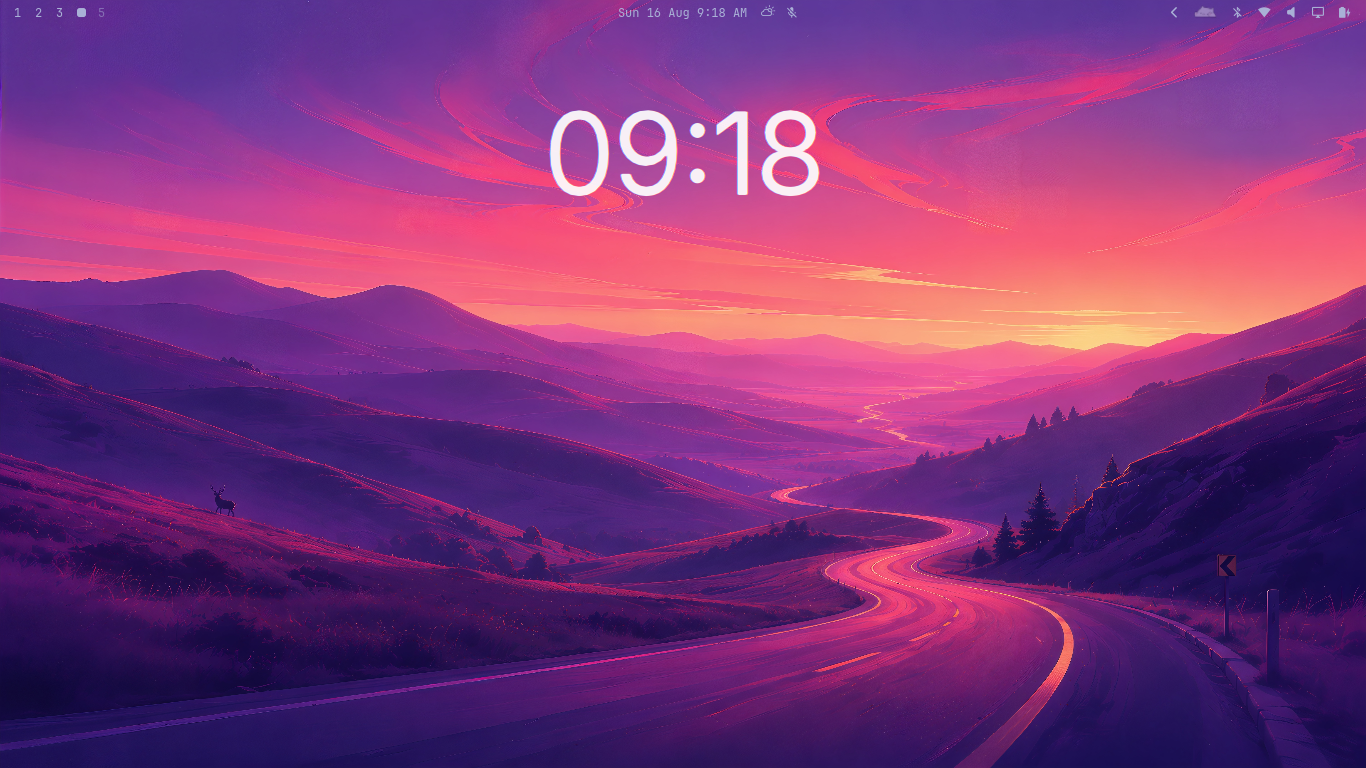
Features
- Renders behind every app window on the bottom layer (click-through; desktop and wallpaper interactions keep working).
- Bar widget control — a button in the status bar opens a panel with sliders, a color picker, font selector, format presets, and a reset button. Changes apply live and are saved automatically.
- Show/hide the bar widget — toggle the bar icon off from the panel. Edit
~/.config/omaclock/config.jsonand set"showIcon": trueto bring it back. - Format presets — one-click 12h / 12h+seconds / 24h / 24h+seconds.
- Theme-aware color by default: matches your top status bar's text color
(
Color.bar.text). Pin to any theme palette role or set a custom hex color. - Bundled Inter typeface (OFL) as the default font — no system install needed. Also bundles Plus Jakarta Sans (OFL) and supports any installed system font.
- Adjustable size, opacity, and on-screen position (sliders + 3x3 grid).
- A single
config.json, hot-reloaded (~2s) on save.
Install
omarchy plugin add https://github.com/ubeyidah/omaclock
omarchy restart shell
Control
Click the OmaClock button in the status bar to open the panel:
- Size — 5–45% of screen height.
- Position — X/Y sliders (0–100%) or click a cell in the 3x3 grid.
- Opacity — 0–100%.
- Format — 12h, 12h +s, 24h, 24h +s presets.
- Color — three modes:
- Auto: follows the top bar's text color (theme/wallpaper-aware).
- Theme: pick any theme palette role from the swatches.
- Custom: type a hex color (e.g.
#ffcc00) and hit Apply.
- Font — search and pick from all system fonts + bundled options.
- Hide — hides the bar widget icon. Edit
~/.config/omaclock/config.json("showIcon": true) to bring it back. - Reset — restores default size, position, and visibility.
Options
| Key | Default | Description |
|---|---|---|
format |
h:mm |
Qt time format. h:mm = 12h, HH:mm = 24h, h:mm:ss = with seconds. |
showSeconds |
false |
Tick every second instead of every minute. |
fontFamily |
"" |
"" = bundled Inter; "system" = platform default; any name = that font. |
fontWeight |
200 |
Numeral weight, 100–900. |
fontScale |
0.15 |
Font size as a fraction of screen height (0.15 = 15%). |
letterSpacing |
-3 |
Extra spacing between numerals (negative tightens them). |
colorMode |
auto |
auto / theme / custom. |
colorRole |
bar.text |
Theme palette role when colorMode is theme. |
color |
"" |
Custom hex color when colorMode is custom. |
opacity |
0.92 |
Clock opacity, 0–1. |
showIcon |
true |
Show the bar widget icon. Set to false to hide it. |
xRatio |
0.5 |
Horizontal position, 0–1. |
yRatio |
0.20 |
Vertical position, 0–1 (overrides position). |
position |
top |
Vertical anchor when yRatio is not set: top / center / bottom. |
namespace |
ubeyidah.omaclock |
Layer namespace (advanced). |
Fonts
""(default) → bundled Inter."system"→ your platform's default UI font.- Any other value → that font family (e.g.
"Plus Jakarta Sans").
Font lists are cached to ~/.cache/omaclock/fonts.txt after the first load.
Delete the file to refresh.
Examples
Bigger, centered, with seconds:
{
  "format": "h:mm:ss",
  "showSeconds": true,
  "fontScale": 0.22
}
Bar-matching color, Inter, lower on the screen:
{
  "color": "",
  "fontFamily": "",
  "yRatio": 0.80
}
Use the system font with a fixed white color:
{
  "fontFamily": "system",
  "colorMode": "custom",
  "color": "#ffffff"
}
Troubleshooting
Desktop clicks stopped working (e.g. double-click wallpaper switcher).
Fixed via an empty input mask (mask: Region {}). Update the plugin:
omarchy plugin add https://github.com/ubeyidah/omaclock
omarchy restart shell
Bar widget is hidden and I can't get it back.
Edit ~/.config/omaclock/config.json and set "showIcon": true. The bar icon
should reappear automatically within ~2s.
Uninstall
omarchy plugin remove ubeyidah.omaclock
Delete ~/.config/omaclock/config.json and ~/.cache/omaclock/ to clean up.
License
- Plugin code: MIT
- Bundled Inter font: SIL Open Font License 1.1
- Bundled Plus Jakarta Sans font: SIL Open Font License 1.1