
Omawake
A small Omarchy bar widget for sending Wake-on-LAN magic packets and pinging hosts from a popup panel. Hosts are kept in a single INI-style config file you can edit by hand or from inside the panel itself. Pings are not persistent, they live only as long as the panel is open, there is no live polling with this plugin which is by design.
This allows you to quickly check if a host is running and if not, wake it.
Disclaimer
I am not a dev. I am an amateur scripter at best and program a few micro controllers here and there. This was 100% vibe codedwith OpenCode using MiniMax-M3, probably using way more tokens than it should have.
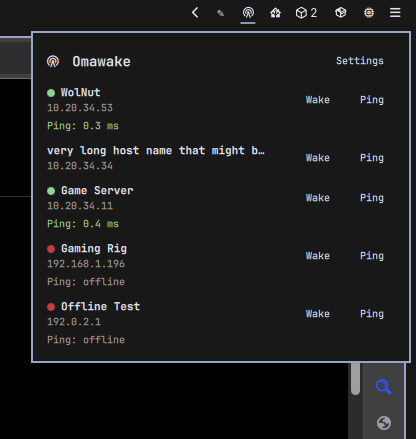
Preview
Features
- Bar chip — single Nerd Font icon with a tooltip summarising host count.
- List view — one row per host with
WakeandPingbuttons; the last result of each action is shown inline and as a coloured dot next to the host name (yellow while in flight, green on reply, red after all retries fail) - Settings view — add, edit, or remove hosts from the panel; entries are
written straight back to
~/.config/omawake/hosts.conf - External edit-friendly — the config file is plain INI; edit it in your editor of choice and click Fetch in Settings to reload the panel
- Three-ping retry —
ping -c 3 -W 2per click; the dot reports reachable if any of the three replies - No background polling — ping is on-demand only, no timers in the background
- Ephemeral state — the Wake/Ping result dots reset when you close the panel
Requirements
wakeonlanonPATHfor the Wake button to do anything- Arch: install
wakeonlan(e.g.pacman -S wakeonlanas root)
- Arch: install
ping(ships withiputilson Arch, part of the base install)
Install
omarchy plugin add https://github.com/ubiquities/omawake
omarchy plugin enable ubiquities.omawake
The widget lands in the bar's right section by default. Move it with:
omarchy bar move ubiquities.omawake --section <left|center|right>
Setup
Hosts live in ~/.config/omawake/hosts.conf. The plugin creates the
directory on first run; you can either hand-edit the file or use the
panel's Settings view to add entries.
# Each [host "<label>"] section defines one machine.
# `address` is a hostname or IP used by ping; `mac` is the WoL target.
# Blank lines and lines starting with # or ; are ignored.

[host "Living Room PC"]
address = livingroom.lan
mac     = AA:BB:CC:DD:EE:FF

[host "NAS"]
address = 192.168.1.10
mac     = 11-22-33-44-55-66
addressmay be any hostname (nas.lan.local), IPv4 dotted-quad, or IPv6 literal.pingwill resolve it;wakeonlanignores address.macaccepts bothAA:BB:CC:DD:EE:FFandAA-BB-CC-DD-EE-FF. Mixed-case hex is fine; the file is rewritten in canonical uppercase colon form when saved from the panel.- Labels are the unique key for each host. Renaming a host = edit its section header.
- Host order in the file is preserved — hand-arrange your list however you like.
Behaviour
- Wake runs
wakeonlan <mac>and shows "magic packet sent" on success.wakeonlandefaults to the IPv4 broadcast address, which is what every consumer NIC actually listens on for WoL. The dot next to the host name goes green for the duration of the panel session. - Ping runs
ping -c 3 -W 2 <address>— three attempts at 2 seconds each. If any of the three replies, the dot goes green and the row shows the first latency; if all three time out, the dot goes red and the row shows "offline". Hosts that resolve to IPv6 will ping over IPv6 (no-4forced). - Missing
wakeonlanis probed once on startup. If not installed, the Wake button is disabled for every row and a banner at the top of the panel says so.
Remove
omarchy plugin disable ubiquities.omawake
omarchy plugin remove ubiquities.omawake
~/.config/omawake/hosts.conf is left in place; remove it by hand if you
want a clean uninstall.
License
MIT.