
OmaGPU for Omarchy



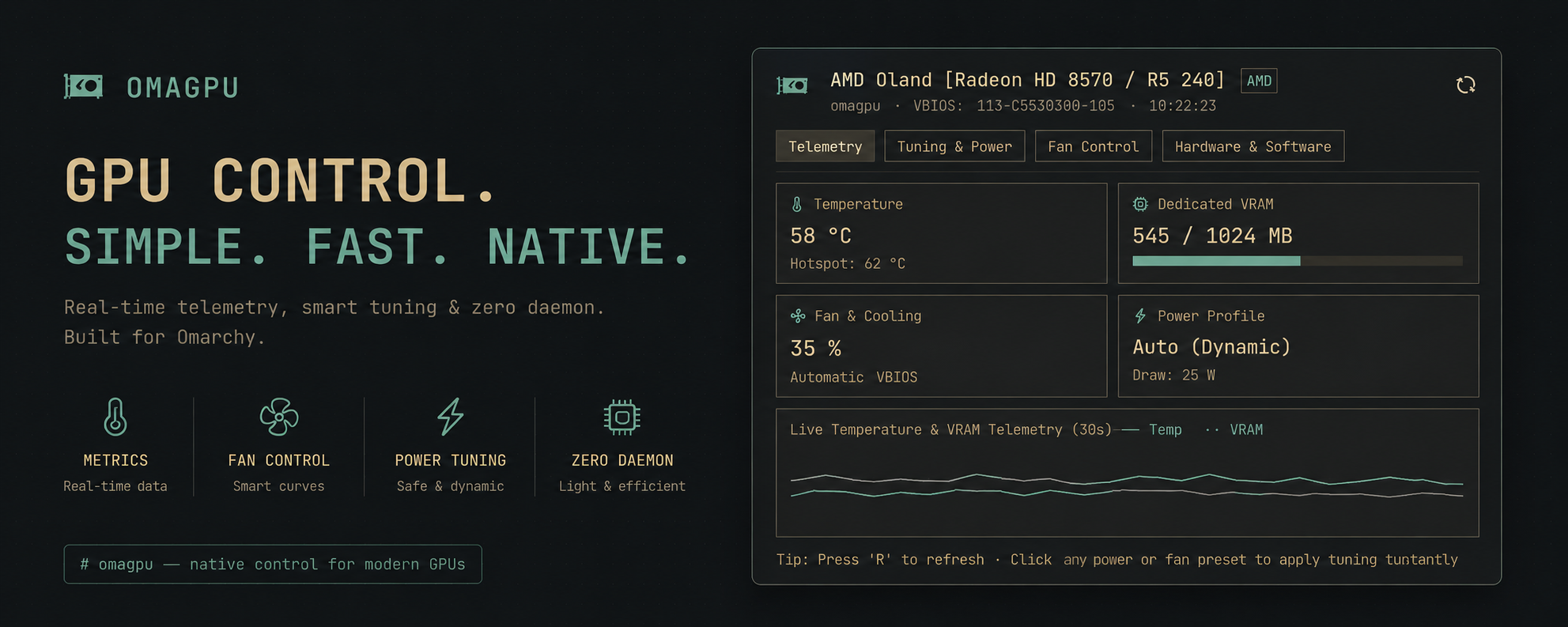
An advanced hardware telemetry dashboard, DPM power governor tuner, acoustic fan controller, and graphics stack monitor built natively for the Omarchy Quattro bar (inspired by LACT).
Highlights
- 🎨 Multi-State Dynamic Colors: Bar and panel icons dynamically change colors based on active power governors, fan acoustic speeds, and thermal levels.
- ⚡ DPM Power & Clock Tuning: Switch between dynamic Auto, High Performance (locked max clocks for low latency gaming), Low Power / Silent (battery saving), and Peak Profile.
- 🌡️ Multi-Sensor Thermals: Real-time Core Temperature (°C) and Hotspot / Junction Temperature (°C) with dynamic thermal warning states.
- 💾 VRAM & GTT Memory Breakdown: Live dedicated VRAM capacity progress bar and GTT system-shared memory allocations.
- 💨 Acoustics & Fan PWM Tuning: Switch between automatic VBIOS firmware curves and manual fixed PWM presets (
35% Silent,60% Balanced,80% Aggressive,100% Max). - 📈 Rolling Telemetry Sparklines: Built-in 30-second live historical graph tracking temperature and VRAM spikes in real time.
- 🧩 Graphics Stack & Topology: Reports GPU Model, ASIC Family, VBIOS version, PCIe Link Speed/Width, Resizable BAR, Vulkan 1.3/1.4 instance versions, and Mesa/OpenGL versions.
- 🔍 Active GPU Process Monitor: Identifies live processes utilizing the
/dev/drirender node (e.g. Hyprland, Chromium, Games) with dedicated RSS memory allocations.
Screenshots
<p align="center"> <img src="screenshots/telemetry.png" alt="OmaGPU Telemetry & Live Graphs" width="220"> <img src="screenshots/tuning.png" alt="OmaGPU Power & DPM Governors" width="220"> <img src="screenshots/hardware.png" alt="OmaGPU Hardware & Process Clients" width="220"> <img src="screenshots/multi-gpu-selector.png" alt="OmaGPU Multi-GPU Selector" width="220"> </p>Dynamic Status & Icon Colors
The bar icon and panel telemetry gauges dynamically transition colors based on the GPU's operational state:
| State Indicator | Color | Trigger Condition |
|---|---|---|
| 🟢 Eco / Silent | Soft Green (#87c095) |
Low Power / Silent or Power Saving DPM governor active. |
| 🔵 Balanced Auto | Cyan / Foreground (#6aa6b2) |
Normal Dynamic Auto mode with stable thermals (<68°C) and moderate fan speeds. |
| 🟡 High Performance / Warm | Gold / Accent (Color.accent) |
High Performance, 3D Gaming, Peak Profile, Temp ≥ 68°C, or Fan PWM ≥ 60%. |
| 🔴 Critical / Extreme Cooling | Urgent Red (Color.urgent) |
Thermal threshold ≥ 80°C, Fan PWM ≥ 85%, or Dedicated VRAM capacity ≥ 92%. |
Multi-Vendor Hardware Support
| Vendor | Driver / Interface | Telemetry & Controls Supported |
|---|---|---|
| AMD | amdgpu (DRM sysfs & hwmon) |
GPU %, VRAM / GTT, Core & Hotspot Temp, Fan PWM, DPM Power States, Power Cap. |
| NVIDIA | nvidia (NVML / nvidia-smi) |
GPU %, VRAM, Core & Hotspot Temp, Fan Speed, Power Draw (Watts), Clock Frequencies. |
| Intel | i915 / xe (DRM sysfs) |
Frequency Scaling (RP0/RPe/RPn), RC6 Power States, Package Temp, Arc Dedicated/Shared VRAM. |
Multi-GPU & Hybrid Laptop Architecture
Telemetry (temperatures, VRAM, busy %, and power draw) is continuously sampled across every GPU in the system, including multi-adapter workstations and hybrid/Optimus laptops (e.g. AMD Ryzen APU + discrete NVIDIA GPU):
- Multi-GPU Selector: An interactive selector bar appears at the top of the panel when multiple adapters are detected.
- Per-GPU Telemetry & History: Each device maintains its own isolated 30-second rolling sparkline history.
- Hardware Capability Detection: OmaGPU automatically determines whether a GPU supports DPM power governors or fan PWM control. Integrated APUs/iGPUs (where fans are motherboard EC-controlled) and laptop discrete GPUs cleanly display informational notes rather than failing.
Dependencies & Prerequisites
Most distributions have these installed by default. To ensure all telemetry, process tracking, and tuning controls work:
| Dependency | Purpose | Arch Linux | Fedora | Debian / Ubuntu |
|---|---|---|---|---|
python (3.8+) |
Telemetry engine | python |
python3 |
python3 |
polkit (pkexec) |
Privileged tuning & fan control | polkit |
polkit |
policykit-1 |
psmisc (fuser) |
Active GPU process monitor | psmisc |
psmisc |
psmisc |
pciutils (lspci) |
Hardware model resolution | pciutils |
pciutils |
pciutils |
wl-clipboard |
Copy specs to Wayland clipboard | wl-clipboard |
wl-clipboard |
wl-clipboard |
vulkan-tools (optional) |
Vulkan version inspector | vulkan-tools |
vulkan-tools |
vulkan-tools |
mesa-utils (optional) |
OpenGL version inspector | mesa-utils |
mesa-demos |
mesa-utils |
nvidia-utils (NVIDIA only) |
NVIDIA telemetry (nvidia-smi) |
nvidia-utils |
xorg-x11-drv-nvidia-cuda |
nvidia-utils-* |
Install
OmaGPU requires Omarchy with shell plugin support.
omarchy plugin add https://github.com/ucmz851/omagpu.git --enable
The shell normally picks up the plugin immediately. If the widget does not appear, restart it once:
omarchy restart shell
Use
| Action | Result |
|---|---|
| Left-click | Open or close the GPU control center |
| Middle-click | Refresh telemetry metrics immediately |
R while open |
Refresh telemetry metrics now |
[ / ] while open |
Cycle between available GPUs (multi-GPU setups) |
Esc while open |
Close panel |
Tab / Shift+Tab |
Switch between panels in sequence |
Hardware Metrics & Sysfs Sources
| Subsystem | Kernel Source / Interface |
|---|---|
| GPU Model & Topology | /sys/class/drm/card*/device/vendor, device, subsystem_device, lspci |
| Thermals & Hotspot | /sys/class/drm/card*/device/hwmon/hwmon*/temp1_input, temp2_input |
| VRAM & GTT Memory | /sys/class/drm/card*/device/mem_info_vram_*, mem_info_gtt_* |
| Fan RPM & PWM | /sys/class/drm/card*/device/hwmon/hwmon*/fan1_input, pwm1 |
| Power Consumption | /sys/class/drm/card*/device/hwmon/hwmon*/power1_average, power1_input |
| PCIe Bus Link | /sys/class/drm/card*/device/current_link_speed, current_link_width |
| Render Client Processes | /dev/dri/renderD* active file descriptor clients via /proc/*/ |
| NVIDIA Graphics | nvidia-smi / NVML query interface |
Power Governors & Tuning
| Profile Mode | Kernel Value | Target Behavior |
|---|---|---|
| Dynamic Auto | auto |
Balanced dynamic scaling. Clocks down to minimum at idle, clocks up under 3D load. |
| High Performance | high |
Locks core and memory clocks to maximum states for stutter-free gaming and low frame latency. |
| Low Power / Silent | low |
Locks clocks to lowest P-states for silent fan operation and battery saving. |
| Peak Profile | profile_peak |
Forces highest power envelope for compute and heavy rendering. |
Security & Privilege Model
- Telemetry Sampling: 100% unprivileged. All GPU metrics, temperatures, VRAM, and process lists are read directly through standard unprivileged kernel sysfs and
/proc/nodes with zero root requirements. - Tuning Controls: Applying fan speed overrides or DPM power governor changes prompts through standard desktop PolicyKit (
pkexec) authentication to safely guard hardware configuration changes.
Update
omarchy plugin update ucmz851.omagpu --yes
Remove
omarchy plugin remove ucmz851.omagpu
Removing the plugin unregisters the widget from your bar and removes its checkout. It does not alter system graphics packages.
Privacy & Security
All telemetry inspection stays 100% on-device. The plugin does not connect to external networks, collect credentials, or transmit telemetry. All UI text rendering explicitly enforces textFormat: Text.PlainText to prevent rich-text parsing.
Development
Validate the plugin schema from a checkout:
omarchy plugin validate .
License
MIT © 2026 Usama Imran (ucmz851).