
Tempest
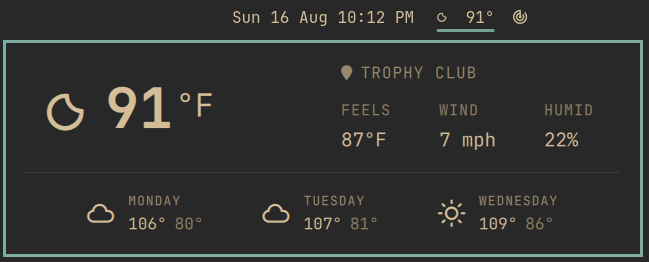
Weather for the Omarchy bar, with the current temperature next to the condition icon.
Based on Omarchy's built-in weather widget. The forecast popup, location picker, and data sources are the same; the bar pill shows icon + temp instead of the icon alone.
Install
omarchy plugin add https://github.com/unleashed-nick/omarchy-tempest.git --enable
omarchy plugin disable omarchy.weather
Disable stock weather or you will have two weather pills. The widget lands in the center of the bar. Move it if you want:
omarchy bar move unleashed-nick.tempest --section center --after omarchy.clock
Updating
omarchy plugin update unleashed-nick.tempest
omarchy restart shell
Removing it
omarchy plugin remove unleashed-nick.tempest
omarchy plugin enable omarchy.weather
That deletes Tempest and its bar entry. It leaves
~/.local/state/omarchy/settings/weather.json alone, since that file is owned
by omarchy-weather-location and is shared with stock weather.
Requirements
Omarchy Quattro, and curl, which Omarchy already installs. The plugin calls
omarchy-weather-location, omarchy-weather-status, and
omarchy-notification-send — all ship with Omarchy. Nothing else is installed.
Usage
| Left click | open the forecast popup |
| Right click | send a full weather notification |
| Middle click | refresh |
| Click the location in the popup | search and set a city |
Temperature units follow locale and country (Fahrenheit in the US, Celsius elsewhere).
License
MIT. The forecast panel is derived from Omarchy's omarchy.weather plugin.
See LICENSE.