
Ratbag Mouse
An Omarchy Quattro bar plugin for gaming mice supported by libratbag.
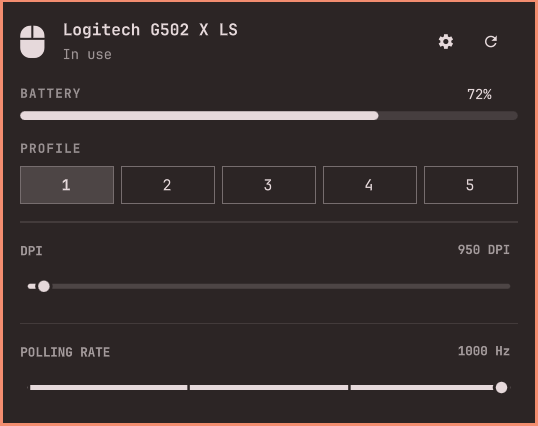
Features
- Automatic device detection through
ratbagd - Active onboard profile selection
- DPI selection
- Polling-rate selection
- Battery percentage and charging state from the Linux power-supply API
- Optional Piper launcher for advanced button and macro configuration
Requirements
- Omarchy 4 with the Quattro shell
libratbagand a runningratbagdsystem service- A mouse supported by libratbag
- Linux HID++ battery support for battery information
Piper is optional. When installed, the gear button opens it with the system Python interpreter so distribution-provided GTK bindings remain available.
The plugin executes ratbagctl with /usr/bin before /usr/local/bin in
PATH. This allows locally installed libratbag builds to work while keeping
the system Python interpreter and its evdev package available.
Install
Install libratbag if it is not already available:
omarchy pkg add libratbag
Install and enable the plugin:
omarchy plugin add https://github.com/UrielCuriel/omarchy-ratbag.git --enable
Piper is optional and enables advanced button and macro configuration through the gear button:
omarchy pkg add piper
Usage
Click the mouse widget in the bar to open the panel. Middle-click the widget to refresh device and battery information.
The panel writes changes directly to the mouse's onboard profile through ratbagd.
Permissions and processes
The plugin runs without elevated privileges. It executes ratbagctl to read
and write onboard mouse settings, reads battery status from
/sys/class/power_supply, and optionally starts Piper. Plugins run unsandboxed
inside the long-running Omarchy shell process, so review ratbag-status before
installation.
Remove
omarchy plugin remove urielcuriel.ratbag --yes
Removing the plugin does not uninstall libratbag or Piper and does not revert settings already stored in the mouse.
Validate
omarchy plugin validate "$HOME/.config/omarchy/plugins/urielcuriel.ratbag"
qmllint -I "$OMARCHY_PATH/shell" \
  "$HOME/.config/omarchy/plugins/urielcuriel.ratbag/BarWidget.qml" \
  "$HOME/.config/omarchy/plugins/urielcuriel.ratbag/Panel.qml"