
🇪🇹 Ethiopian Calendar & Fidel Suite for Omarchy
An authentic, comprehensive, and beautifully themed Ethiopian Calendar and cultural suite designed specifically for the Omarchy Linux Desktop (Quattro Shell).
✨ Features
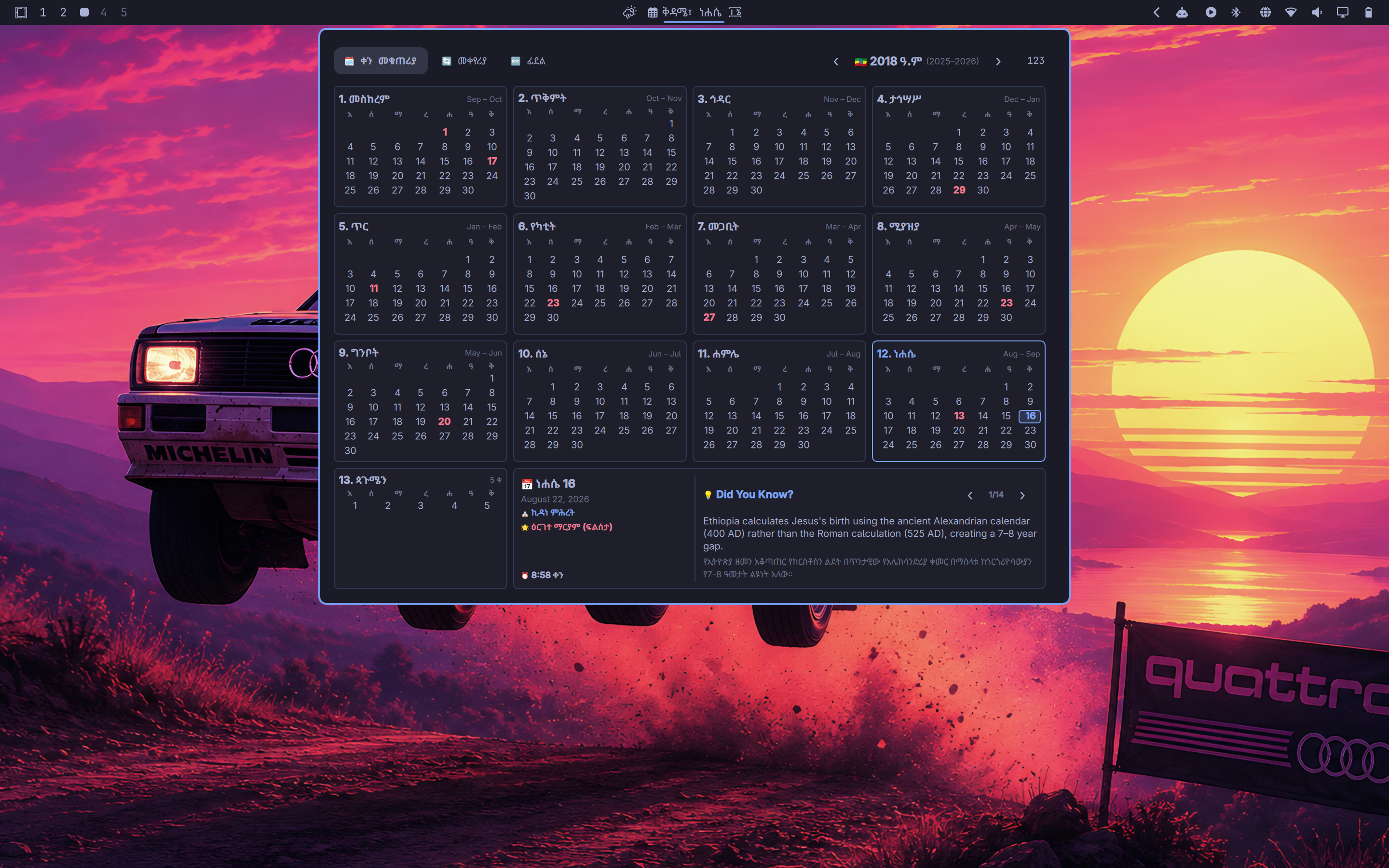
🗓️ 1. Complete 13-Month Year Poster Calendar
- Full Year Overview: Displays all 13 Ethiopian months side-by-side in a responsive 4-column poster grid.
- 13 Months of Sunshine: Exact handling of 12 thirty-day months plus Pagumē (5 days in standard years, 6 days in leap years).
- Dual Calendar Spanning: Each month header displays its corresponding Gregorian month span (e.g., Sep – Oct).
- Interactive Day Selection: Click any day cell across the year to inspect its detailed metadata in the bottom dashboard.
- Ge'ez Numerals Toggle (
፩፪፫/123): Instant toggle between ancient Ge'ez numerals (፩, ፪, ፫ ... ፳፻፲፰) and Western Arabic numerals. - Year Navigation: Browse past and future Ethiopian years with high-visibility
‹and›controls.
🔄 2. Bi-directional Gregorian ⇄ Ethiopian Converter
- Two-Way Date Calculator: Convert seamlessly from Gregorian to Ethiopian or Ethiopian to Gregorian.
- Typable & Stepper Inputs: Type exact years, months, and days directly or adjust them via
-/+and‹/›stepper buttons. - Auto-Syncing Month Labels: Live month names update dynamically as you type numbers (e.g.,
11➔ ሐምሌ / July). - One-Click Date Copying: Copy formatted converted dates directly to the system clipboard with desktop notification feedback.
- Instant "Today" (ዛሬ) Shortcut: Reset calculations to the current date in a single click.
🔤 3. Interactive Amharic Fidel & Numeral Chart
- 33 Consonant Families × 7 Vowel Orders: Complete traditional Abugida chart with Latin phonetics.
- 21 Labialized Diphthongs (ዲቃላ ፊደላት): Phonetic guide for compound sounds (
ሏ, ሟ, ሯ, ሷ ...). - Ge'ez Numerals (ቁጥሮች): Quick reference table mapping Ge'ez digits (
፩–፻) to their numerical values. - 1-Click Copy: Click any character to immediately copy it to the clipboard with native desktop notification.
⛪ 4. Orthodox Holidays & Daily Saint Commemorations
- Public & Orthodox Holidays: Dot indicators and badges for major Ethiopian holidays (እንቁጣጣሽ, መስቀል, ገና, ጥምቀት, የዐድዋ ድል በዓል, ደብረ ታቦር / ቡሄ, ፍልሰታ).
- Daily Saint (የዕለቱ ታቦት): Displays the daily Ethiopian Orthodox saint or angel commemoration (e.g., ሚካኤል, ማርያም, ጊዮርጊስ, ተክለ ሃይማኖት, መድኃኔዓለም).
⏰ 5. Traditional 12-Hour Sunrise Clock
- Equatorial Dawn-to-Dusk Time: Converts system time into traditional Ethiopian 12-hour clock based on sunrise (6:00 AM = 12:00 ንጋት).
- Displays live hour, minute, and period indicator (ቀን / ማታ).
💡 6. Curated Cultural Facts ("Did You Know?")
- 14 concise, educational facts covering calendar history (why Ethiopia is 7–8 years behind the West), sunrise time calculations, the Ge'ez script, coffee origins, fossil history (Lucy / Dinknesh), monolithic architecture (Lalibela), and endemic wildlife.
🎨 7. Pure Omarchy Theme Integration
- Zero Hardcoded Colors: Strictly inherits Quattro theme tokens (
Color.popups.text,Color.popups.background,Color.accent,Color.urgent,Style.font). - Native Wayland Popup / Overlay: Powered by Quickshell for fluid 60fps rendering with zero CPU overhead.
⌨️ Keyboard Shortcuts
When the calendar popup is open:
| Key | Action |
|---|---|
| <kbd>1</kbd> | Switch to Calendar View (🗓️ ቀን መቁጠሪያ) |
| <kbd>2</kbd> | Switch to Converter View (🔄 መቀየሪያ) |
| <kbd>3</kbd> | Switch to Fidel Chart View (🔤 ፊደል) |
| <kbd>T</kbd> | Reset view to Today (ዛሬ) |
| <kbd>N</kbd> | Toggle Ge'ez / Arabic Numerals (፩፪፫ ⇄ 123) |
| <kbd>←</kbd> | Navigate to Previous Year |
| <kbd>→</kbd> | Navigate to Next Year |
| <kbd>C</kbd> | Copy Selected Date to clipboard |
| <kbd>Esc</kbd> | Unfocus input or Close Panel |
🏷️ Bar Widget Formats
Right-click the bar widget at any time to cycle between 4 different date/time display modes:
- Medium Ge'ez (Default):
ቅዳሜ፣ ነሐሴ ፲፮ - Full with Year:
ቅዳሜ፣ ነሐሴ ፲፮ ፳፻፲፰ - Date with Live Ethiopian Time:
ነሐሴ ፲፮ · 4:59 ቀን - Western Arabic Numerals:
ቅዳሜ፣ ነሐሴ 16, 2018
🚀 Installation
Via Omarchy Plugin Marketplace (Recommended)
Search for "Ethiopian Calendar" in the Omarchy Marketplace catalog and click Install.
CLI / Manual Installation
- Install using the Omarchy CLI:
omarchy plugin add https://github.com/yaredow/omarchy-ethiopian-calendar.git --enable - Or clone directly into your Omarchy plugins directory:
git clone https://github.com/yaredow/omarchy-ethiopian-calendar.git ~/.config/omarchy/plugins/user.ethiopian-calendar - Rescan and restart the Omarchy Quattro shell:
omarchy-restart-shell
🗑️ Removal & Uninstallation
Via Omarchy CLI
omarchy plugin remove user.ethiopian-calendar
Manual Removal
- Delete the plugin directory:
rm -rf ~/.config/omarchy/plugins/user.ethiopian-calendar - Restart the Omarchy Quattro shell:
omarchy-restart-shell
📄 License
Distributed under the MIT License. See LICENSE for more information.